

How to Deposit on Polymarket (Complete Step-by-Step Guide)
We believe in full transparency with our readers. Some of our content includes affiliate links, and we may earn a commission through these partnerships. However, this potential compensation never influences our analysis, opinions, or reviews. Our editorial content is created independently of our marketing partnerships, and our ratings are based solely on our established evaluation criteria. Read More






Polymarket is a popular prediction market where you can earn rewards for simply predicting the outcome of real-world events. It has fundamentally changed how traders consume news, allowing them to trade on the probability of these actual events, typically spanning topics like election results and even pop culture outcomes.
But before you place your first trade, you’ll first have to fund your Polymarket account using any of the supported cryptos. Our detailed yet simple guide will show you how to deposit on Polymarket in just a few simple steps. We will cover everything from the prerequisites to the three main deposit methods, and step-by-step instructions for each.
Overview: 3 Ways to Deposit on Polymarket
Polymarket currently lets you fund your account in three common ways. Here’s a quick overview of those methods:
- Crypto Wallet Transfer: Send USDC from your own wallet (or an exchange) straight to Polymarket. We found this to be the cheapest option, but you will need a Web3 wallet and basic crypto knowledge.
- Deposit from Coinbase: You can also move USDC from your Coinbase account to Polymarket, which is relatively easy if you already hold crypto asset balances on Coinbase. Note that this method does involve moderate fees.
- Buy USDC with a Card (MoonPay): And finally, you could use a debit or credit card to buy USDC on Polymarket via MoonPay. Though it’s the fastest option for new users, it comes with higher fees and requires identity checks (KYC).
What You Need Before Depositing on Polymarket
It is important to understand that Polymarket operates like a wallet-first Web3 platform rather than a traditional brokerage. And this is why, before depositing funds on Polymarket, you’ll need an account that’s tied to a crypto wallet.
As prediction markets scale, Eilers & Krejcik project that trading volume could reach $1 trillion by the end of the decade. Security in this context is thus crucial because whoever controls the wallet’s private keys can directly control the funds. Since Polymarket doesn’t hold your money the way an exchange or a bank does, your funds are stored in your own wallet.
If you’re not using the email/Google sign-up that generates a wallet for you, you will need a wallet app or extension. You can opt for any of the top Polymarket crypto wallets, including MetaMask, Coinbase Wallet, or Trust Wallet.
Polymarket runs on the Polygon network to keep fees low and transactions fast. Ideally, your wallet should be configured to use Polygon for sending funds. Even if you send funds via the Ethereum mainnet, they will still go through, but can trigger extra bridging and higher gas fees.
Also, Polymarket runs exclusively on USDC, a regulated stablecoin that is pegged to the US Dollar.
On Polygon, USDC exists in two forms:
- USDC.e (Bridged): The legacy version brought over from Ethereum. Notably, Polymarket’s order books were originally built on this.
- Native USDC: The official version issued by Circle.
The good news? Polymarket now handles both. If you deposit Native USDC, the platform will prompt you to activate it and seamlessly swap it for the tradable version.
Polymarket Deposit Methods
Below is a summary comparison table to help you decide the best Polymarket deposit method:
| Deposit Method | Best For | Fees | Speed | Difficulty |
| Crypto Wallet Transfer | DeFi enthusiasts and even casual crypto holders. | Lowest (just network gas) | Fast | Moderate |
| Coinbase Withdrawal | Beginners or intermediate American users who prefer a simple approach. | Moderate (Coinbase spread & fee) | Fast | Easy |
| Card Purchase via MoonPay | New Web3 users without any crypto holdings. | Highest (4.5% and a spread) | Very Fast | Easiest |
Method 1: Crypto Wallet Transfer (Most Common)
You can directly transfer any of the supported cryptos from your own Web3 wallet or exchange directly to your Polymarket deposit address. It is the cheapest option if you already hold crypto assets like USDC.
To opt for this method, you can click Deposit → Transfer Crypto after logging into your account. Polymarket will show you a deposit address and ask you to choose the asset and network you’re sending from (for example, USDC on Polygon or USDC on Ethereum).
You can then visit your existing crypto wallet or exchange account and send that asset to the deposit address on the exact same network.
After you’ve confirmed the transfer, Polymarket will wait for blockchain confirmations. Polygon deposits usually appear relatively quickly, while Ethereum can take longer because it may require bridging.
You’ll see status updates in the Polymarket interface until your USDC balance is credited. One of the main advantages of this method is that you only incur network costs. These fees on Polygon are usually low, whereas they can be higher on Ethereum.
👉 Learn More: How to Use Polymarket in 2026
Method 2: Deposit From Coinbase
Instead of sending from a wallet, if you buy (or already hold) USDC on Coinbase, you can withdraw it directly to your Polymarket deposit address on Polygon.
It is best for beginners because Coinbase looks and feels like a regular app. As a result, you can add funds via bank transfer/card, convert them to USDC, and send them to Polymarket in just a few taps. You’ll still need a Polymarket deposit address, but the core benefit here is that Coinbase handles most of the complexity.
Even so, the main step is choosing the correct network when withdrawing. In Coinbase, you will have to select Polygon (Matic) for USDC withdrawals to Polymarket. But if you accidentally choose Ethereum, the recovery of the funds could be a bit more confusing.
The major cost under this method comes from Coinbase’s conversion/spread and any withdrawal fees shown in the preview. Sending USDC over Polygon is generally inexpensive, so this method often costs less than a card-on-ramp like MoonPay.
Method 3: Buy USDC With a Card Via Moonpay
An instant way to fund your Polymarket account is to buy USDC with a credit/debit card via MoonPay, a third-party service. This route is designed mainly for people who don’t already have crypto holdings and want to quickly get started.
To use this method, simply go to Deposit → “Buy USDC” with card. In the checkout window that opens, you can then enter the amount of fiat crypto you want to spend to receive USDC.
For context, MoonPay will ask you to complete KYC checks when you opt for this method for the first time. Once approved, MoonPay will send USDC on Polygon directly to your Polymarket wallet within a few minutes.
The only trade-off of selecting this method is the high cost because MoonPay is often the most expensive option, with fees that can reach 4.5% plus a minimum spread. The upside is that you don’t need to manage an exchange account or a separate wallet for making the deposit.

How to Deposit USDC on Polymarket Using Metamask
MetaMask is the by far most common way to deposit USDC on Polymarket. Below, you’ll find the step-by-step process. If you’re uncertain about whether this wallet is the best option for you, read our MetaMask review.
Step 1: Set Up Metamask
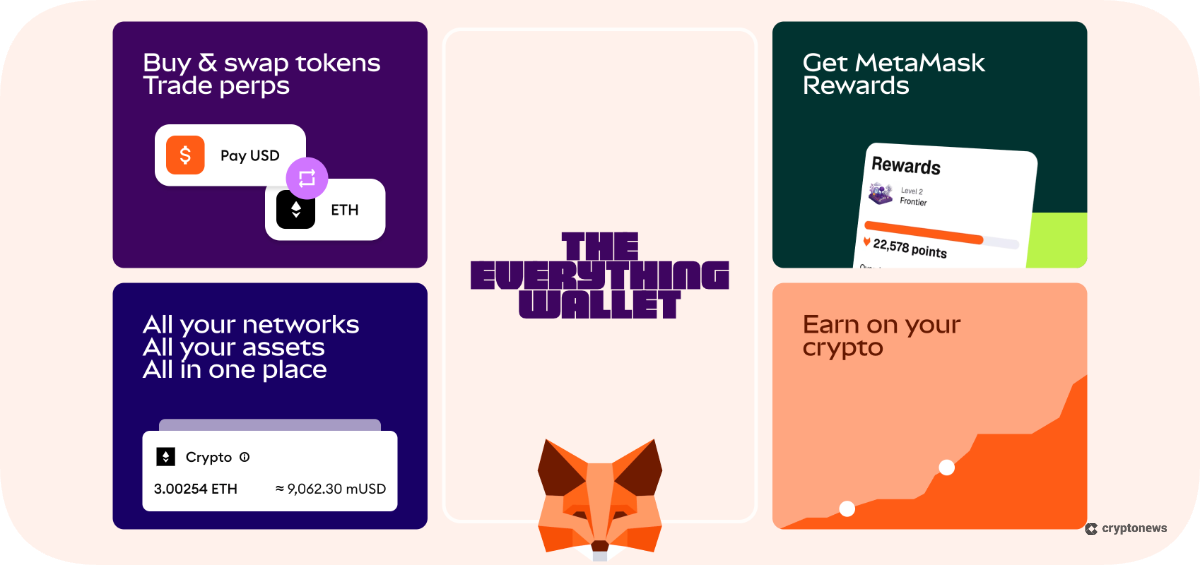
You can begin by installing MetaMask’s browser extension or app from its official website. Once you’ve created a new account, remember to securely store your recovery phrase and not share it with anyone you don’t trust.
👉 Learn More: How to Set Up a MetaMask Wallet in 2026
Step 2: Switch Metamask to Polygon
As we briefly discussed, Polymarket runs on the Polygon network. But MetaMask is set to Ethereum’s Mainnet by default, and hence, you’ll need to switch that setting to the Polygon network before sending funds.
Perhaps the easiest way to do this is to log in to a Polymarket account using your MetaMask wallet. And at this stage, Polymarket might prompt you to add/switch to Polygon with a few clicks. If that is not the case, you can also add it manually by clicking the network dropdown, selecting “Add Network,” and searching for the Polygon network.
Step 3: Get USDC on Polygon
Now, you will need to ensure your MetaMask wallet has an adequate balance of USDC on Polygon. If you don’t hold any, you can withdraw it from an exchange, bridge from Ethereum, or even buy via MetaMask Swap.
Step 4: Connect Metamask to Polymarket
Visit Polymarket’s official site and click on either “Sign Up” or “Login.” If you’ve previously signed up with an email address, you’ll need to go to settings and connect your MetaMask wallet.
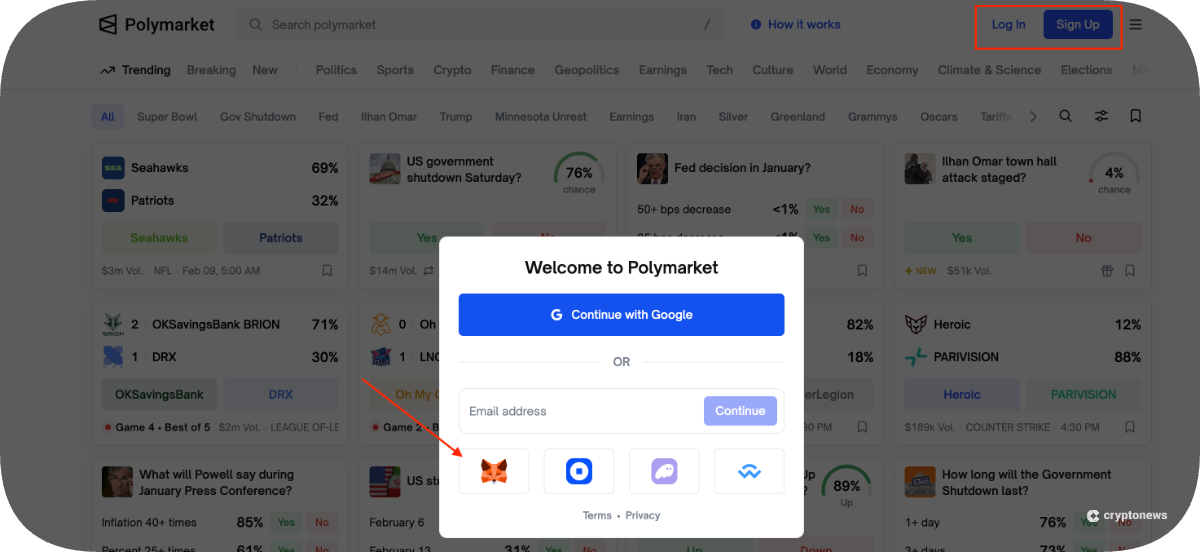
However, if you’re new, simply click on “Sign Up” and then choose the MetaMask icon to log in using your wallet. A window will pop up asking for confirmation to connect your wallet to the site, at which point you can click “Connect.”
Step 5: Send USDC to the Deposit Address
Once you’ve logged in, click “deposit” on your dashboard and select “transfer crypto” to copy your USDC deposit address.
Here, you will also need to select the appropriate chain before copying the address.
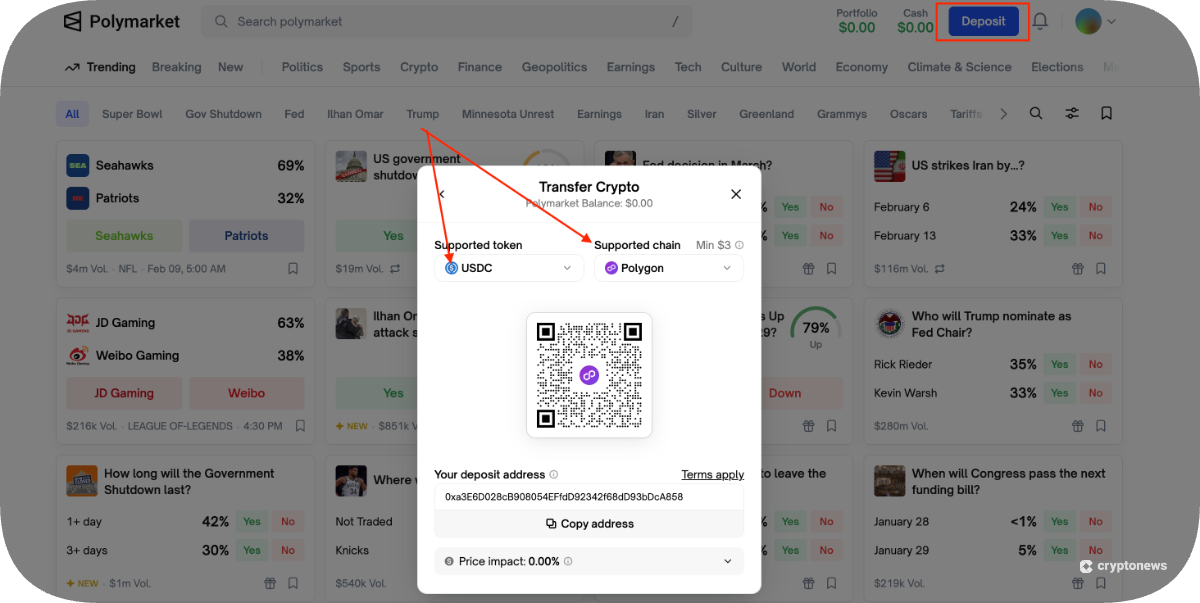
Now, open MetaMask and click on “USDC” → “Send.” Simply paste the previously copied deposit address in the required field and enter the amount you wish to transfer.
Step 6: Confirm and Check Your Balance
After verifying all the details and clicking “confirm,” wait for the transaction to reflect on Polymarket. Our research reveals that it typically takes only a few minutes for your USDC balance to appear on the platform.
How to Deposit on Polymarket From Coinbase
An even simpler way to deposit funds on Polymarket is to initiate the deposit directly from your Coinbase account. It is like withdrawing crypto from an exchange to an external wallet address, but the wallet in this case is your Polymarket’s deposit address.
You will, however, need to first create an account on Coinbase after completing your KYC. Since it’s an American exchange, verified US users can unlock all buying and withdrawing capabilities on the platform. Here is a simple guide to help you deposit funds on Polymarket from Coinbase.
Step 1: Add USDC on Coinbase
If you don’t already have an existing USDC balance, you can directly buy USDC on Coinbase.
If you buy USDC via ACH, Coinbase may not allow you to withdraw the funds for 3-5 days. If you need to trade today, use a debit card or wire transfer to buy your USDC, or use funds that have already settled.
Traders should keep in mind that Coinbase also allows you to convert USD from your bank account or wallet to USDC at no additional fee. Alternatively, if you hold any other crypto on the exchange, you could sell some of those holdings for USD and then convert the proceeds to USDC.
Step 2: Initiate Withdrawal
On Polymarket, you could simply click Deposit → Connect Exchange, and select “Coinbase” to directly connect your exchange account and initiate the transfer process.
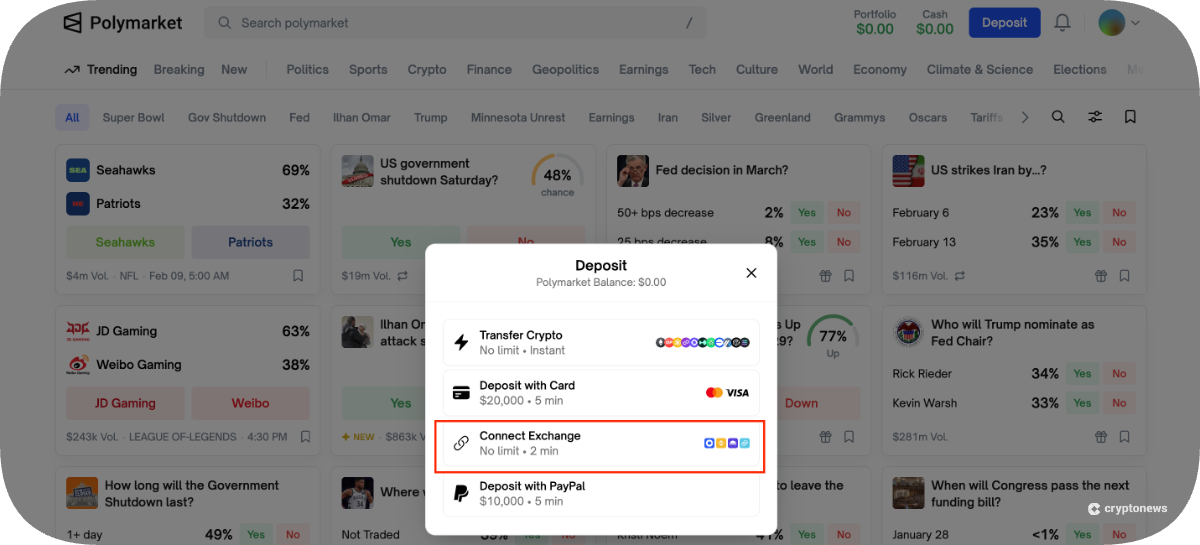
Alternatively, on the main homepage of the Coinbase dashboard, the “crypto” section should reflect your existing USDC balance. Simply click USDC → Send Crypto, and after that, Coinbase will ask for a destination address and network.
In another browser tab, open Polymarket, click Deposit → Transfer Crypto, and select USDC on Polygon as the deposit option to display your deposit address.
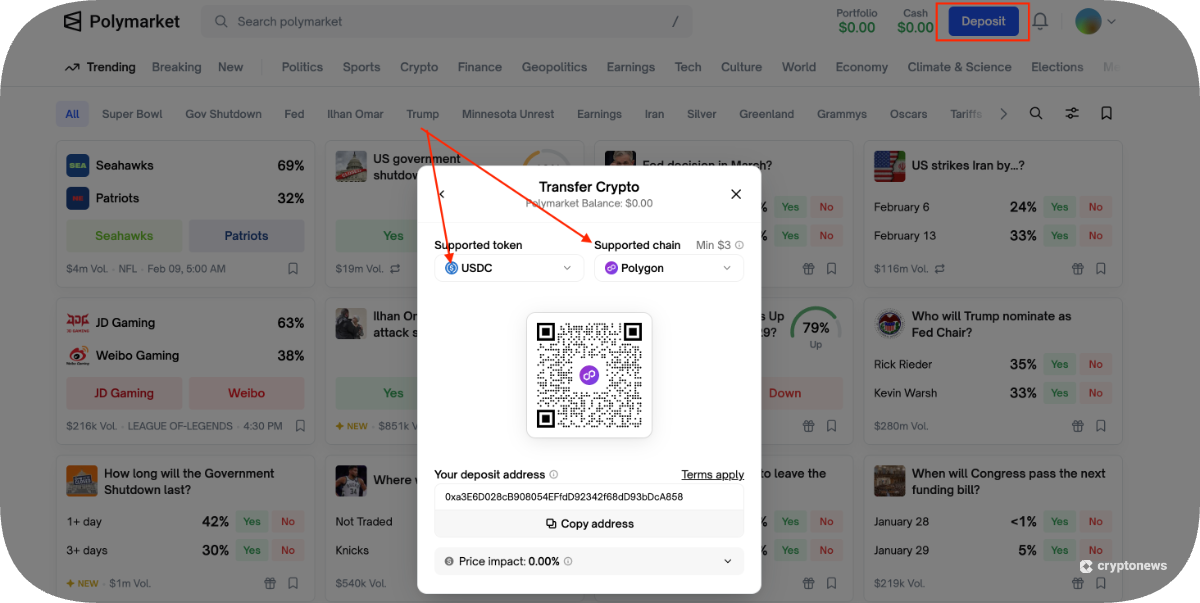
It is important to double-check that you generate the USDC deposit address for the Polygon network to avoid complications.
Step 3: Enter Address and Amount in Coinbase
You can now go to the Coinbase withdrawal form and paste the Polymarket deposit address into the required field. Coinbase will automatically recognize it as a Polygon address if you’ve selected the Polygon network on Polymarket.
At this stage, enter the USDC amount you want to transfer and confirm the transaction. Because 2FA is enabled, Coinbase will request a verification code before processing the transfer.
Step 4: Wait for Confirmation
The transfer usually completes in seconds or a few minutes. Once the USDC is sent, open the Polymarket tab to check your balance. If it doesn’t appear right away, wait a few minutes and refresh the page.
💡 Key Points to Remember
- Sending USDC on Ethereum rather than Polygon can delay the transfer and require additional steps, such as bridging.
- Recent bank deposits may not be withdrawable immediately.
- Crypto transfers are irreversible. Therefore, you should verify every step with utmost care and detail.
- This method is ideal if you’re starting with fiat or already use Coinbase and want a simple way to top up Polymarket without managing a Web3 wallet.
How to Deposit Cash on Polymarket Using Moonpay
MoonPay is an external service within Polymarket itself that lets you buy USDC with a debit or a credit card. It basically allows you to bypass exchanges entirely to keep things simple for beginners. The service is currently available in more than 160 countries, including the U.S.
It is important to know that even though you’re not using an exchange, regulations require MoonPay to verify your identity.
Here’s how it works:
- Tier 1: For small amounts, basic details might suffice.
- Tier 2: To make a meaningful deposit, you will need to upload a photo of your Driver’s License or Passport and take a live selfie. This verification usually takes a few minutes, but it can even take a few days if the system flags your ID for manual review.
Keeping that in mind, follow these steps to deposit cash on Polymarket using MoonPay:
- On Polymarket, click Deposit → “Buy with Card.“
- Enter the amount of USD you want to spend.
- Enter your email and verification code to sign up on MoonPay.
- Complete the ID check if prompted.
- Enter card details and authorize the payment.
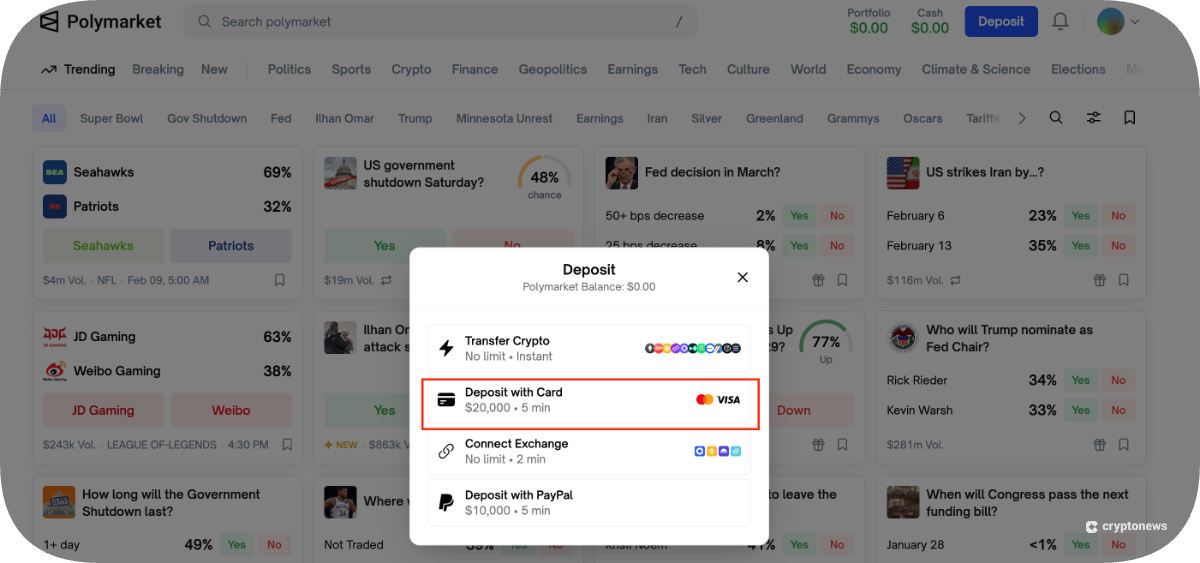
Using MoonPay’s service is indeed the fastest and easiest way to deposit funds on Polymarket. The only downside of this option is the high processing fee, which can be up to 4.5% of the transaction amount. There may also be a spread woven into the USDC price itself, meaning it could be relatively higher than on an exchange.
Polymarket Deposit Fees Explained
Polymarket does not charge deposit fees to encourage more user deposits. And that’s why the actual deposit costs you will incur are entirely external, like network or provider fees.
Gas fees are negligible when you deposit via Polygon, whether from a wallet or an exchange. For context, it is typically under $0.05, but it can vary based on network conditions. However, on Ethereum, these fees can even go as high as a few dollars, depending on network congestion.
Other than that, when you first interact with the Polymarket smart contract using a personal wallet like MetaMask, you must grant “Token Approval.” It’s a one-time security transaction that authorizes the contract to move your USDC and incurs only a few cents in gas fees.
MoonPay and Coinbase fee comparison:
- Coinbase: Purchase fee (variable) + a network fee = Relatively low total cost. Traders should note that fees may be higher when purchasing crypto with a debit card on Coinbase.
- MoonPay: Processing fee (High at 4%) + spread (Medium) + a network fee = High total cost.
Polymarket Minimum Deposit Requirements
Polymarket doesn’t have a strict universal minimum amount. But in practice, extremely low deposits can actually fail due to network fees and/or Polymarket’s bridging process.
If you deposit from chains that require bridging (like Ethereum), Polymarket’s system will require sufficient value to cover the cost of moving funds. And that is why Polymarket’s official docs currently indicate that a USDC deposit on Ethereum has a minimum of $45. That said, the minimum deposit is much lower on Polygon because fees are low and no bridging is needed.
If you’re depositing from your own wallet, small transfers usually are not feasible because the network fee may exceed the amount you’re sending.
For example, sending $0.5 of USDC from Ethereum while paying, say, $5 in gas will result in a loss. If you send $0.5 via the Polygon network, you’ll pay just a fraction of a cent, but that amount might not meet Polymarket’s minimum requirement.
Keeping these points in mind, we recommend depositing at least $10-$20 for Polygon network transfers. If you’re depositing via Ethereum-based USDC, the official Polymarket docs example implies you should deposit at least $45 just to clear the route minimum. It is also worth bearing in mind that third parties, like MoonPay, may have their own minimums.
How Long Do Polymarket Deposits Take?
The fastest way to deposit on Polymarket is to transfer USDC using the Polygon network. Polygon produces blocks in about 2 seconds on average, so a direct Polygon transfer usually confirms quickly.
Having said that, what matters to traders is how long it takes for those funds to reflect in their Polymarket accounts. We found that transactions typically complete within a few minutes, but can take longer when networks are busy.
How exactly does a deposit work?
- You send USDC to the Polymarket deposit address
- Polymarket then detects the incoming transfer and starts processing it.
- If the deposit is coming from Ethereum or another network, the next stage may include bridging or swapping to move the funds to Polygon.
- Next, your transaction on the original network is confirmed. After that, Polymarket submits the transfer to the destination chain.
- Once the routing is complete, the funds are credited to your Polymarket balance as USDC.e on Polygon, and you’re ready to trade.
Troubleshooting Guide: Why Is My Polymarket Deposit Not Showing Up?
If your Polymarket deposit isn’t yet showing up, don’t panic. Let’s run through a checklist of common issues and how to resolve them:
Check the Transaction Status First
The first step is to locate the transaction hash (txid) from your wallet or exchange and paste it into the correct block explorer.
For Polygon deposits, use Polygonscan and verify:
- Status: Success / Failed / Pending
- To address: It should match the deposit address Polymarket showed you
- Token: It should be the exact asset you meant to send (for example, USDC on Polygon)
You should wait a while if the status still shows as “pending.” Networks and explorers can lag when traffic increases.
“Confirmed” does not mean “credited.” Even after the original transaction confirms, Polymarket may still be routing or bridging funds. Your balance typically updates only once the deposit flow reaches its final stage.
Common Reasons for Delay
- Wrong network: Confusion between the Ethereum and Polygon networks is perhaps the most common reason. It’s important to note that Ethereum deposits may take longer due to bridging.
- Unsupported token or amount too small: If the token/chain combo isn’t supported, or the amount is below the minimum, the transaction may not be processed.
- Not enough gas: MetaMask requires a small amount of native gas to submit the transfer.
What to Do if You Sent the Funds Incorrectly?
If you’ve deposited the wrong token on either Polygon or Ethereum, here is where you can recover your funds:
- For Polygon: Visit matic-recovery.polymarket.com
- For Ethereum: Visit recovery.polymarket.com
Both these tools will let you connect your Polymarket wallet, select the mistakenly deposited asset, and recover it to a specified wallet.
When (And How) to Contact Support?
You can contact Polymarket’s support team if the transaction is confirmed but not yet credited, or if the transaction status shows “FAILED.” You can also reach out to them if the previously discussed recovery tools do not detect the funds.
To contact the customer support team, send an email to [email protected] or raise a ticket on their official Discord channel.
How to Reduce Gas Fees When Depositing on Polymarket
To put network fees into context, it helps to know that Ethereum gas fees can see a sharp spike when its network is busy. But Polygon can process more transactions at lower costs, which is why Polygon transfers are usually the cheapest option to deposit when available.
We recommend depositing funds via Polygon rather than the Ethereum mainnet to minimize these gas fees. Also, Polymarket’s trading collateral is USDC.e on Polygon. If you deposit native USDC, Polymarket will prompt an “activate funds” swap into USDC.e. While convenient, that is still an extra on-chain step. Thus, if you can deposit USDC.e directly, you can avoid that extra step and associated fees.
Another important point to keep in mind is to make fewer, larger deposits rather than many small ones. If you’re executing multiple deposits, you’ll end up paying network costs multiple times.
Supported Tokens and Chains for Polymarket Deposits
Your trading balance on Polymarket typically settles to USDC.e on Polygon, even if you start your deposit from other chains or tokens. That said, Polymarket’s “Transfer Crypto” flow actually supports a range of tokens. The current list includes USDC, USDC.e, USDT, DAI, ETH, WETH, SOL, MATIC/POL, cbBTC, ARB across supported chains.
We found that Polymarket’s bridge supports deposits from multiple chains, including EVM networks and Solana, and automatically converts them into USDC.e on Polygon.
Security Best Practices When Depositing on Polymarket
Your biggest deposit risk is selecting the incorrect deposit address. To avoid this, always copy the address from Deposit → Transfer Crypto after selecting the exact token as well as the chain you’re sending to. It is best to verify first 4 and last 4 characters match after pasting the address.
Traders should also be aware of common scams and malicious links. As Polymarket has gained wider visibility, including a partnership with Dow Jones to publish its prediction data, fake support accounts have become a huge risk. For example, if someone from Polymarket’s support team supposedly DMs you, treat it as a scam and use the official chat or the ticket instead.
It is worth putting into context that Polymarket activity ultimately occurs on a public chain. So, anyone can potentially trace deposits or withdrawals if they can link your wallet to you. If you’re privacy-conscious, we recommend using separate wallets for trading and long-term holdings.
👉 Learn More: Polymarket Review: Is It Safe?
Quick Start Checklist for Users Ready to Deposit Now
Here is a checklist you can refer to for depositing funds on Polymarket:
- Set Up Your Account: Log in or sign up for a Polymarket account, and ensure it is linked to a Web3 wallet like MetaMask.
- Add USDC: Ensure you have a sufficient USDC balance in your crypto wallet or exchange account to get started.
- Choose the Deposit Route: Go to Deposit → Transfer Crypto and select the token and network, like USDC on Polygon, to generate a deposit address. Alternatively, you can directly connect a Coinbase account to transfer USDC or buy supported cryptos through an external service provider like MoonPay.
- Wait for Confirmation: Wait for a few seconds for the blockchain to confirm your transaction. Polymarket balance should reflect this balance within a few minutes.
FAQs
Does Polymarket charge a deposit fee?
Can I deposit from Binance?
Is it easy to withdraw after depositing?
Can I recover a failed or wrong deposit?
Do I need KYC to deposit on Polymarket?
References
2M+
250+
8
70





 in numbers

About Cryptonews
Our goal is to offer a comprehensive and objective perspective on the cryptocurrency market, enabling our readers to make informed decisions in this ever-changing landscape.
Our editorial team of more than 70 crypto professionals works to maintain the highest standards of journalism and ethics. We follow strict editorial guidelines to ensure the integrity and credibility of our content.
Whether you’re looking for breaking news, expert opinions, or market insights, Cryptonews has been your go-to destination for everything cryptocurrency since 2017.
