


 MetaMask Wallet Review 2026
- Compatible with most major blockchains
- Non-custodial wallet, you control your funds
- Wallet extensions enable extra features
With nearly 100 million users around the world, MetaMask is one of the most instantly recognizable crypto wallets on the market. It’s particularly popular among DeFi users, crypto presale investors, and long-term holders due to its compatibility with most Web3 protocols, its advanced security measures, and its non-custodial design. MetaMask’s comprehensive user interface provides crypto enthusiasts with complete control over their funds and instant 24/7 accessibility.
In this MetaMask review, we’ll find out how MetaMask works, why it’s so popular, what sets it apart from the competition, and much more. Our experts have extensively tested MetaMask and other well-respected alternatives, so you can make the right decision when choosing which crypto wallet to use in 2026.
MetaMask Review: Pros and Cons
MetaMask initially became popular among the Ethereum community following its launch in 2016, as Ethereum was the only blockchain natively supported by this wallet at the time. Today, MetaMask also natively supports Solana – and the project’s developer community has created a long list of extensions (“MetaMask Snaps”) offering interoperability, heightened security, and other additional functions. This means that MetaMask is compatible with most major blockchains and cryptos, while users can add their own custom ERC-20 tokens if they’re not already supported by default.
For absolute beginners, MetaMask will be challenging to get to grips with, mainly due to the interface differences between its mobile app, web app, and official browser extension. However, it is accessible through most devices, and most Web3 projects, protocols, and presales aim to connect to MetaMask because of its reputation as a standard-setting product. MetaMask is very popular in the DeFi sector, making it highly useful for users who want to experiment with decentralized finance.
If you’re wondering how to get started with MetaMask, we cover everything you need to know throughout this MetaMask app review.
Pros
- Non-custodial wallet – you have full control over your assets
- Mobile app, browser extension, and web app access
- Option to connect via Google or Apple account
- Currently running pilot for MetaMask Card payment feature
- No KYC required (except if using MetaMask Card)
- “MetaMask Snaps” wallet extensions for interoperability, security, social media integration, and more
- Compatible with dozens of blockchains (native connection to Ethereum and Solana, others via Snaps)
- Can be used to interact with decentralized applications (dApps)
Cons
- Some features only available via web app
- Limited functionality for mobile app and browser extension
- Selecting some features within browser extension opens web app, requiring additional sign-in and wallet connection approval
What Is MetaMask?
The MetaMask crypto wallet was created by a team at Consensys in 2016 and is generally considered a benchmark product within the Web3 wallet space. Its range of features may be fairly basic in comparison to some newer and more disruptive wallets, but MetaMask still covers all the fundamentals, from non-custodial storage to crypto buying and selling options, fiat on-ramps and off-ramps, and sending and receiving functions. MetaMask also includes a decentralized crypto swap platform, which aggregates liquidity from leading DeFi protocols like Uniswap, Curve, and 1inch, offering flexibility when it comes to trading.
The MetaMask ecosystem has been massively expanded by the introduction of “Snaps,” which are essentially MetaMask wallet extensions that unlock new capabilities. Using Snaps, you can connect your MetaMask wallet to almost any major blockchain, apply enhanced security measures, integrate Web3 social media feeds, and more.
Through a partnership with Mastercard, MetaMask recently introduced its own “MetaMask Card” service, enabling wallet holders to pay for everyday goods and services using crypto while earning on-chain rewards. A physical card (“MetaMask Metal”) is also in the works, although the quantity of metal cards will be limited.
As MetaMask is accessible through a mobile app, browser extension, web app, and soon a physical card, it has set a clear standard that every other Web3 wallet is expected to meet or exceed.
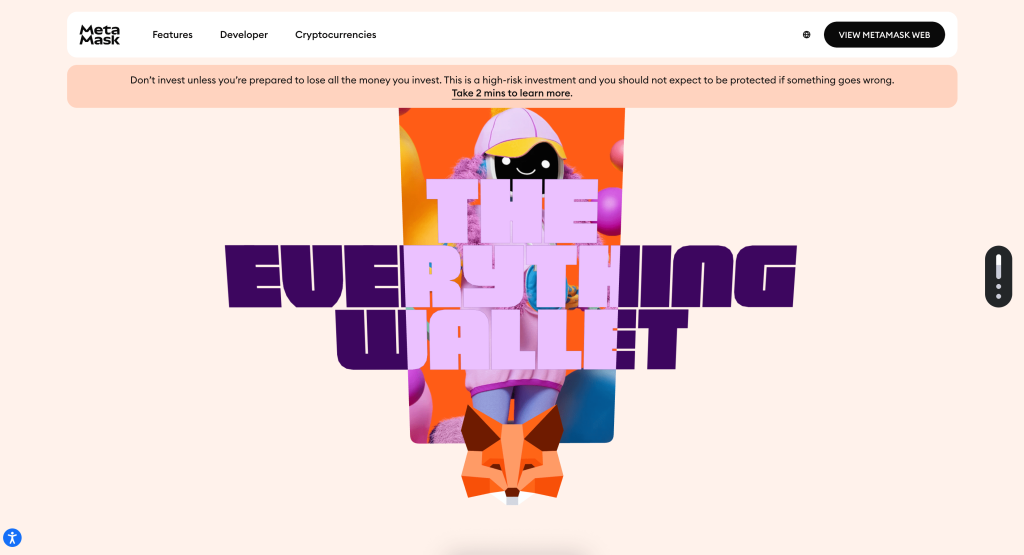
What Type of Wallet Is MetaMask?
MetaMask is a non-custodial decentralized crypto wallet that also incorporates some additional features, such as a built-in crypto swap platform and the MetaMask Card payment service. It’s compatible with most Ethereum-based Web3 projects that require wallet connections, and cross-chain interoperability is facilitated by independently-created extensions called “MetaMask Snaps.”
As MetaMask does not require users to follow a KYC (Know Your Customer) process, it’s also a popular choice for users who prefer anonymous crypto wallets and prioritize privacy when engaging with Web3 platforms. However, some Web3 projects that allow MetaMask connections may still enforce their own KYC requirements - and all crypto transactions are recorded on blockchains, which normally makes them publicly visible by default.
MetaMask Security
MetaMask has been an almost ubiquitous part of the Web3 industry for nearly 10 years, and was developed by Consensys - one of the main contributors to the Ethereum ecosystem. This clearly indicates that MetaMask is fundamentally reliable. MetaMask has also not been hacked to date, and employs advanced security measures like Wallet Guard, which offers phishing protection, human-readable transaction signatures, and an assortment of automated scam detection functions.
Nonetheless, MetaMask users must still follow cybersecurity best practices (such as keeping private keys safe and carefully checking that they’re connecting their wallet to a trustworthy smart contract when executing transactions). Despite MetaMask’s efforts to maximize user security, malicious actors are constantly working to discover new vulnerabilities - and human error can lead to potentially damaging accidents. More information can be found in our complete guide, “Is MetaMask Wallet Safe in 2026?”
Key MetaMask Security Measures:
- Wallet Guard (formerly a security-focused MetaMask extension, now acquired by Consensys and integrated directly into the MetaMask wallet)
- Scam detection and phishing protection protocols
- Transaction signatures that can be easily read by humans
- Private keys and recovery phrases that cannot be accessed by Consensys or the MetaMask team
- No KYC required, preserving user privacy
- Non-custodial crypto wallet, providing complete user control over funds and transaction approvals with no third-party access
MetaMask Supported Coins and Networks
MetaMask started out as an Ethereum-based crypto wallet and was developed by Consensys, which is focused on the Ethereum ecosystem. However, many developers have created “MetaMask Snaps,” which extend MetaMask’s range of capabilities and supported networks via cross-chain interoperability protocols. A list of officially approved Snaps can be found on the MetaMask website.
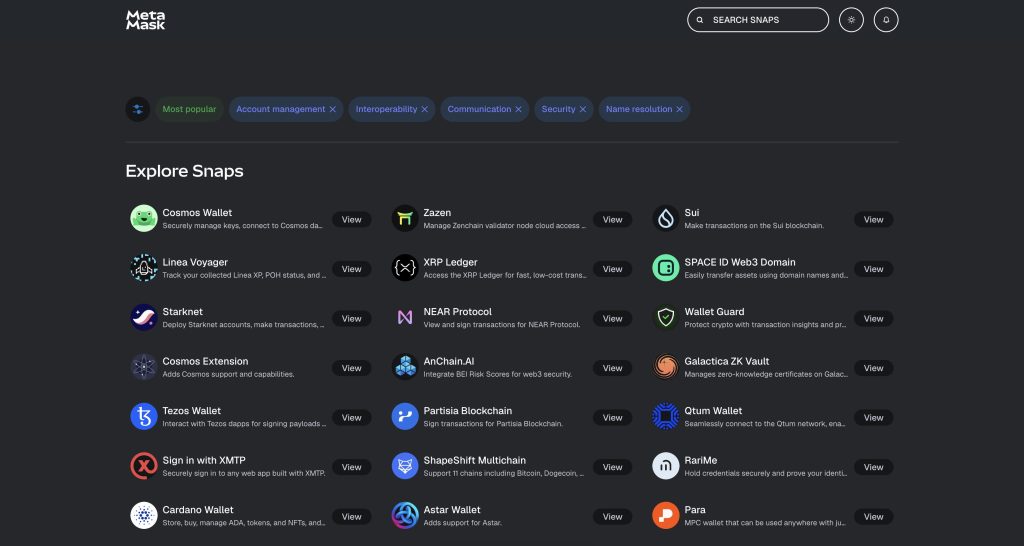
Due to the availability of interoperability Snaps, MetaMask users can connect to almost any major blockchain, store tokens, and sign transactions. Beyond Ethereum, networks supported by the most popular MetaMask interoperability Snaps include NEAR Protocol, Cosmos, Tezos, and Cardano.
In July 2025, MetaMask added native support for the Solana blockchain, and its team has also announced plans to provide native connections to more non-EVM (Ethereum Virtual Machine) blockchains in the future
Then, in December 2025, MetaMask also added native support for Bitcoin, so users can now store and transact with Bitcoin without relying on Snaps.
MetaMask’s token swapping feature allows users to connect to 10 blockchains (Ethereum, Solana, Linea, Optimism, BNB Chain, Polygon, zkSync, Base, Arbitrum, and Avalanche), and execute swaps directly within the MetaMask app. MetaMask’s website states that the wallet’s transaction success rate currently stands at 99.995% for swaps, with access to dozens of crypto exchanges and thousands of tokens. You can also add custom ERC-20 tokens to your MetaMask wallet if needed.
MetaMask Wallet Key Features
For most Web3 users, MetaMask’s list of features has proven more than satisfactory. Below, we’ll review the most important MetaMask functions that users need to know about.
Buy, Sell, and Swap
You can use your MetaMask wallet to buy crypto using a range of fiat currencies and payment methods (such as PayPal, Apple Pay, and standard credit and debit cards). It’s worth noting that the availability of specific currencies and payment methods may vary depending on the country you’re in.
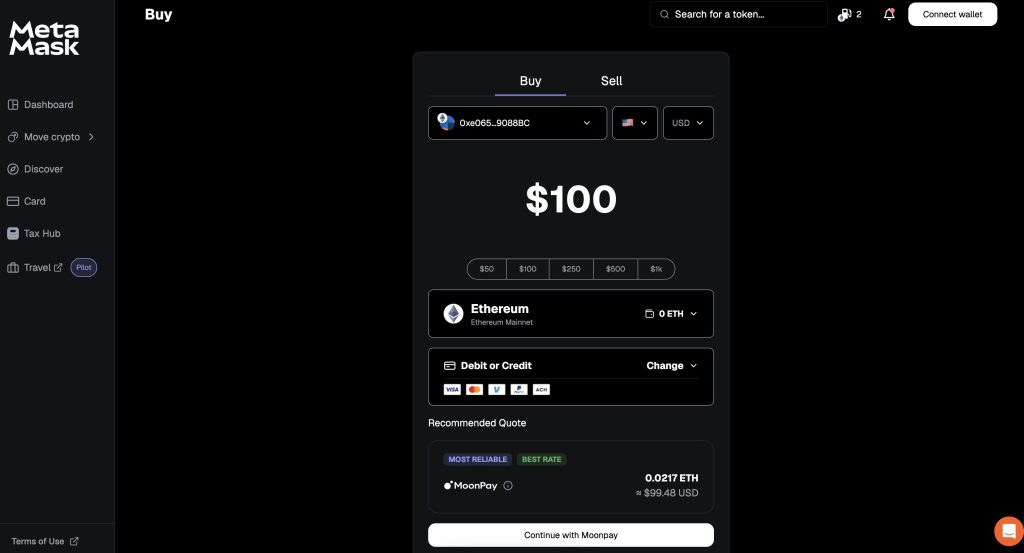
Selling your crypto uses a similar interface and allows you to cash out directly to your bank account or credit card.
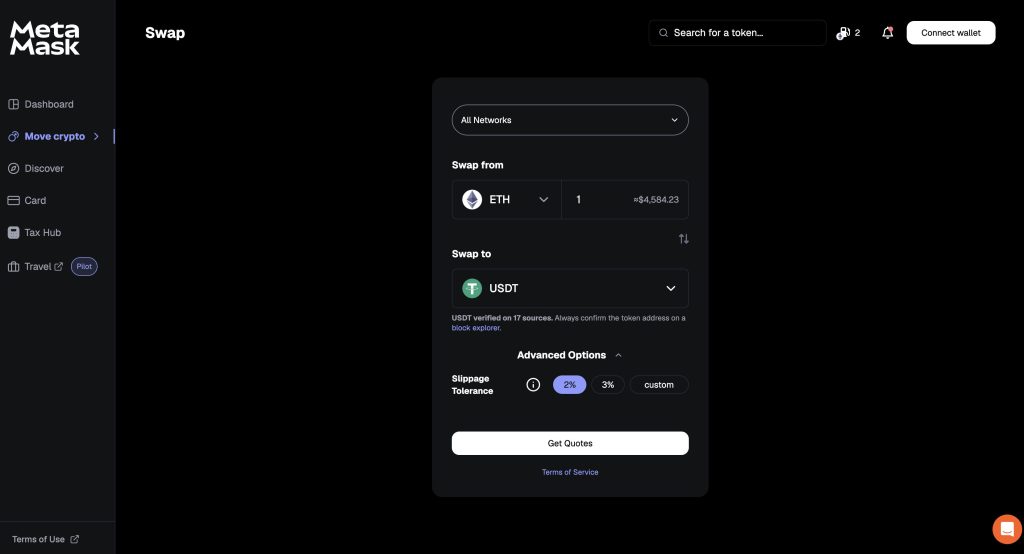
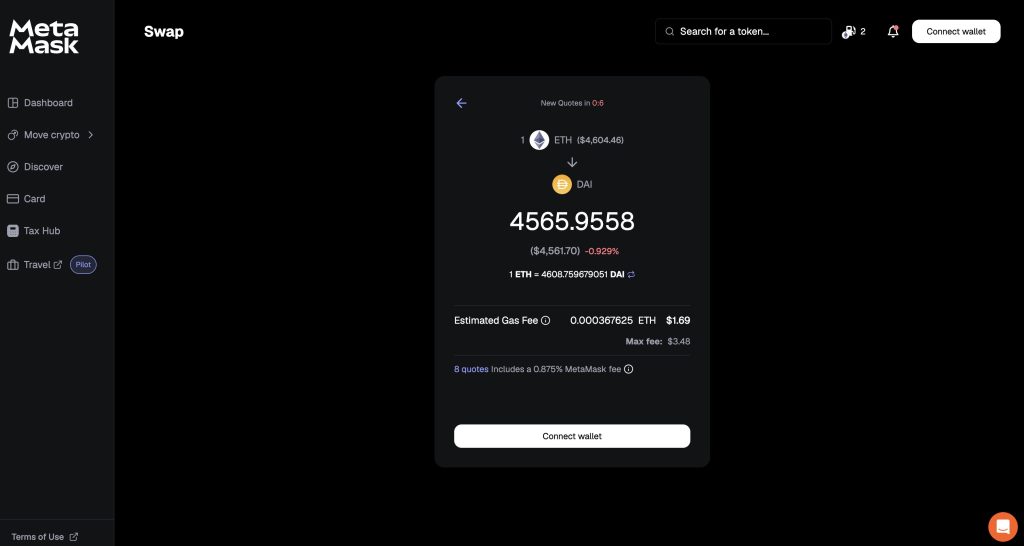
If you need to swap your crypto, MetaMask uses a standard token swap interface - with additional options to set your slippage tolerance. Default options include 2% and 3%, but you can also specify a custom amount if you prefer.
MetaMask Perps
In October 2025, MetaMask introduced perpetual futures trading in its mobile app. You can now use up to 40x leverage to go long or short on any EVM-based token without leaving the application or connecting to a third-party dApp.
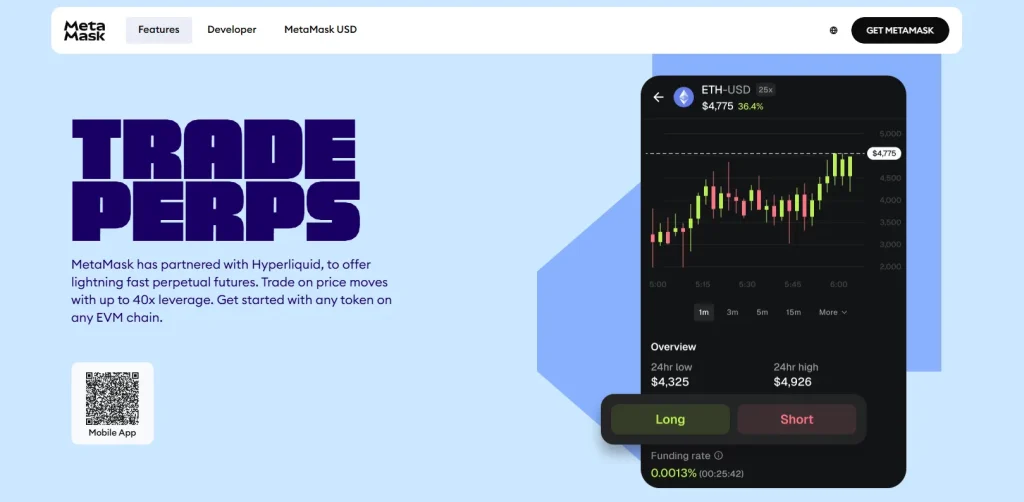
The feature is provided in partnership with Hyperliquid, one of the most popular decentralized exchanges on the market. Moreover, MetaMask remains true to its privacy-focused nature, so you won't need to provide personal information or go through KYC verification to trade perpetuals.
Staking
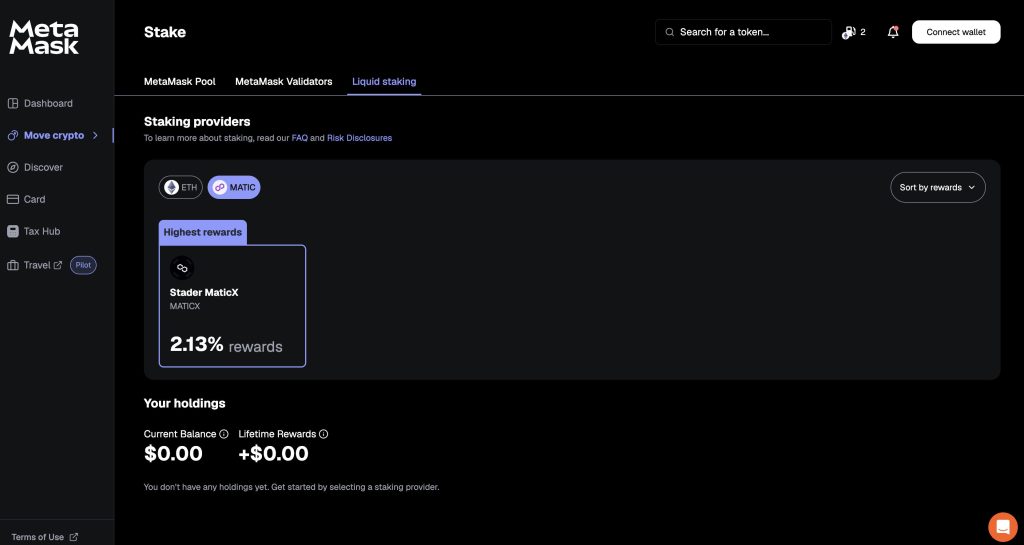
At the time of writing, MetaMask offers staking for Ethereum (ETH) via its own MetaMask Pool, generating rewards at an annual rate of 2.4%. ETH validator staking is also available (with 2.6% in annual rewards), and liquid staking is provided through Lido (2.71% rewards) and Rocket Pool (2.47%).
Users also have a liquid staking option for the MATIC cryptocurrency via Stader Labs, with a 1.85% annual reward rate.
DeFi and dApp Support
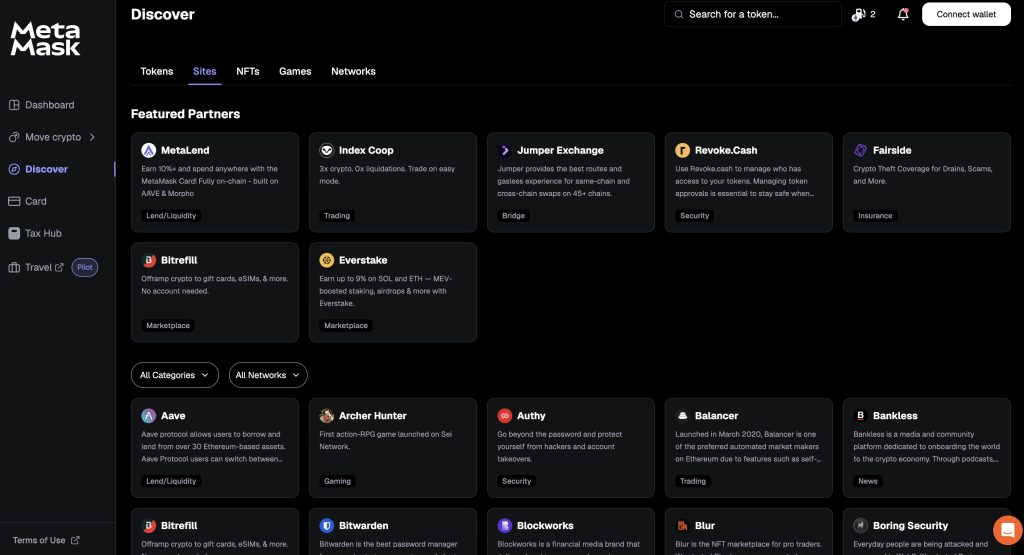
The “Discover” tab within the MetaMask web app contains a list of more than 100 MetaMask-compatible dApps, from DeFi protocols and decentralized exchanges to Web3 gaming and metaverse platforms. Clicking on a project will take you directly to its website, where you can explore further and connect your MetaMask wallet. Always be careful to check individual signature requests and transactions, and ensure that you are connected to trustworthy and legitimate websites - even if you initially accessed the page from MetaMask’s platform.
NFT Management
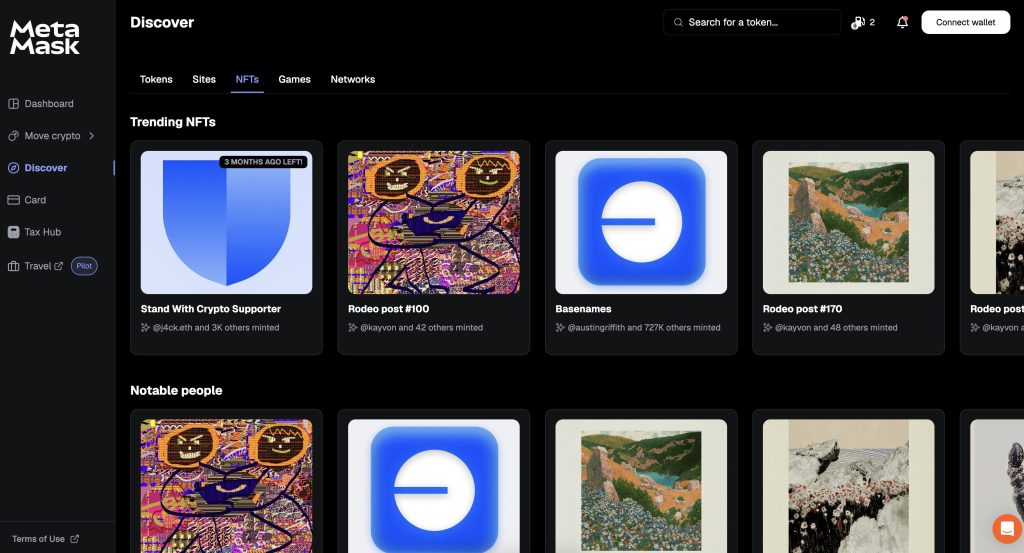
NFT fans can also use the “Discover” tab within the MetaMask web app to check out top-trending NFTs; access external NFT marketplaces like OpenSea, Blur, and LooksRare; and connect their MetaMask wallets to manage their own NFT collections.
Gas Station
MetaMask’s “Gas Station” feature operates primarily behind the scenes of your MetaMask transactions, and is designed to make gas fee payments more convenient. Instead of strictly requiring users to pay gas fees using a blockchain’s native token (such as ETH when using Ethereum), the Gas Station feature automatically factors network fees into swap quotes and uses the token being swapped to pay for the gas fees.
This means (for example) that if you want to swap DAI for USDC via the Ethereum network, you don’t need to also have some ETH in your MetaMask wallet to pay for gas. Instead, your swap quote will include a deduction for gas fees, which will be taken from the USDC you receive in this example. Instead of leaving the swap interface to buy more ETH to pay for the gas fee (which may, in turn, require you to purchase the ETH using a fiat currency payment from your bank account), you can just go ahead with the swap transaction immediately.
Gas Station is currently only available when using the Ethereum and BNB Chain networks, but it may expand to more chains in the future. When engaging directly with dApps on the above chains, users can also pay gas fees with USDT, USDC, DAI, ETH, wETH, wBTC, wstETH, and wSOL using the Gas Station feature. This does expand the range of gas fee payment options, but it will still require additional crypto purchases if your balance of the selected payment coin is too low.
MetaMask Card
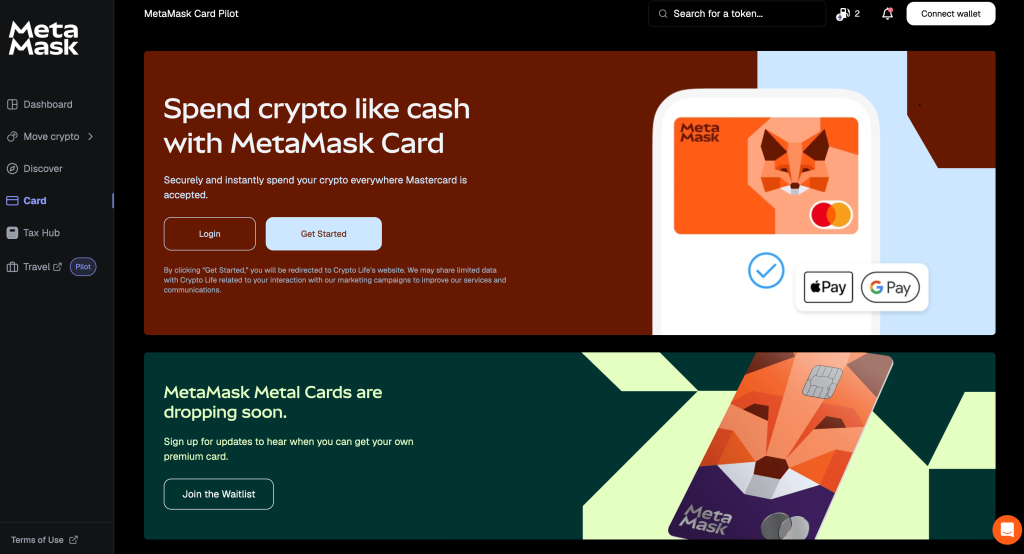
Created through a partnership between MetaMask and MasterCard, MetaMask Card is currently in its pilot stage and allows mobile users to spend their cryptocurrency at 150 million merchants around the world that all accept Mastercard. A limited-edition physical card (“MetaMask Metal”) will also be available soon.
It’s important to note that signing up to MetaMask Card will require users to complete a comprehensive KYC process, including the provision of personal details (email address and phone number), a government-issued ID (passport, driving licence, etc.), and a biometric scan using a selfie picture.
MetaMask Snaps
Although MetaMask’s default feature range is quite limited, Consensys has allowed external developers to build their own MetaMask extensions, which are known as “MetaMask Snaps.” These add-ons provide extra functionalities, from additional security measures to social platform and chat integrations - and even interoperability Snaps, which allow users to connect their MetaMask wallet to the most popular blockchains. As MetaMask only offers native support for Ethereum, Solana, and Bitcoin interoperability, Snaps are especially popular among MetaMask users.
MetaMask Wallet Fees
Setting up a MetaMask wallet is free - but using some wallet features can incur fees either from MetaMask or the blockchain network being used to execute a given transaction (gas fees). Gas fees can vary depending on the blockchain and its current traffic load, and are paid to the network’s miners or validators when executing deposit, withdrawal, and dApp transactions; MetaMask itself does not charge a fee or receive payment during this process. However, MetaMask does offer some tools that can help to estimate gas fees, and its Gas Station feature allows gas fee payments for swaps to be made using the token you’re planning to swap for another coin, making the swapping process more convenient.
When swapping tokens or staking them using MetaMask’s integrated dApps, some additional fees payable to MetaMask can apply, and are usually taken care of automatically as part of the swap or staking process. For swaps, MetaMask charges a standard fee of 0.875% per swap, while staking ETH via MetaMask’s Validator Staking service incurs a fee of 10% of the rewards generated via staking.
When buying or selling crypto in exchange for fiat currency via MetaMask, fees can also apply, although these are mainly payable to the payment facilitators (such as Moonpay, PayPal, and others that may vary depending on your location). These fees are set by the facilitators and can vary at their discretion.
Is MetaMask User-Friendly?
MetaMask has set a standard for Web3 wallet accessibility, and its ecosystem includes a browser extension, web app, and mobile app (available for iOS and Android devices).
The mobile app’s interface is very simple, clear, responsive, and user-friendly - but some options (such as selling crypto and accessing DeFi services) may not be available, depending on your location.
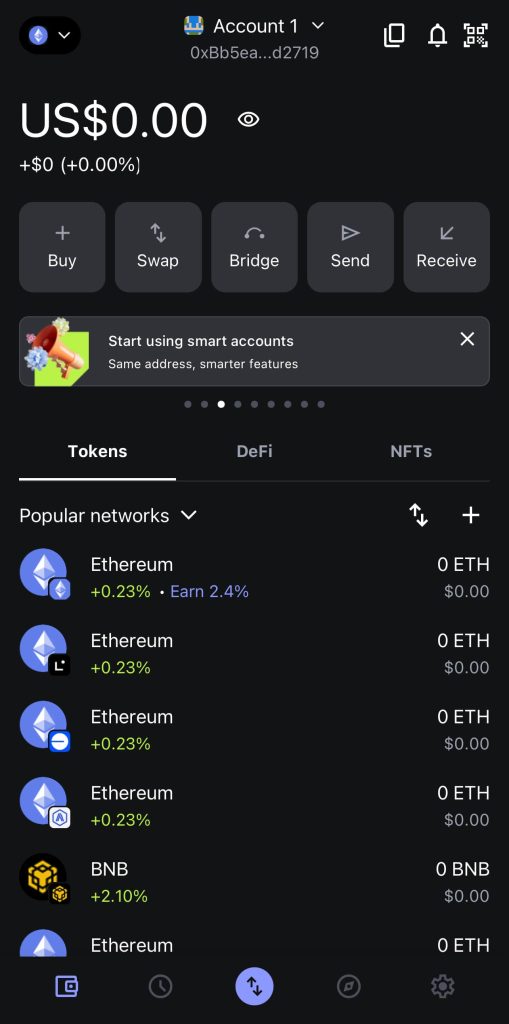
The MetaMask browser extension also offers a clean and straightforward interface and is essential for users who want to engage with Web3 projects using an internet browser on a desktop or laptop computer. However, the default interface can feel quite fiddly to use for actions beyond simply reading and signing transactions - and selecting the “Buy” and “Sell” functions automatically opens the MetaMask web app, which requires the user to sign in again.
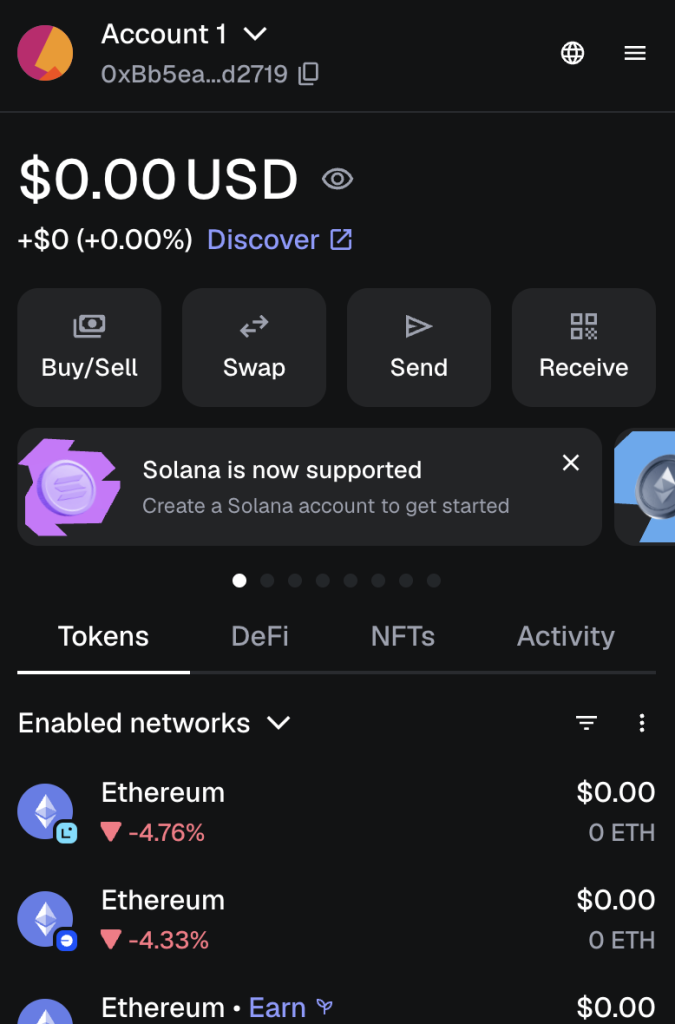
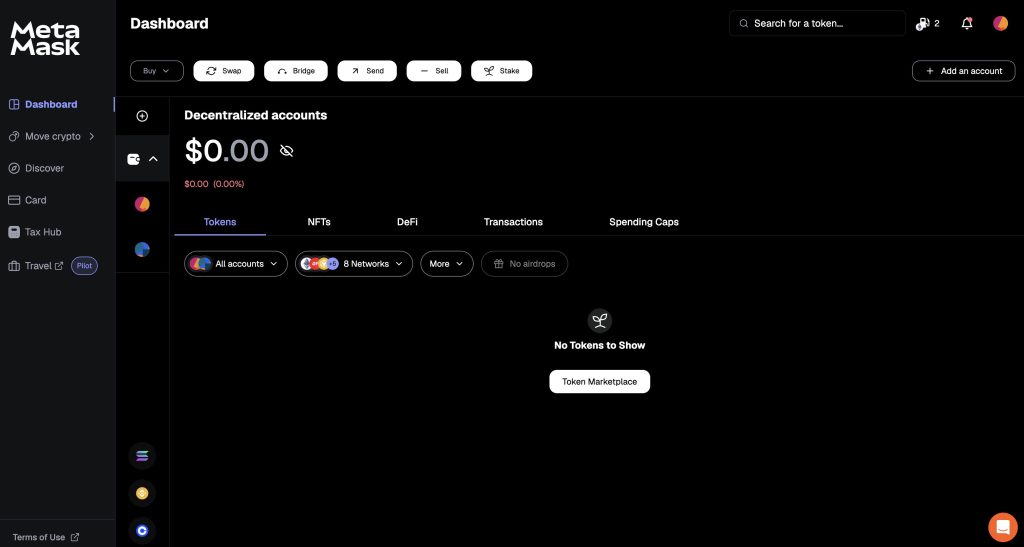
Furthermore, MetaMask’s advanced features (such as staking, Snaps, wallet transfers from Binance and Coinbase, and access to some external dApps and platforms) are only available through the MetaMask web app. This makes it the best default option when using MetaMask; the browser extension and mobile app are mainly oriented toward simple actions like sending, receiving, and swapping tokens, and signing transactions. MetaMask Card will also be integrated with Apple Pay and Google Pay, making the mobile app worthwhile for users who want to spend their crypto in everyday life.
MetaMask Customer Support
MetaMask’s customer support channels are easily accessible across the mobile app, web app, and browser extension. Support options include FAQs, educational guides, detailed product documentation, a community support forum, and a customer service chat window. Chats initially use an AI agent to cover common queries, but also allow users to connect to a human support team member.
MetaMask’s website states that its customer support covers 134 languages, making it a strong option for users outside the US and other English-speaking countries.
Users should also bear in mind that customer support channels for all Web3-related companies can become congested during major market events (especially sudden dips and crashes). Therefore, it’s best to get acquainted with MetaMask when you first begin using it, so you can plan for extreme market conditions and potentially avoid the need for a customer support request at that point.
Where Can MetaMask Improve?
MetaMask’s main drawback is that its web app allows users to access the platform’s complete range of features and functions, but the browser extension and mobile app do not. As noted above, the web app offers the only way for users to engage with important features like MetaMask Snaps, staking, and access to most external dApps, and attempting to buy or sell crypto using the browser extension redirects users to the web app, requiring additional sign-ins and wallet connection approval.
This adds a moderate-to-steep learning curve to the MetaMask user experience, which could confuse both beginners and crypto veterans.
Security-conscious users should also remember that MetaMask is a hot wallet - meaning it’s always connected to the internet - and individual wallets will be vulnerable to attacks that target the user, such as phishing and malware attacks. MetaMask itself has never been hacked, but many individual users have been tricked by scammers into giving away their login credentials and private keys. Web3 users must always watch out for malicious smart contracts that can steal your funds (“wallet drainers”), fake websites, scam token airdrops, and other cybersecurity risks.
As MetaMask is a non-custodial crypto wallet (so the MetaMask team cannot access your account or wallet, or view or change your login details), it also cannot offer two-factor authentication (2FA). This reduces the wallet’s security protection - although Consensys has gone to great lengths to improve security through other means, such as the Wallet Guard protocol. MetaMask can also be paired with a cold wallet (a physical hardware wallet that does not require an internet connection), which further boosts security as you can store the physical wallet device in a safe location.
Overall, MetaMask offers a flexible and strong product - but it’s best to use the web app by default. The browser extension is mainly helpful for signing transactions, and the mobile app offers instant access to a limited range of features wherever you are. MetaMask Card users will also need the mobile app to make crypto payments at physical locations.
MetaMask Alternatives
MetaMask has built an impressive reputation as a “classic” crypto wallet, and its userbase of 100 million crypto enthusiasts clearly demonstrates its appeal. That said, our experts have identified some promising software-based and non-custodial MetaMask alternatives that are also worth considering.
| Wallet | Coins / Networks | Standout Features | Best For |
| MetaMask | Almost every crypto across most major blockchains, plus custom tokens | Large range of wallet extensions, providing additional interoperability (including connection to Bitcoin), security measures, and communication protocols | Web3 users looking for maximum flexibility |
| Best Wallet | Thousands of cryptos across 60 blockchains | Crypto presale launchpad and integrated DEX | Beginners and presale investors |
| Zengo | 320+ coins over 10 blockchains | Multi-Party Computation (MPC) security technology, two-factor and biometric authentication, no wallets hacked to date | Security-focused users |
| Trust Wallet | Thousands of tokens, dozens of blockchains | Owned by and integrated with Binance, directly facilitating crypto swaps, purchases, and sales | Mobile device users who prefer to stay within the Binance ecosystem (while still benefiting from cross-chain interoperability) |
How to Set Up and Use MetaMask
Below, we’ll run through a quick guide to setting up a MetaMask wallet via a browser extension, which is the most popular way to use MetaMask.
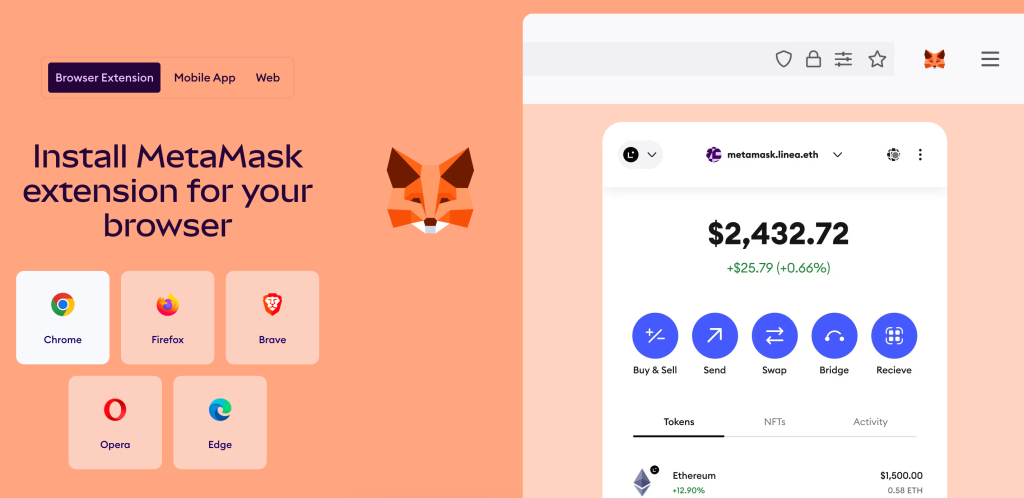
Step 1: Download and Install the MetaMask Extension
The MetaMask website provides download links for extensions across a range of web browsers. In this example, we’ll use Google Chrome.
Step 2: Create a New MetaMask Wallet
After downloading and opening the MetaMask browser extension, you will first need to accept MetaMask’s terms and conditions.
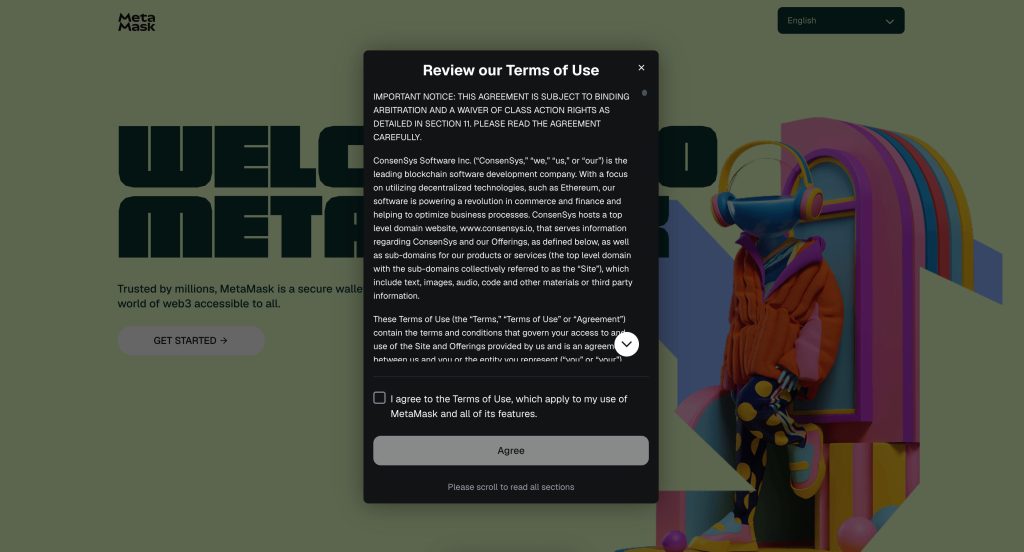
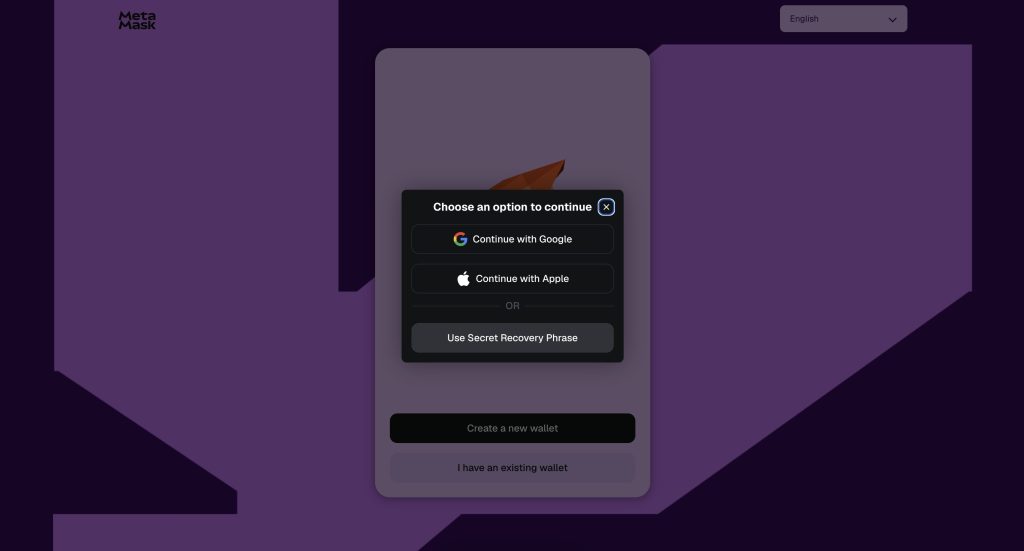
You’ll then be given the option of connecting an existing Google or Apple account, or using a secret recovery phrase. In this example, we’ll connect directly using Google.
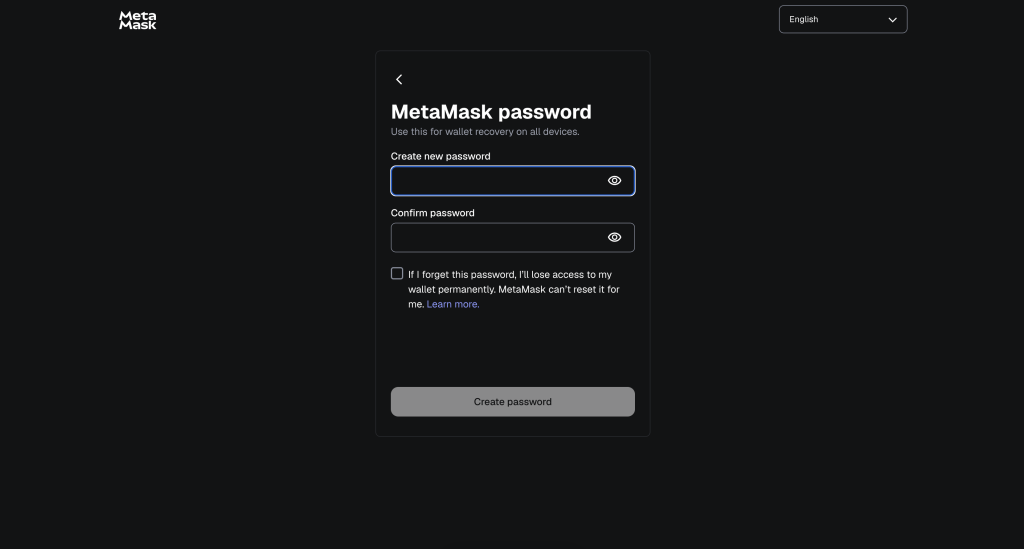
Next, choose your MetaMask password. Make sure you choose a secure password that you’ll also be able to remember, as the MetaMask team will not be able to reset it. You’ll also be prompted to confirm if you want any of your wallet usage data to be available to MetaMask for product analysis and improvement purposes (and there is an option to refuse this).
Step 3: Begin Exploring MetaMask
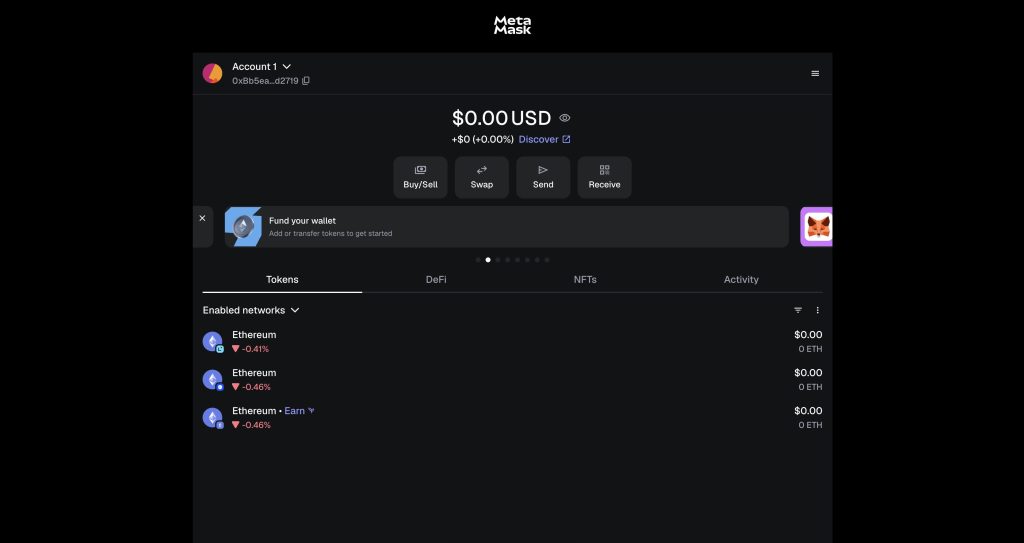
After setting up your MetaMask wallet, you’ll be taken to the wallet’s browser extension interface. From here, you can buy, sell, swap, send, and receive crypto, read MetaMask news updates, view your portfolio, access DeFi and NFT features, and more. An extensive list of settings can be found in a dropdown menu by clicking the three horizontal lines in the top-right corner of the interface.
MetaMask Review Conclusion: Who Is It Best For?
Overall, MetaMask provides enough functionality, flexibility, security, and accessibility for the vast majority of Web3 and crypto users. Beginners are likely to find the learning curve somewhat steep - but MetaMask also counters this by providing comprehensive technical support resources, and 24/7 connection to human customer service experts.
After new users get more familiar with MetaMask’s interfaces, the wallet becomes far more rewarding. MetaMask Snaps (wallet extensions) are a real highlight, as they enable direct compatibility with dozens of blockchains, DeFi protocols, games, Web3-based virtual worlds, powerful security extras, and more. Even if you prefer a simpler crypto wallet experience, MetaMask remains a strong choice - especially if you’re mainly active on the Ethereum and Solana blockchains, due to MetaMask’s native integration with both networks.
Visit MetaMaskOur Methodology: How We Tested and Reviewed MetaMask
For this MetaMask wallet review, we installed the MetaMask mobile app on an iPhone 12 Pro Max running iOS 18.6.2 and created a new account via the MetaMask browser extension for Google Chrome. The setup process was simple, although the variation between interfaces was initially confusing – and we found the MetaMask web app to be the best way to interact with this wallet’s full range of capabilities.
Once we’d moved beyond the initial confusion regarding the differences between the different interfaces, MetaMask proved highly flexible due to its community-developed wallet extensions (MetaMask Snaps). We were also impressed by its security measures, staking options, and interoperability. MetaMask is mainly known as an Ethereum wallet, as it was created by Consensys (who mainly focus on Ethereum-related projects), but it now includes native support for Solana and can also be connected to many other blockchains, thanks to the aforementioned Snaps.
We also assessed MetaMask’s capabilities in comparison to other leading Web3 wallets (Best Wallet, Zengo, and Trust Wallet), and found MetaMask to be impressively competitive. We would recommend this wallet to crypto users who don’t mind overcoming a steep initial learning curve and want to explore every aspect of the Web3 space.
FAQs
Is MetaMask trustworthy?
Who owns MetaMask?
Is MetaMask legal in the US?
Can MetaMask get hacked?
How much does MetaMask charge to withdraw?
Can MetaMask hold Bitcoin?
What happens if I delete MetaMask?
References
- MetaMask Official Website (MetaMask)
- Custodial vs non-custodial wallets: What's the difference? (MoonPay)
- Wallet Guard: Sunset Notice (Wallet Guard)


