

Trezor Vs Ledger: Which is Better in 2026?
We believe in full transparency with our readers. Some of our content includes affiliate links, and we may earn a commission through these partnerships. However, this potential compensation never influences our analysis, opinions, or reviews. Our editorial content is created independently of our marketing partnerships, and our ratings are based solely on our established evaluation criteria. Read More





Trezor and Ledger are the most popular hardware wallets today, and for a good reason. They utilize advanced security measures and support a wide range of third-party wallets and apps. However, these two providers differ in many segments, which we’ll discuss in more detail in this Trezor vs Ledger guide.
To create an unbiased and in-depth comparison, we purchased both wallets and compared their key features, security measures, price, companion apps, compatibility, and connectivity. We rated each category separately to determine which wallet performs better.
So, should you entrust your crypto holdings to Ledger or Trezor? Keep reading to find out:
Trezor vs Ledger – Our Verdict
After several days of testing, we came to the conclusion that both Trezor and Ledger utilize advanced security measures, which make them safe to use. However, Trezor is more transparent, since its operating system is fully open-source, while Ledger’s operating system is 95% open source. On the other hand, Ledger supports more coins and tokens, 15,000+ vs 1,000+, making it more suitable for those who want to diversify their portfolio.
Ledger also offers a better companion app that supports native borrowing and lending and native NFT support, which is not the case with the Trezor Suite app. On the downside, we noticed that the Ledger Nano S Plus model doesn’t work with iOS devices.
Trezor is easier to use and set up, and its devices are much cheaper than Ledger’s. As for their customer support, both providers failed to impress us since they don’t offer 24/7 live chat, and their agents take a long time to respond.
That said, based on our research, Ledger takes the win due to its larger list of supported coins and chains, better companion app, sturdier design, and more in-wallet features. Although its most expensive model, Ledger Stax, is not the most budget-friendly option.
However, if you’re new to the crypto world, you won’t go wrong with Trezor’s Safe 3 model, as it offers the best value for money. You can also check out our extensive Trezor wallet review to learn more about this provider.
Trezor vs Ledger: Side-by-Side Comparison
Trezor and Ledger are the two most popular hardware wallets that stand out from the competition with their strict approach to security. The former is known for its Shamir Backup feature, while the latter is known for its proprietary operating system called BOLOS. Both providers designed four wallet models that differ in their price and functionality.
With that in mind, take a look at our table to see how these two wallets compare to each other in terms of their model variety, supported coins and networks, security, compatibility and connectivity, key features, transparency, and price.
| Trezor | Ledger | Winner | |
|---|---|---|---|
| Model Variety | Trezor Model One ($49), Trezor Model T ($129), Trezor Safe 3 ($79), Trezor Safe 5 ($169) | Ledger Nano S Plus ($79), Ledger Nano X ($149), Ledger Flex ($249), Ledger Stax ($399) | Tie |
| Supported Coins and Networks | 1,000+ natively supported coins with compatibility for 9,000+ tokens through third-party wallets / 50+ networks | 15,000+ / 50+ networks | Ledger |
| Security | PIN and passphrase protection, Shamir Backup, Address poisoning protection | PIN protection, BOLOS operating system, Secure element chip | Tie |
| Compatibility | Desktop and Android (the iOS app operates in view-only mode) | Desktop, Android, and iOS app | Ledger |
| Connectivity | USB connection | USB, Bluetooth, NFC | Ledger |
| Key Features | Integrated buy and sell feature, In-app staking, OTC trading | Integrated support for NFTs on Ethereum and Polygon, Built-in swap functionality, Ledger Recover subscription service | Ledger |
| Software Wallet Support | 37 third-party wallets, including MetaMask, OKX, and Exodus | 50+ third-party wallets, including MetaMask, Phantom, and MyEtherWallet | Ledger |
| dApp Integration | Via WalletConnect | Via WalletConnect | Tie |
| Staking | Ethereum, Cardano, and Solana | Ethereum, Solana, Cosmos, Polkadot, Tezos, Algorand, Celo, and Tron | Ledger |
| Transparency | Open source | Closed source | Trezor |
| Price | $49 to $169 | $79 to $399 | Trezor |
Trezor vs Ledger Wallet: Supported Coins and Blockchains
- Trezor: 7/10
- Ledger: 8/10
Trezor provides native support for 1,000+ coins and tokens across 50+ blockchains, including Bitcoin, Ethereum, Cardano, and Dogecoin. However, its newer models (Trezor Safe 5) have the capacity to support more than 9,000 tokens via third-party wallet integrations. On the downside, Trezor’s cheapest model, Model One, doesn’t support XRP, SOL, ADA, and XMR.
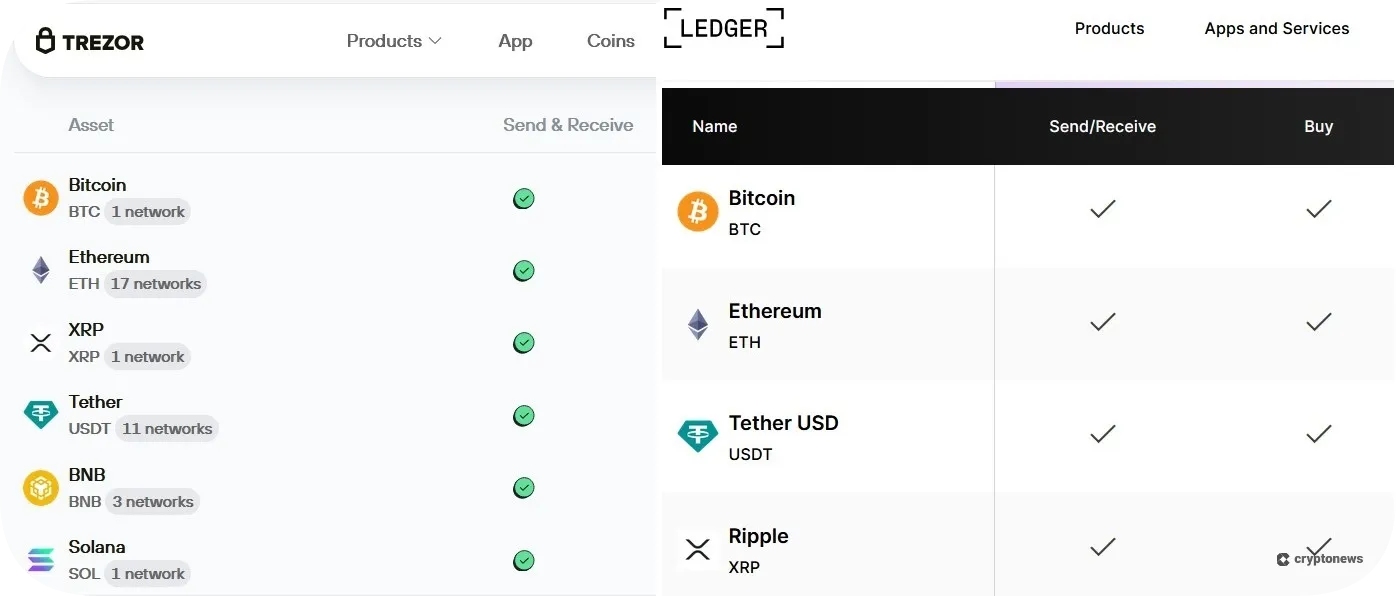
In comparison, Ledger wallets support 15,000+ digital assets across 50+ networks, including Bitcoin, Ethereum, Ripple, and Binance Smart Chain. You can also invest in DeFi tokens, such as Wrapped Bitcoin (WBTC), Uniswap (UNI), Aave (AAVE), and Chainlink (LINK). While both wallets support major cryptocurrencies, ERC-20 tokens, and popular meme coins like PEPE, SHIB, and WIF, Ledger is a better option for traders who want to diversify their portfolios.
So, in this Ledger vs Trezor category, the former takes the lead.
Trezor vs Ledger: Security Comparison
- Trezor: 8/10
- Ledger: 8/10
Both wallets are non-custodial, meaning you’ll have full control over your crypto holdings and private keys. However, Trezor and Ledger differ in how they store your private keys. On that note, Trezor uses the SLIP39 security standard, also known as Shamir backup. Shamir backup creates multiple recovery shares to back up your private keys.
On the other hand, Ledger uses a Secure Element chip to store your private keys offline. This chip runs on a custom-made, multi-application operating system called BOLOS (Blockchain Open Ledger Operating System). This means that no single application has access to your private keys or seed phrase, and all operations take place within the Secure Element chip. Trezor’s newer models, Safe 5 and Safe 3, also use a Secure Element chip.
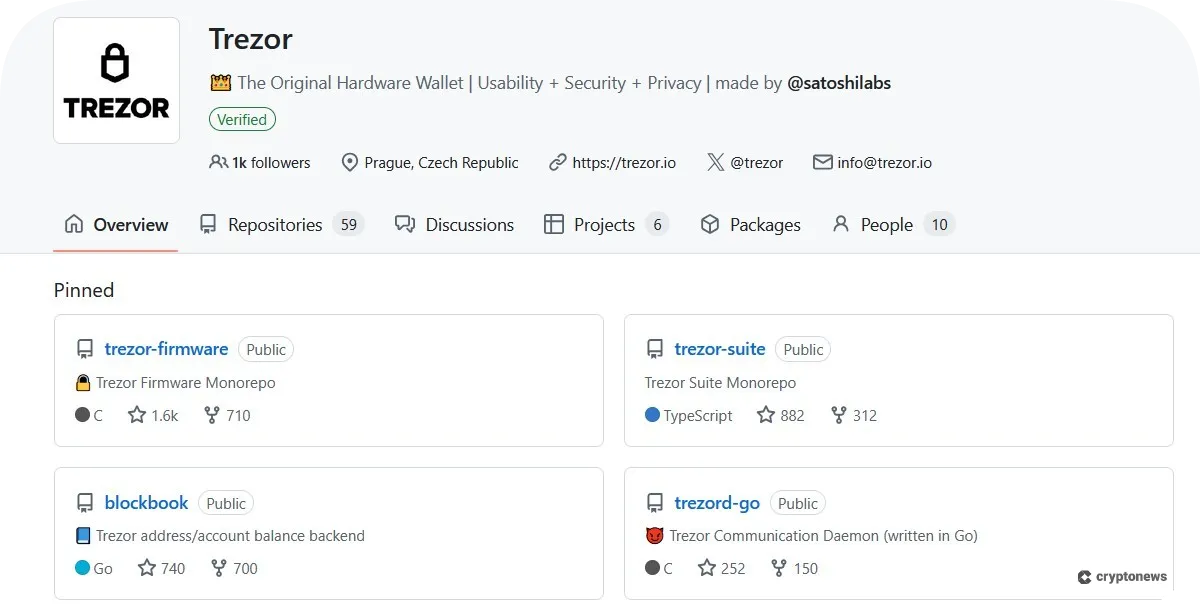
Both wallets use PIN and passphrase protection and are audited by reputable cybersecurity firms. However, Trezor has an open-source firmware, meaning its source code is publicly available on GitHub, while Ledger’s operating system and software are 95% open source.
Ledger and Trezor are tied in the security category as both wallets utilize advanced security measures. Moreover, Trezor Safe 3 and Ledger Stax are recognized as one of the best cold storage wallets.
With that in mind, in the following segment, we’ll discuss their security features in more detail:
Backup and Recovery
Trezor uses the BIP39 standard for wallet backups consisting of 12, 20, or 24 words, depending on the model. For example, a 12-word backup is the default for Trezor Model T and Trezor Safe 3 devices, while Trezor Safe 5 and Trezor Model One use 20 and 24-word seed phrases, respectively. Trezor Safe 5, Trezor Safe 3, and Trezor Model T also support the multi-share backup feature, aka Shamir backup, meaning you’ll be able to split your keys into multiple parts.
Ledger devices use a 24-word backup, which you can use to regain access to your wallet if you lose your physical device. You can also take advantage of Ledger Recover, a subscription service ($9.99 per month) that will split your 24-word phrase into three parts and store them with three independent custodians – Coincover, Ledger, and Escrowtech. At the time of writing, Ledger Recover is compatible with Ledger Nano X and Ledger Nano S Plus.
Another notable feature is the Ledger Recovery Key, a physical backup card that you can use to store a copy of your secret recovery phrase. It’s included only in the Ledger Flex and Ledger Stax models. However, you can also buy it as a standalone product for $39.
Chip Security
As mentioned at the beginning of our Trezor wallet vs Ledger wallet security segment, both devices use Secure Element chips. Trezor uses the OPTIGA™ Trust M (V3) SE chip, which is used in smart homes and IoT security development. The chip is EAL6+ certified, indicating it has passed rigorous testing and verification processes. Keep in mind that only Trezor Safe 5 and Trezor Safe 3 use SE chips.
On the other hand, all Ledger devices use EAL6+ certified Secure Element chips, except for the Ledger Nano X, which uses an EAL5+ SE chip. The Ledger Nano X and Ledger Nano S Plus have also received CSPN certification from ANSSI (National Agency for Information Systems Security). Ledger uses the ST33K1M5 SE chip, which is often used in credit cards and passports.
👉 Learn More: Ledger Nano S Plus Vs X: Which is Better in 2025
Audits and Transparency
Trezor’s firmware is 100% open-source, meaning you’ll be able to check its code on GitHub, while Ledger’s firmware is 95% open-source. This means you’ll get to review the following components of Ledger’s ecosystem: Ledger Live app, Wallet API, secure SDK, embedded applications that run on all Ledger devices, OS commands dispatcher, and Ledger Recover implementation entry points.
Trezor is audited by independent security researchers, while a cybersecurity firm, Kudelski, has reviewed Ledger. Ledger also has a team of white hat hackers called the Ledger Donjon, whose mission is to improve the security of Ledger devices by identifying vulnerabilities in their code.
Scam and Phishing Protection
Both wallet providers have a dedicated page about the most common scams and phishing attacks that can affect their users. You’ll also be able to report a phishing attempt. Moreover, Ledger offers a list of ongoing phishing campaigns that target its users.
The Trezor Suite app has a built-in address poisoning protection feature, which detects fake tokens and scam airdrops. Trezor Suite is powered by the Tor network, an open-source software that masks your location and IP address and shields your crypto transactions from tracking.
At the same time, the Ledger Live app comes with an NFT filter that automatically hides scam NFTs from your gallery. You can also benefit from its transaction check feature, which analyzes EVM transactions for potential threats.
Software Wallet Support
Trezor Safe 5, Safe 3, and Model T support 37 third-party wallets, such as MetaMask, Exodus, Sparrow, OKX, and Rabby. Trezor Model One supports 20 software wallets, such as Lace, Ronin, and Specter, while the Bitcoin Safe wallet is supported only on Safe 5 and Safe 3 models.
Conversely, Ledger is compatible with over 50 third-party wallets, such as MetaMask, Phantom, MyEtherWallet, Rainbow, and Neon wallet.
Incident Track Record
Trezor and Ledger have never experienced a remote hack. However, they did experience a few incidents that led to data breaches. For example, in July 2020, Ledger was targeted by hackers who managed to gain access to approximately 1 million Ledger users’ addresses. They also got the first and last names, postal addresses, and phone numbers of 9,532 Ledger customers. In 2025, hackers used fake Ledger apps to steal seed phrases of macOS users.
In June 2025, Trezor fell victim to a sophisticated phishing attack. Hackers abused its contact form to send scam emails pretending to be part of the Trezor support team. However, this wasn’t the first such incident. Namely, in 2022, MailChimp experienced a security breach that compromised its users’ data, including Trezor. Hackers sent Trezor wallet users a fraudulent email that contained a link asking them to download an updated version of the Trezor Suite. This link led to a phishing site.
In 2023, Trezor once more became the victim of a large-scale phishing campaign. Trezor users received SMS messages and emails stating that Trezor had suffered a data breach. These messages contained a malicious link.
Ledger vs Trezor: Companion Apps
- Trezor: 7/10
- Ledger: 9/10
Trezor and Ledger wallets come with companion apps – Trezor Suite and Ledger Live. The Trezor Suite app is compatible with Windows, Linux, and macOS operating systems, as well as Android and iOS devices. However, the iOS app operates in view-only mode, so you won’t be able to use it to send or receive assets, but only to monitor your balances. Moreover, the app has not yet implemented popular tokens such as XMR, XLM, and XTZ.
On a positive note, you can take advantage of the Trezor Suite Lite app, a companion app to the Trezor Suite desktop application, allowing you to track your assets on the go.
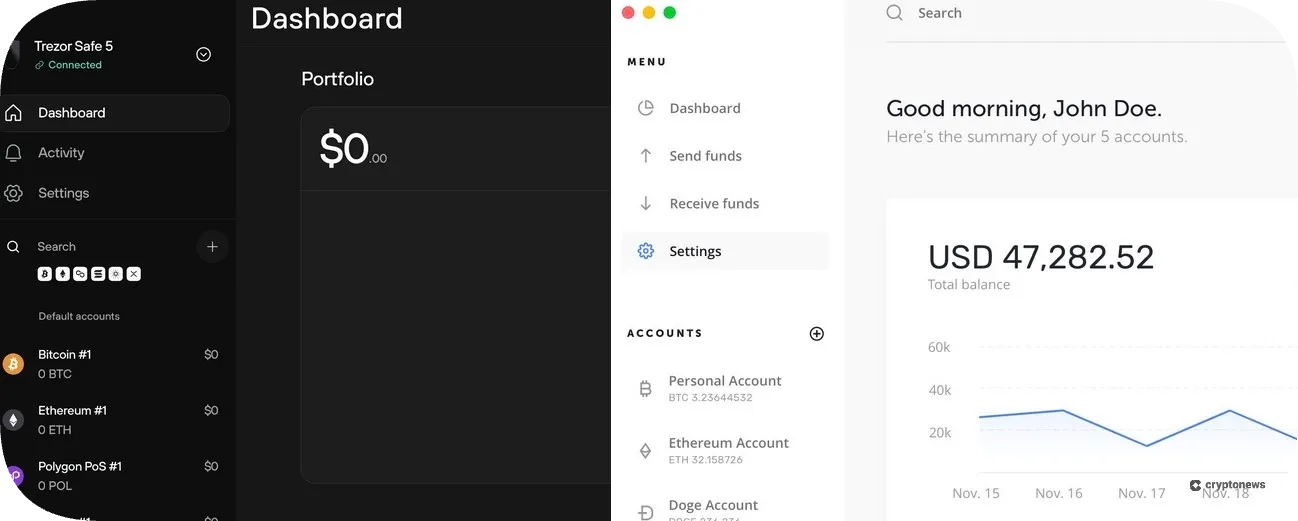
When it comes to Ledger, its app is compatible with Windows (10 or later), Linux (Ubuntu 20.04 or later), and macOS (v10.15 or later), as well as Android and iOS (15.1 or later) devices. Keep in mind that the Ledger Live app is not compatible with Surface Pro devices and computers that use ARM-based chips. We also noticed that Ledger Nano S Plus doesn’t work with iOS devices, which is a big letdown.
So, who is the winner in the Trezor vs Ledger companion apps category? That would be Ledger. Why? Because Ledger Live is integrated with Morpho, a decentralized lending protocol that supports borrowing and lending, while the Trezor Suite app doesn’t support native borrowing or lending. Moreover, Trezor Suite doesn’t support native NFT management, while Ledger Live offers native NFT support.
Trezor vs Ledger: Features
- Trezor: 7/10
- Ledger: 8/10
In this category, Ledger has a slight advantage over Trezor, as you’ll soon find out:
In-Wallet Trading
Trezor Suite has an integrated buy, sell, and swap feature. You can select two types of exchange rates, fixed and floating. You can also tap the Compare offers button to see a list of CEX and DEX providers. Trezor’s buy and sell feature is powered by Invity, an exchange aggregator that allows you to buy crypto with fiat directly from your wallet. Moreover, the Trezor Suite app supports over-the-counter (OTC) trading. However, this service is only available to users located in Europe.
Like Trezor, Ledger lets you manage and track your portfolio, buy crypto with fiat, and swap and trade crypto directly from the Ledger Live app thanks to its partnership with Changelly, a crypto exchange known for its industry-low fees. Ledger also supports native staking, meaning you’ll get to stake Ethereum, Solana, Cosmos, Polkadot, Tezos, Algorand, Celo, and Tron directly from the wallet.
Buying Crypto
As mentioned before in our Trezor vs Ledger review, Trezor is powered by Invity. This crypto exchange comparison tool will enable you to choose the provider with the best exchange rates. Invity’s list of providers includes Banxa, Coinify, Mercuryo, Moonpay, Paybis, etc. This also means you’ll be able to use a wide range of payment options to buy crypto, such as debit/credit cards, SEPA bank transfers, SOFORT, iDeal, EPS, PayPal, Vemo, and more.
You can adjust the transaction fees to low (~1 hour), normal (~30 minutes), or high (~10 minutes). You can also set a custom fee via the Advanced menu.
Ledger works with multiple payment providers, from Moonpay and Ramp to Simplex and Transak, meaning you can buy crypto using debit/credit cards, SEPA, PayPal, Venmo, and UK Faster Payments. The fees will depend on the payment provider, which means that compared to Trezor, Ledger may charge higher transaction fees.
We noticed that neither Trezor nor Ledger supports Google and Apple Pay. However, Ledger Live supports Coinbase Pay, which means you can buy crypto using your Coinbase account. This gives Ledger a slight advantage over Trezor.
DeFi/ dApp Access
Trezor can be integrated with WalletConnect and 37 third-party wallet apps. This will enable you to create multisig wallets, trade NFTs, and interact with multiple dApps, such as 1inch, Jupiter, Meteora, and Curve.fi. You can also interact with on-chain insurance providers like BitInsurance and Redefind. What we liked most about Trezor is its compatibility with the NuFi wallet, a non-custodial wallet that lets you store, send, and receive SOL and other Solana-based tokens and interact with Solana dApps.
Keep in mind that the NuFi wallet can be paired with the Trezor Model T, Safe 3, and Safe 5, while the Trezor Model One doesn’t support this option.
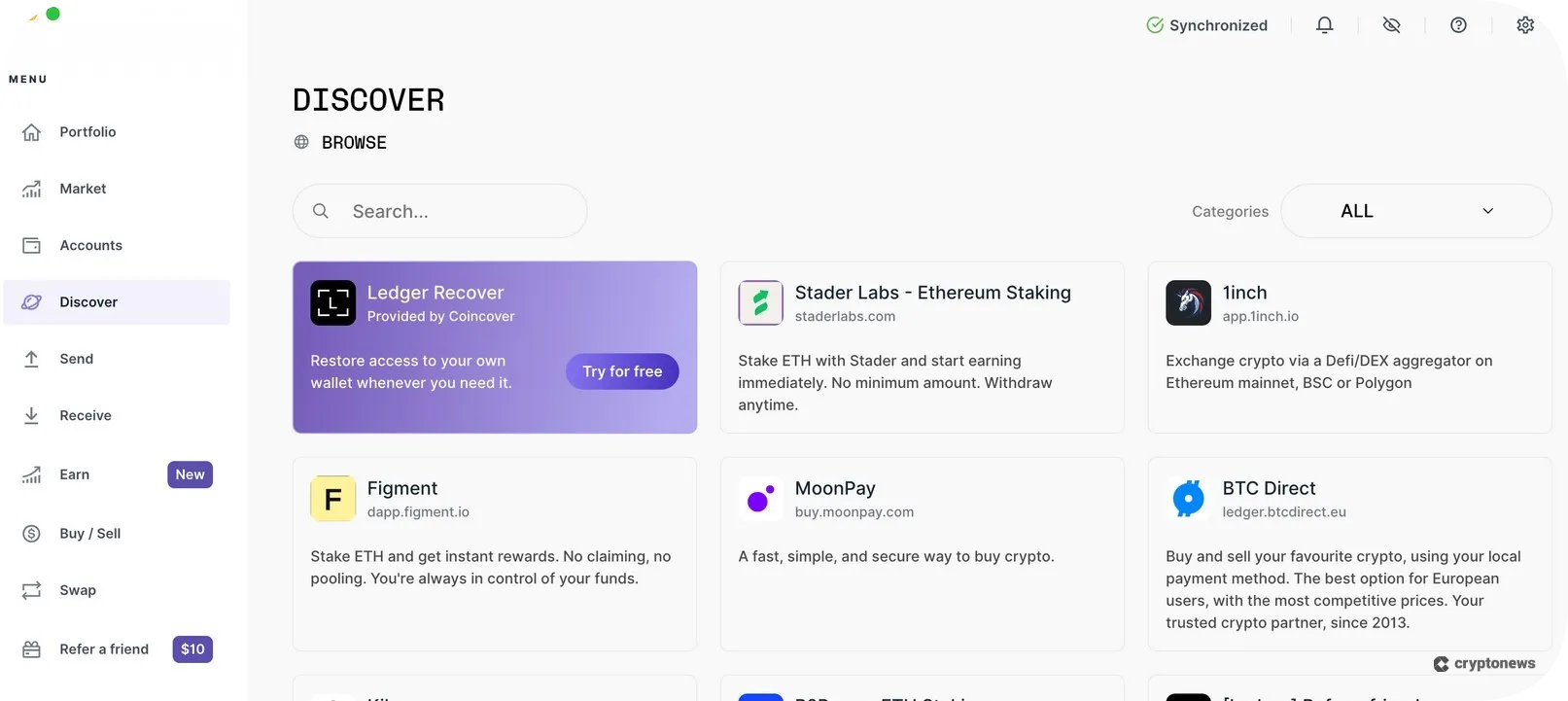
Ledger offers direct access to dApps via WalletConnect (currently available for Ethereum, Polygon, and Binance Smart Chain accounts) and its Discover section. You’ll get to interact with popular DeFi platforms, such as Uniswap, KyberSwap, 1inch, OpenSea, and Rarible. You’ll also find several NFT-related apps that will allow you to manage, store, and visualize NFTs. Ledger has recently joined forces with Uniswap Labs, which means you can now trade and swap crypto on the Uniswap Protocol without leaving the Ledger Live interface.
Staking
The Trezor Suite supports native ETH, SOL, and ADA staking. However, during our testing, we noticed that all Trezor wallets support ETH staking, while only Model T, Safe 3, and Safe 5 support ADA and SOL staking, which is a bit of a letdown. Trezor’s staking service is powered by Everstake. This staking service provider will enable you to participate in the staking process with as little as 0.1 ETH. When it comes to staking Cardano, you’ll have to deposit 2 ADA to register your delegation, while for Solana, you’ll have to stake a minimum of 0.01 SOL.
Ledger supports native Ethereum, Solana, Cosmos, Polkadot, Tezos, Algorand, Celo, and Tron staking. You can also stake other tokens within the Ledger Live app, such as BNB, NEAR, DAI, and CRO. In addition to solo staking, you can participate in pooled and liquid staking. Ledger is partnered with Klin, which means that you can deploy your own validators to stake ETH fully on-chain.
In the Ledger vs Trezor staking category, Ledger is the clear winner.
NFT Management
You can use Trezor hardware wallets to store NFTs and view NFT collections. However, you won’t be able to interact with NFTs. I.e., if you want to send or sell your NFTs, you’ll need to use a third-party wallet, such as MetaMask. We also noticed that the Trezor Suite app displays only NFTs on EVM chains, such as Ethereum, BNB Smart Chain, and Polygon.
Ledger Live has integrated support for NFTs on Ethereum and Polygon. This means you can visualize and manage your NFTs directly from the wallet. You can also send, receive, buy, and sell NFTs on popular marketplaces, like Opensea, Magic Eden, and Rarible. In addition to that, you can take advantage of its NFT filter that will automatically hide scam or dangerous NFTs from your gallery.
Trezor Wallet vs Ledger: Price Comparison
- Trezor: 9/10
- Ledger: 8/10
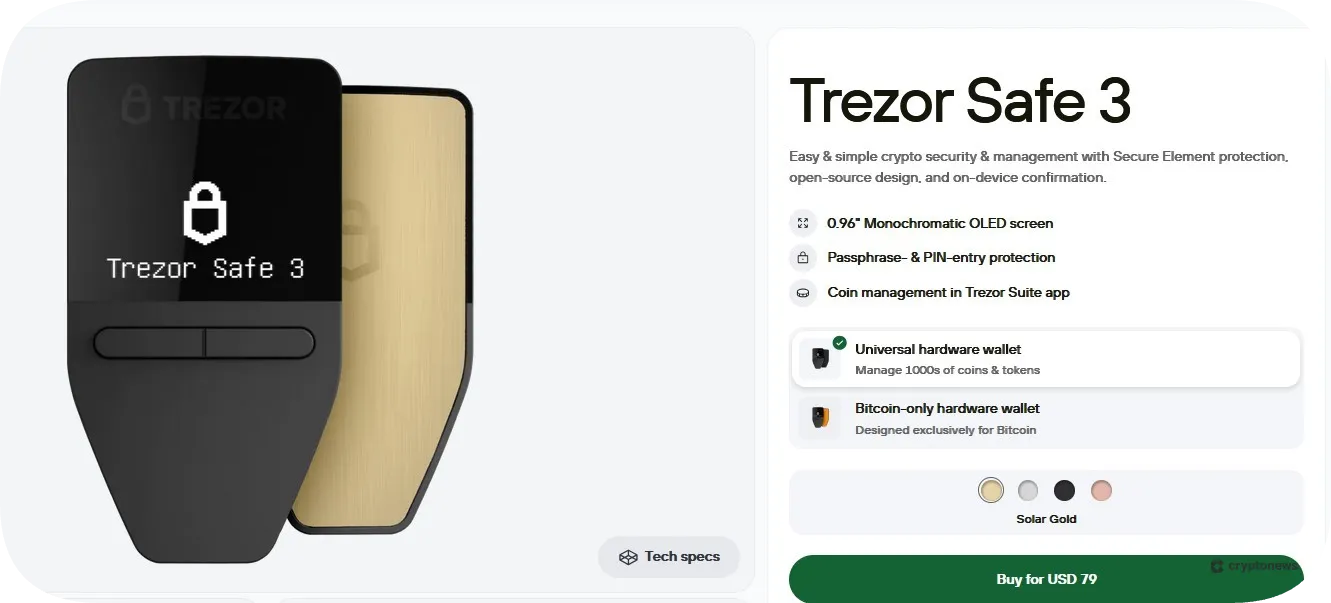
Trezor offers four models – Trezor Model One ($49), Trezor Model T ($129), Trezor Safe 3 ($79), and Trezor Safe 5 ($169). Trezor Model One is the cheapest model and supports 1,000+ coins and tokens. This model is ideal for beginners looking for a budget-friendly wallet solution. Trezor Model T also supports 1,000+ assets. However, this model is more expensive since it uses a tamper-evident casing and Shamir backup, which makes it suitable for traders who prefer a higher level of security.
Trezor Safe 3 is an upgraded version of the Model One, which also comes as a Bitcoin-only wallet. This model uses an EAL6+ certified Secure Element chip and offers advanced multi-share backup. Trezor Safe 5 is Trezor’s most expensive model. It can be described as an advanced version of the Trezor Model T, which uses haptic feedback and features a scratch-resistant screen.
Ledger offers four models – Nano S Plus ($79), Nano X ($149), Flex ($249), and Stax ($399). Ledger’s cheapest model, Nano S Plus, supports 15,000+ assets; however, it doesn’t work with iOS devices. Moreover, it doesn’t have a built-in battery, which makes its price a bit too high. Nano X is a more advanced version of the S Plus model, which will enable you to trade 15,000+ tokens and install up to 100 apps. This model has an integrated 100 mAh battery that allows up to 5 hours of normal use.
Ledger Flex and Stax are the most advanced models that feature a secure E Ink® touchscreen. Both models are CC EAL6+ certified, and you can use them for up to 10 hours. Ledger Stax is also known for its stacking capabilities, which means that you can stack multiple devices on top of each other.
As you can see, Ledger wallets are more expensive than Trezor because they use more advanced security features. Moreover, they have a more durable design. For example, Ledger wallets are made of plastic and stainless steel, while Trezor wallets are made of reinforced plastic.
Based on our research, the Trezor Safe 3 offers the best value for money, which makes Trezor the winner in the price category.
Ledger vs Trezor: Compatibility and User Experience
- Trezor: 8/10
- Ledger: 7/10
Trezor and Ledger are compatible with desktop (Windows, Linux, and macOS) and mobile devices (Android and iOS). However, Trezor’s iOS app operates in view-only mode, which makes Ledger more suitable for mobile traders. However, when it comes to ease of use, Trezor is easier to navigate. Its interface is intuitive, and you’ll be able to set up the wallet in less than 15 minutes.
Ledger wallets are more complex to set up since you’ll need to install the corresponding apps to interact with each cryptocurrency. For example, you’ll need to install the Bitcoin app to add Bitcoin accounts. This is why setting up a Ledger wallet can take up to 20 minutes. What’s more, some users have reported that the Ledger Live app is slow to load on Windows and macOS devices.
With that in mind, in this Trezor vs Ledger category, the former takes a small lead.
Trezor vs Ledger: Customer Support & User Reviews
- Trezor: 6/10
- Ledger: 6/10
You can reach Trezor’s and Ledger’s support team via multiple support channels – ticketing system, chatbots, and social media channels. However, neither Trezor nor Ledger offers 24/7 live chat support, which is a big drawback. Moreover, most users complain that their support agents are slow to respond, which is why we rated both wallets quite low in this category. With that in mind, let’s go into more detail.
Customer and Community Support
You can learn more about Trezor by navigating to the Learn and Support page. Here you’ll find extensive guides about Trezor devices, Trezor suite, sending and receiving funds, and backups and recovery. You can also tap the Need Help button to talk to the chatbot. However, if you want to speak to a human agent, you must book a Trezor Expert session. For $99, you’ll get a 60-minute one-on-one video call with one of Trezor’s trained specialists. Another way to get help is to file a support ticket. It usually takes 3 days to get a response.
In addition to that, you can get help from Trezor’s official forum, which is moderated by Trezor’s expert team, who usually respond to queries within 24 hours, or you can send them a message on their official social media channels (X, Reddit, Facebook, and Instagram).
On the other hand, you can contact Ledger’s support team via live chat, social media channels (X, Reddit, Insta, Facebook), and the official Discord server. You can also submit a ticket (it takes 1 to 2 days to get a response). Ledger’s chat agents are available from Monday to Friday, from 9:00 AM to 2:00 AM CET. To reach them, navigate to the Support page, tap the chat icon (in the lower right corner), and enter your email. First, you’ll be greeted by the AI chatbot. However, you can ask the bot to connect you to one of Ledger’s agents.
Ledger’s Discord server was recently attacked by hackers (on May 11, 2025), who tried to trick users into sharing their seed phrases. In response, Ledger has strengthened access controls on its Discord server.
User Reviews
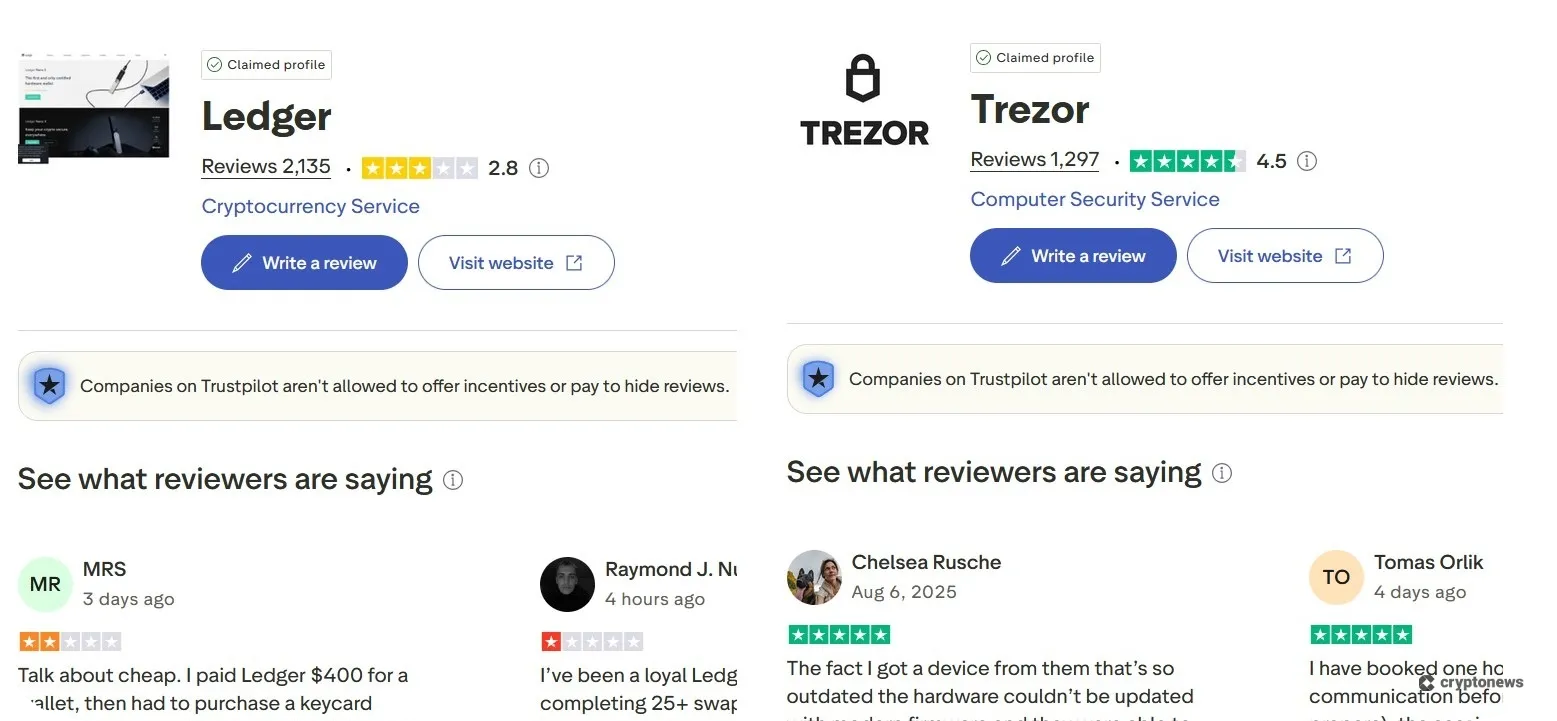
Trezor has a 4.5 rating on Trustpilot, based on 1,296 reviews, while Ledger holds a 2.8 rating, based on 2,134 reviews. We noticed that Trezor’s support team replies to every 1-star review, while Ledger hasn’t responded to any of its 1-star reviews in the past 10 days. That said, for both wallets, the majority of negative comments are related to their slow customer support and issues with refunds.
When it comes to their Google Play and Apple Store ratings, the situation is quite the opposite. On that note, Ledger has a 4.5 rating on Google Play and a 4.9 rating on Apple Store, while Trezor’s rating stands at 3.8 on Google Play and at 3.1 on Apple Store. Again, the majority of Ledger and Trezor users complain about slow customer support.
That said, we have a tie in the customer support category, since neither Trezor nor Ledger offer 24/7 live chat support, and their support agents are slow to respond.
Trezor vs Ledger Conclusion: Which is the Better Cold Wallet in 2026?
You won’t go wrong if you get Trezor or Ledger, since both wallets offer a high level of security. However, based on our research, Ledger supports more in-wallet trading features, such as integrated support for NFTs, native staking, and compatibility with 50+ third-party wallets. Ledger also supports more coins and chains, and you can connect it to your computer or mobile device via USB, Bluetooth, and NFC, while Trezor wallets can only be connected via USB.
Both wallets will enable you to buy crypto with fiat due to their partnerships with third-party payment providers, like Moonpay, Banxa, and Simplex. However, Ledger may charge higher transaction fees. On the downside, both providers have slow customer support.
So, which one to choose? If you want to diversify your portfolio and engage with DeFi platforms, Ledger should be your go-to wallet, while beginners will do just fine with budget-friendly Trezor wallets.
FAQs
Should I use Ledger or Trezor?
Is Trezor more secure than Ledger?
Can Ledger or Trezor be hacked?
Does Trezor work on iPhone?
Is Ledger Recover optional?
References
- What is Shamir backup? (Trezor)
- What do the different ANSSI qualifications/certifications mean? (Thales)
- Message by LEDGER’s CEO – Update on the July data breach (Ledger)
- Hackers Use Fake Ledger Apps to Steal Mac Users’ Seed Phrases (WebAsha Technologies)
- Trezor’s support platform abused in crypto theft phishing attacks (Bleeping Computer)
- What Is Over-the-Counter (OTC)? (CoinMarketCap)
- Hackers Target Ledger’s Discord Server with Phishing Attack that Extracts User’s Seed Phrases (TradingView)
2M+
250+
8
70







 in numbers

About Cryptonews
Our goal is to offer a comprehensive and objective perspective on the cryptocurrency market, enabling our readers to make informed decisions in this ever-changing landscape.
Our editorial team of more than 70 crypto professionals works to maintain the highest standards of journalism and ethics. We follow strict editorial guidelines to ensure the integrity and credibility of our content.
Whether you’re looking for breaking news, expert opinions, or market insights, Cryptonews has been your go-to destination for everything cryptocurrency since 2017.
