


 Electrum Wallet Review 2026
- Offers users full control over their Bitcoin holdings
- Designed for speed and minimal resource consumption
- Can connect to cold wallets and supports multisig
Electrum Wallet is one of the oldest and most trusted Bitcoin hot wallets, designed to run as a lightweight client for decentralized BTC storage and management. It operates under an MIT license, with the Electrum open-source software publicly available for anyone to contribute to and verify.
In this Electrum Wallet review, we examine the platform’s core features, offerings, and overall security based on our research and real-world testing of the app. We’ll also explain Electrum’s advantages, drawbacks, and how to set up a wallet yourself. Let’s get started.
Our Take on Electrum Wallet: Pros and Cons
With quick startup times and low resource usage, Electrum offers efficient and secure management of BTC holdings. Based on our Electrum Wallet review, it’s best suited for Bitcoin natives and tech-savvy Web3 users who can leverage the platform’s advanced features beyond simply sending and receiving BTC.
Regarding security features, Electrum Wallet includes multisig wallet creation and two-factor authentication (2FA) for added safety and security. Additionally, users can create offline wallets, watch-only wallets, and connect to cold wallets for users who value securing their private keys offline.
While Electrum Wallet offers various security and customization options, users must manually configure each feature, often through multiple steps. The wallet only supports Bitcoin, provides limited customer support, and does not include fiat on-ramping services for easy deposits. Because of this, it’s not as beginner-friendly as other BTC wallets.
Pros
- Non-custodial software wallet for Bitcoin
- Multisig feature supporting up to 15 cosigners
- Lightweight platform for Android and desktop use
- Supported the Lightning Network for high-speed BTC transactions
- Includes two-factor authentication (2FA) for added security
- Features offline storage mode and hardware wallet support
Cons
- Can only store and manage Bitcoins
- Lacks support for iOS mobile devices
- Not as beginner-friendly as other BTC wallets
- No fiat on-ramping for easy coin deposits
- Limited customer support
What Is Electrum Wallet?
Electrum is a fast and reliable Bitcoin wallet with a lightweight and decentralized design. Instead of storing the entire Bitcoin blockchain, Electrum wallets utilize a Simplified Payment Verification (SPV) model, where Electrum servers index the entire blockchain rather than individual wallets. As a result, Electrum Wallet can run with minimal resources while still maintaining high security.
Since its creation in 2011 by Thomas Voegtlin, various developers have continued to improve the Electrum client, contributing to what the open-source BTC wallet is today. The source code is publicly available in the Electrum GitHub repository, which currently has over 350 contributors and over 8,000 stars.
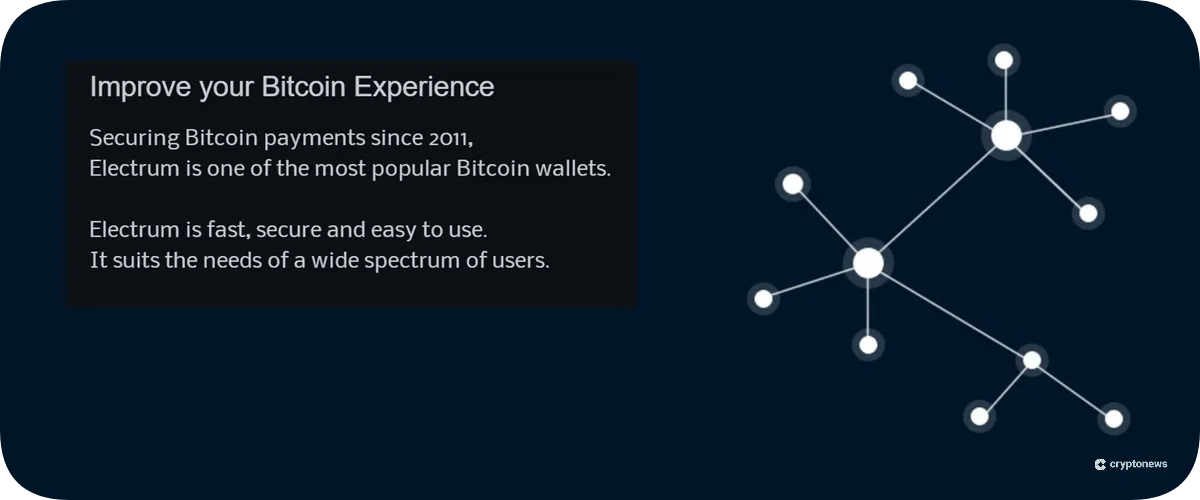
At one point in the 2010s, Electum Wallet was powering approximately 5 to 10% of all Bitcoin transactions. It was one of the leaders in the industry and paved the way for future lightweight SPV wallets.
As of this writing, the BTC wallet’s last major platform update launched in 2020 with Electrum 4.0. Its latest release as of today is Electrum 4.6.2, which features third-party plugins and submarine swaps.
Is Electrum Wallet Safe? Security Features Reviewed
Electrum Wallet’s built-in encryption and non-custodial design make it a generally safe Bitcoin storage solution. The platform utilizes a 12-word seed phrase backup, allowing users to fully recover their funds if their device is lost or stolen. Additionally, users can enhance their login and transaction security by creating an Electrum Wallet with two-factor authentication (2FA) enabled.
For experienced users looking to elevate their crypto security, they can create a multi-signature wallet directly from the Electrum Wallet platform. They can also run the wallet offline, either by running Electrum on an offline machine or linking to a hardware wallet that stores private keys offline.
Although Electrum has a strong security system, users were still vulnerable to cyber attacks in the past. Between 2019 and 2020, hackers stole over $22 million from Electrum users who were tricked into installing a fake update.
To stay secure, Electrum users are advised to download the wallet only from the official website. The team also recommends verifying GPG signatures before installing updates.
What Coins Does Electrum Wallet Support?
As a Bitcoin-native platform, Electrum Wallet currently only supports BTC. However, it does support legacy Bitcoin wallet addresses, Lightning Network transactions, and SegWit for increased flexibility in BTC management.
If you’re looking for a decentralized wallet with multi-chain compatibility, consider Best Wallet. It’s a mobile Web3 wallet that supports over 1,000 cryptocurrencies across more than 60 networks.
Electrum Wallet Review: Key Features
In this section of our Electrum Wallet review, we break down the core features and tools from the latest version of the open-source wallet.
Encryption
Electrum encrypts your private keys, ensuring that they remain protected and don’t leave your device. When users create a wallet on the platform, they’re prompted to write down a given seed phrase for recovering the Bitcoin wallet in case the device is lost or stolen.
Additionally, Electrum allows users to encrypt their wallets with a password, so if someone steals the device, they can’t access the BTC holdings without both the wallet file and the password.
Multisig Support
In a past update, Electrum introduced a multi-signature wallet feature, allowing users to set up a wallet that requires multiple signatures to authorize transactions. With no single failure point, multisig wallets mitigate hacking risks and issues caused by human error.
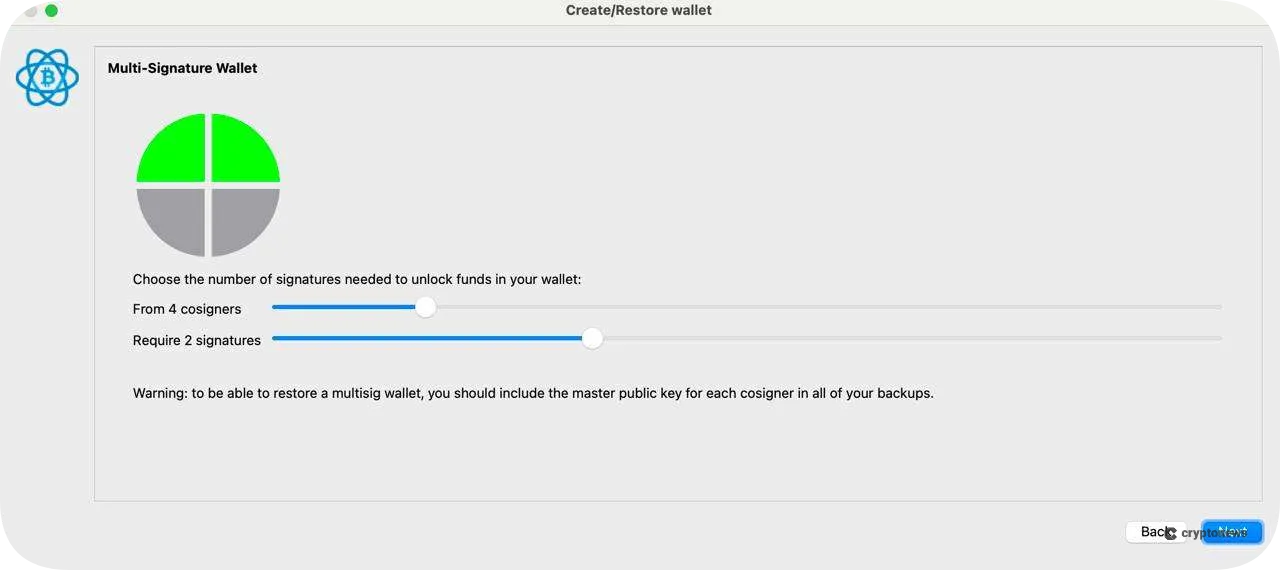
Electrum Wallet’s multisig interface supports up to 15 cosigners, meaning transactions can be managed by a pool of up to 15 wallet addresses. Beyond providing extra security, multisig is also commonly used for collaborative fund management, such as by companies and families.
Proof Checking
By storing the entire Bitcoin ledger on decentralized Electrum servers, Electrum Wallet can run as a lightweight platform that requires minimal resources to operate. It’s an SPV wallet, which connects to reliable Electrum nodes to validate transactions.
Individual Electrum wallets only need to download Bitcoin block headers, which are smaller data packets compared to full blocks. When verifying transactions within a block, the Electrum server sends a Merkle Tree to the wallet to cryptographically confirm the transaction’s inclusion in the specific block.
Build a Cold Wallet
Another security option in Electrum Wallet is offline storage support, which allows users to create a Bitcoin wallet offline for cold storage. You can install Electrum on a device that will never be connected to the internet and set up a wallet there to generate a seed phrase and private keys.
Furthermore, users can configure a watching-only wallet using Electrum, which includes the public master key from the offline wallet. With the watching-only wallet, you can check your BTC balance, create addresses, and generate unsigned transactions. You can use the offline wallet to sign transactions while keeping your private keys offline.
Third-Party Hardware Wallet Support
If you already have a hardware wallet or are considering using one with a hot wallet, Electrum enables users to connect to cold wallets for enhanced security and accessibility. The platform currently supports some of the best cold wallets, including Ledger and Tezos.
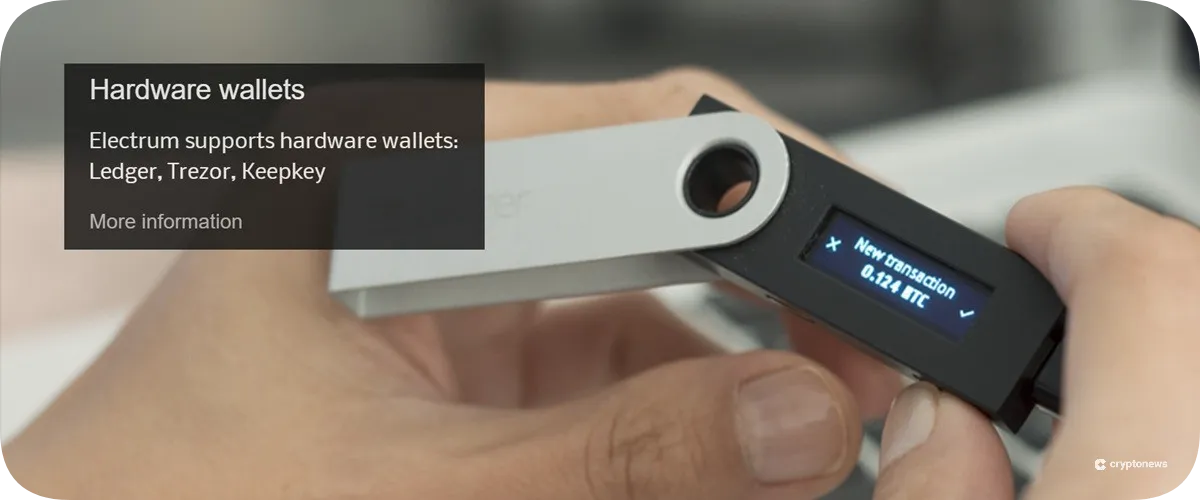
You can check with your hardware wallet’s customer support to see if it can be linked to Electrum Wallet. Once connected, your hardware wallet acts as a private key vault, while Electrum serves as the interface for managing your BTC holdings.
Lightning Network Support
In line with Electrum Wallet’s focus on fast and efficient Bitcoin management, the SVP wallet supports the Lightning Network for high-speed BTC transactions with lower fees. To accomplish this, users must open a Lightning payment channel through the Electrum interface.
Once the Lightning Network channel is established, users can choose to transfer BTC either through the slower and costlier on-chain method or via the faster and more cost-effective off-chain Lightning method.
No Downtime
Electrum servers operate similarly to crypto nodes: they are decentralized, redundant, and dependable. Not only do the servers enable faster BTC management on Electrum, but they’re also highly reliable with zero downtime.
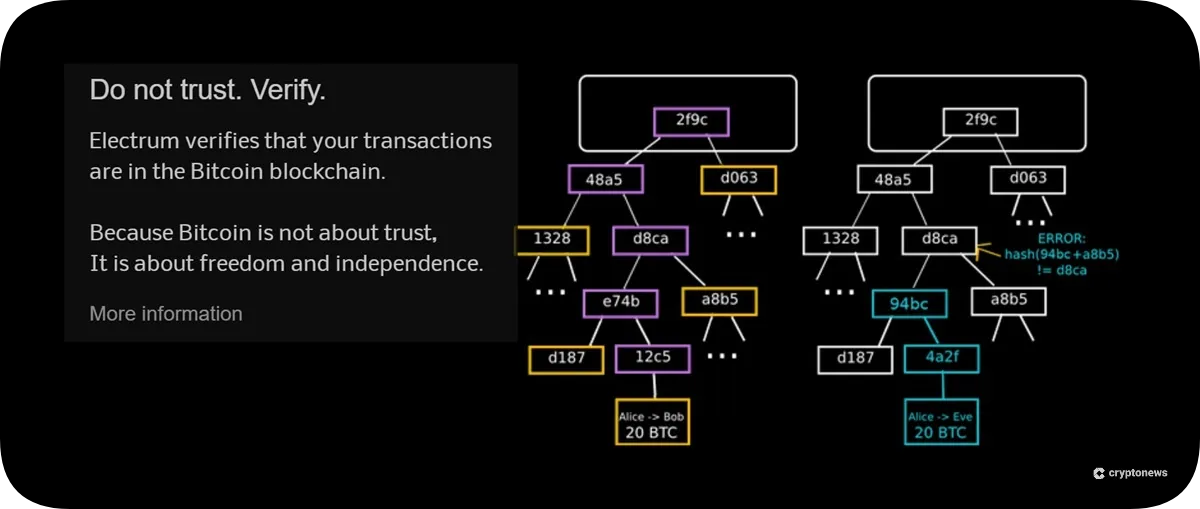
Unlike traditional markets, which open and close at specific times, the cryptocurrency market operates 24/7. That’s why nonstop operation is a key feature of Electrum Wallet.
Private Key Extraction
The Electrum Wallet software does not lock in wallet addresses, allowing users complete freedom to export their private keys to other Bitcoin wallets. This means that you are not limited to using Electrum only to access your funds, as you can import your private keys using your seed phrase to other platforms.
Some of the best hot wallets share this feature, highlighting the full control that their users retain over their cryptocurrencies.
Add-Ons
In one of the more recent platform updates, Electrum developers made it possible for users to install plugins made and distributed by third parties. One plugin that can be enabled is the Cosigner Pool feature, which allows Electrum users to cosign multisig transactions more conveniently.
Other plugins include, but are not limited to, the following:
- Guardian: For added protection against physical coercion by requiring extra safeguards before authorizing transactions.
- LNURL Server: Lets users receive Lightning payments with a static URL.
- Joinstr: Enables greater privacy and flexibility through the Nostr protocol.
Can You Buy Bitcoin on Electrum?
Currently, Electrum does not support on-ramping of any fiat currencies that would allow users to purchase BTC directly from the platform. The wallet also lacks a cryptocurrency swapping feature, so users cannot exchange their ETH, USDT, or other tokens for BTC without leaving the Electrum platform.
If you want to add BTC funds to your Electrum Wallet, you’ll need to buy BTC through a centralized exchange (CEX) or another crypto wallet that has fiat on-ramping options or built-in token swaps.
Electrum Wallet Transaction Fees
Electrum Wallet is free to download and use, and features no platform fees. The only costs that users should be aware of are transaction fees, which vary depending on multiple factors. This includes the current congestion of the Bitcoin blockchain, confirmation urgency, and whether you opt to use the Lightning Network.
For larger transactions, we recommend that users transfer BTC on-chain, which costs around 30+ satoshis per virtual byte (sat/vB). If congestion is high, it would cost more. Lightning network transfers typically cost fewer satoshis.
Is Electrum User-Friendly?
When used as a simple Bitcoin wallet for sending and receiving BTC, Electrum is reasonably straightforward to use on both mobile and desktop interfaces. However, research from our Electrum Wallet review indicates that the platform may not be as well-suited for beginners as some of the best non-custodial crypto wallets on the market.
In particular, setting up additional features, such as multisig, two-factor authentication, Lightning Network integration, and other advanced features, involves multiple steps and requires a deeper technical understanding of blockchain technology.
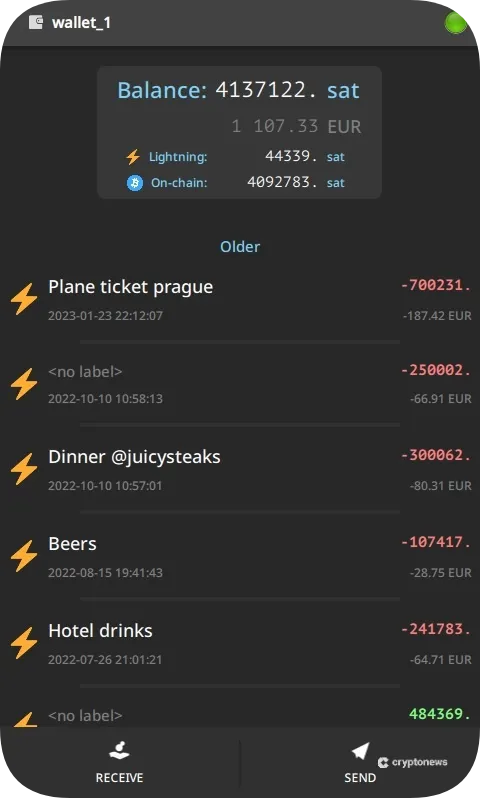
Regarding responsiveness and performance, Electrum Wallet provides a simple user interface designed for efficiency and speed, with minimal hardware requirements. However, the platform seems to sacrifice user-friendly navigation for a more feature-focused aesthetic.
How to Set Up and Use Electrum Wallet
Follow this step-by-step guide on how to set up Electrum Wallet for the first time.
Step 1. Download Electrum
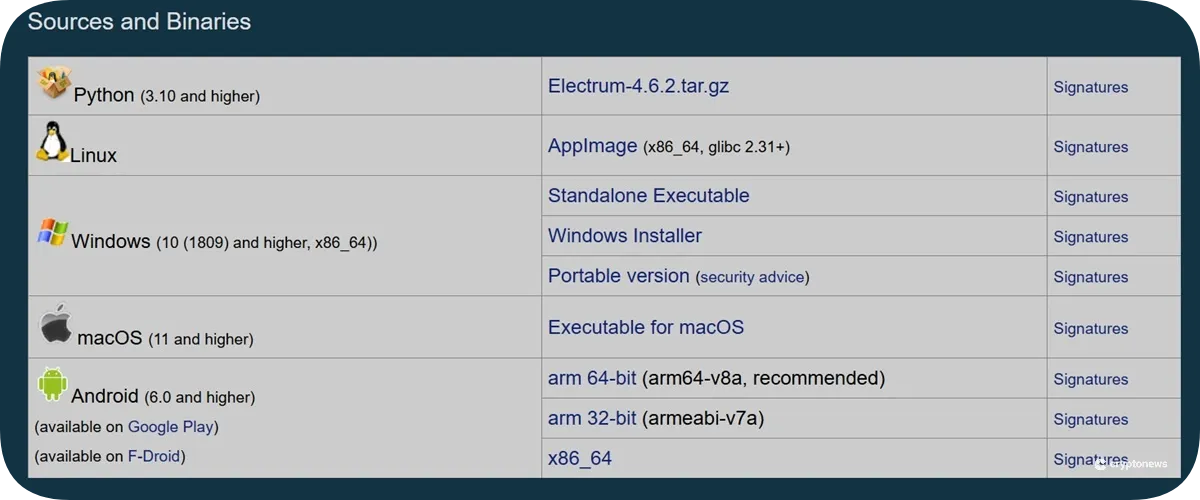
Head to the official Electrum website and select a download option based on your device (Windows, Linux, macOS, or Android). Click the link and download the platform.
Step 2. Create a Wallet
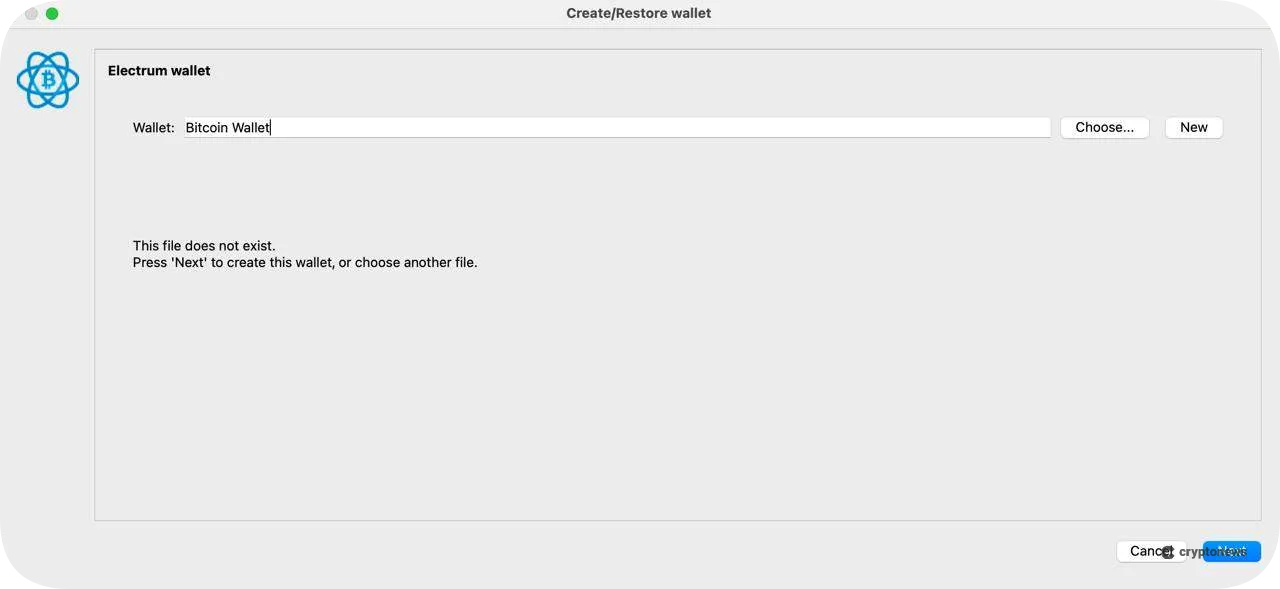
Launch Electrum and select the wallet type you want to use. For beginners, we recommend choosing the standard wallet option. For greater security and flexibility, you can select the 2FA or multisig wallet options.
Step 3. Backup Your Seed Phrase
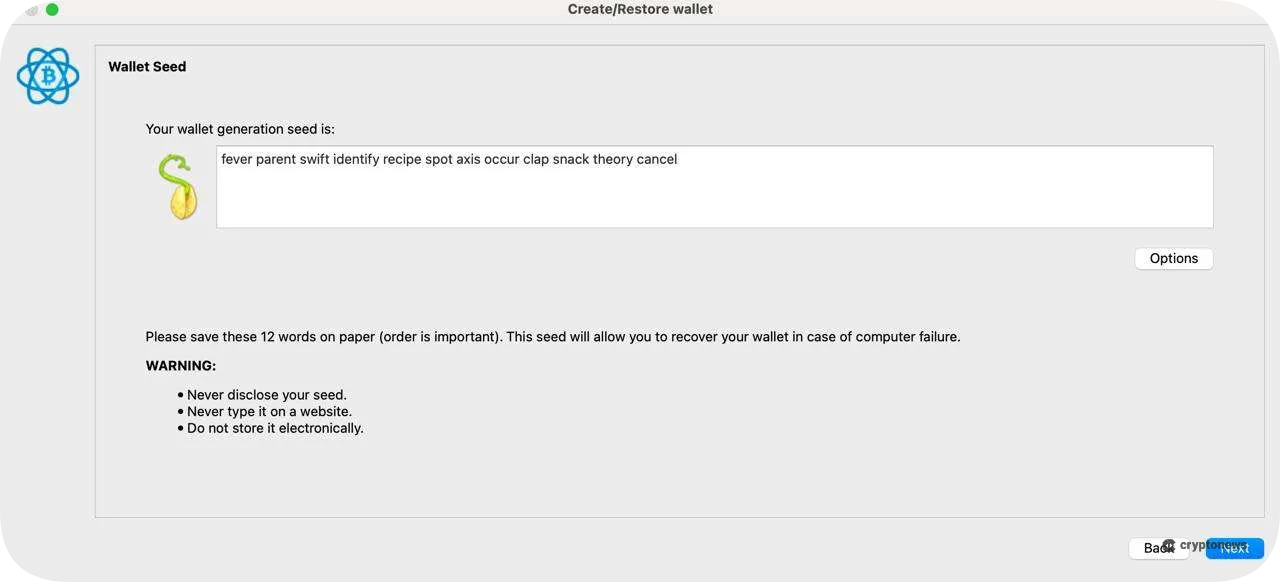
After selecting the wallet option, Electrum will display your 12-word seed phrase. Write down the phrase and store it in a secure location. The seed phrase is required when recovering your funds in case your device becomes inaccessible. Re-enter your seed phrase to complete the wallet creation process.
Step 4. Add BTC
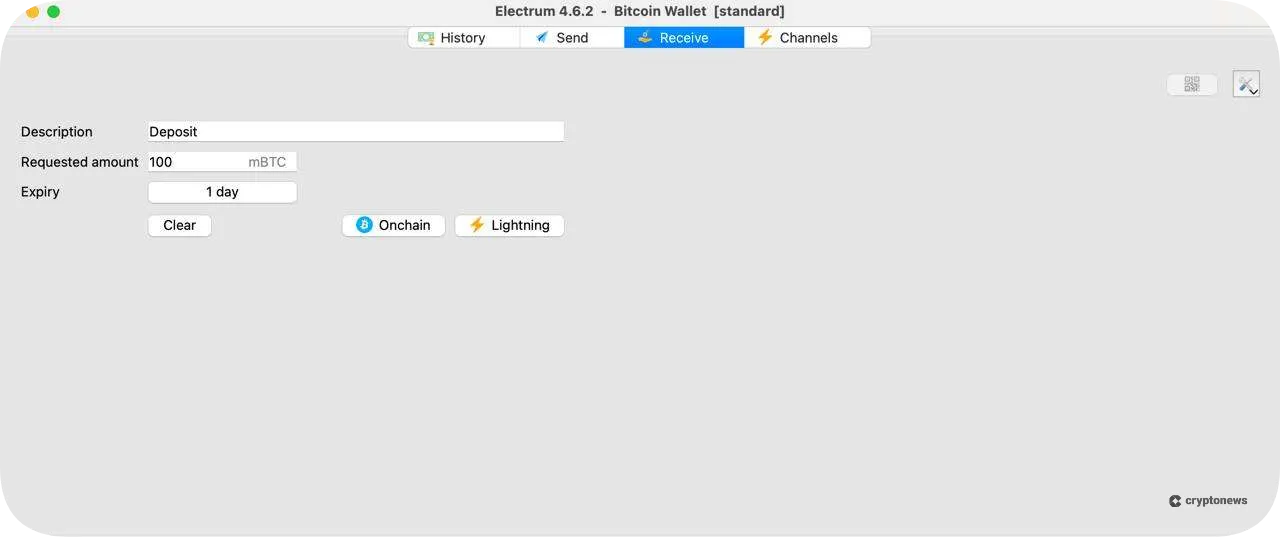
Open the Receive tab, and click the Onchain button. On the right-hand side of the platform, you should see a wallet address, which you can use to send BTC from a CEX or another wallet. Alternatively, you can click the QR icon to generate a QR code for you to scan and send BTC.
What Are the Cons of Electrum Wallet?
Although Electrum can be a powerful Bitcoin wallet, its biggest drawback is its usability. New users might find it hard to set up and use the wallet’s main features. Worse, beginners who don’t follow all the proper precautions and steps when setting up their Electrum wallets could become even more vulnerable to human errors and potential online attacks.
Additionally, Electrum does not have dedicated customer support that could assist even experienced users with questions and concerns. All users receive is an online documentation guide with screenshots and highly technical instructions.
Modern Web3 usage requires users to manage tokens across multiple chains, which can be difficult if they rely on additional platforms like Electrum Wallet. With its outdated design and limited support for altcoins, Electrum may be less attractive to everyday crypto users who need a more versatile wallet.
Electrum Wallet Alternatives
Let’s take a look at some possible alternatives to Electrum in 2026.
Electrum vs. Best Wallet
Best Wallet is one of the leading decentralized mobile wallets, supporting over 60 blockchains and more than 1,000 cryptocurrencies. Based on our Best Wallet review, it’s secured by 2FA, biometrics, and Fireblocks insurance.
As an Electrum alternative, Best Wallet offers a more user-friendly interface that’s better suited for beginners. It’s available on Android and iOS devices, and features fiat on and off-ramping services through integrated third-party providers.
Visit Best WalletElectrum vs. Zengo
Zengo is another multi-chain wallet and stands out with its Multi-Party Computation (MPC) and 3FA recovery features. It’s one of the best options for users seeking a secure cryptocurrency storage solution with broad token support, including BTC, ETH, and BNB.
Compared to Electrum, Zengo offers greater usability and asset protection with its on-ramp and off-ramp services and no seed phrase vulnerability. Additionally, the wallet features a built-in token swapping tool for easy token exchanges. Read our Zengo Wallet review to learn more.
Visit ZengoElectrum vs. BlueWallet
Those looking for a BTC wallet alternative to Electrum may consider BlueWallet. Like Electrum, BlueWallet is geared to more experienced users and Bitcoin natives who can take advantage of several advanced features.
Both wallets support Lightning Network integration, multisig technology, private key storage, and hardware wallet connection. Based on our BlueWallet review and comparing it to real testing with Electrum, we believe BlueWallet provides a more user-friendly environment compared to Electrum’s more antiquated interface.
Electrum Wallet Review Conclusion: Is It The Best Multi-Chain Wallet in 2026?
Electrum Wallet was one of the first SVP wallets and helped drive Bitcoin’s adoption in earlier years. Today, it remains a flexible and lightweight wallet option for users knowledgeable about the Bitcoin blockchain.
However, its legacy interface, Bitcoin-only focus, and highly advanced features make it difficult for new users to learn. If you’re looking for a BTC wallet with comprehensive functionality, Electrum is a good choice. But if you want a more modern, multi-chain wallet with better accessibility and token support, consider options like Best Wallet or Zengo.
Our Methodology: How We Tested and Reviewed Electrum Wallet
Our Electrum Wallet review methodology involved conducting independent research on the platform and testing the wallet firsthand to provide a balanced and reliable evaluation. We analyzed official documentation and installed the wallet on both mobile and desktop to evaluate its core features.
Testing included wallet configuration, installation, multisignature setup, and two-factor authentication. To finish the review, we compared Electrum Wallet with other decentralized wallet alternatives to identify advantages and potential limitations.
FAQs
Is Electrum Wallet free?
Is Electrum Wallet decentralized?
Is Electrum Wallet open-source?
Has Electrum ever been hacked?
Is Electrum a hot or cold wallet?
Does Electrum require KYC?
What is the alternative to Electrum Wallet?
Can I recover my Electrum Wallet?
References


