

5 Best Solana Wallet Trackers for 2026: Reviewed and Compared
We believe in full transparency with our readers. Some of our content includes affiliate links, and we may earn a commission through these partnerships. However, this potential compensation never influences our analysis, opinions, or reviews. Our editorial content is created independently of our marketing partnerships, and our ratings are based solely on our established evaluation criteria. Read More





Based on our research, the best Solana wallet trackers for 2026 are Solscan, Birdeye, Nansen, RayBot, and Jupiter Portfolio. These platforms rank high in terms of affordability, features, and user experience.
During our analysis, we considered more than a dozen different wallet trackers, but eventually determined that only five matched our criteria. Our methodology ranked wallet trackers on Solana based on multiple factors, including features, security, data depth, and more.
Below, we’ll examine what makes the top Solana wallet trackers the best, what you can use them for, and even go through an actual demonstration of how to use one from our list.
- In This Article
-
- 1. Solscan - Best Solana Wallet Tracker for Native Blockchain Data
- 2. Birdeye - Best Enterprise Solution
- 3. Nansen - Best Solana Whale Wallet Tracker for AI-Empowered Insights
- 4. Raybot - Best Solana Wallet Tracker Telegram Bot
- 5. Jupiter Portfolio - Best Wallet Tracker on Solana for Portfolio Management
- In This Article
-
- 1. Solscan - Best Solana Wallet Tracker for Native Blockchain Data
- 2. Birdeye - Best Enterprise Solution
- 3. Nansen - Best Solana Whale Wallet Tracker for AI-Empowered Insights
- 4. Raybot - Best Solana Wallet Tracker Telegram Bot
- 5. Jupiter Portfolio - Best Wallet Tracker on Solana for Portfolio Management
Show Full Guide
Solana Wallet Trackers – Key Takeaways
- A Solana wallet tracker is any tool or application that lets users monitor wallet activity.
- The best wallet trackers for Solana are Solscan, Birdeye, Nansen, RayBot, and Jupiter Portfolio.
- Solana wallet trackers are used for three primary purposes: strategic advantages, risk management, and on-chain investigations.
- They are useful because they make analysis simpler by collecting and interpreting on-chain data.
What Are the Best Solana Wallet Trackers in 2026?
The best Solana wallet trackers in 2026 are:
- Solscan – A block explorer with whale tracking features.
- Birdeye – A Wallet tracking platform for personal use or building enterprise services.
- Nansen – One of the earliest wallet trackers in crypto that integrates AI.
- RayBot – Works by using a combination of Telegram bots to provide alerts.
- Jupiter Portfolio – A superapp managed by the team behind the Jupiter DEX.
The Top Solana Wallet Trackers Reviewed
Now that you’ve had a glance at our top picks, let’s review them in full detail to help you pick the best one for your needs
1. Solscan – Best Solana Wallet Tracker for Native Blockchain Data
- Transactions Cap: 1,000-3,000 RPS (API)
- Free Version: Yes. Paid subscriptions only apply to API plans.
- Real-Time Alerts: ❌
- Mobile App: ❌
Solscan is a block explorer for Solana. It provides users with native blockchain data, such as recent transactions and blocks, epochs, network transactions, validators, and more. You can not only use it to keep track of real-time transactions, but also on-chain analytics for things like transaction content.
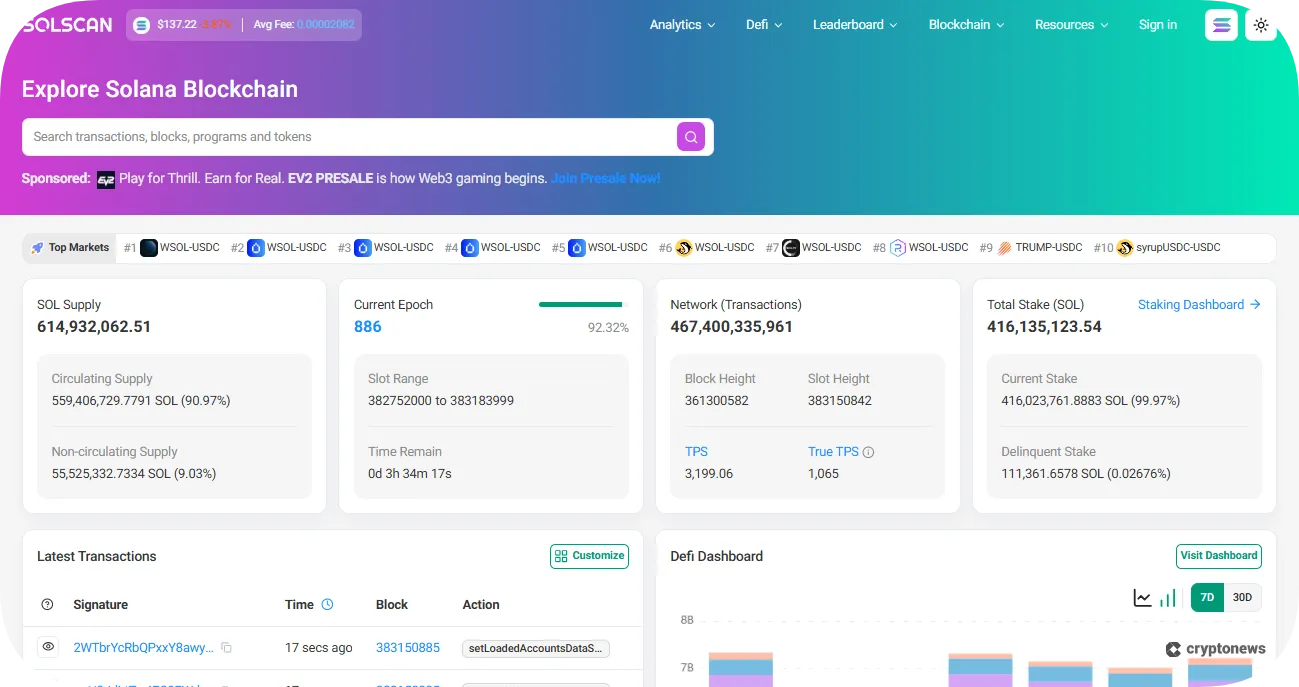
Block explorers like Solscan are some of the best options for wallet trackers because they give you access to organized blockchain data without the hassle of running a node. In particular, Solscan is our top pick because it provides users with a free whale tracker from the start.
- Whale Tracker: Comes with a dashboard of whale transactions you can view for free.
- Leaderboard and Analytics: Offers multiple dashboards that synthesize data for fees, NFTs, DeFi, launchpads, and more.
- APIs: There are free and paid API subscription plans.
- Account Balance Checker: Allows you to check the token balance of an account on a specific date.
- Analyze the content of transactions and account state changes directly on the platform
- Loads of documentation on how to use the platform
- The user interface is easy to use, and the layout is well-designed
- Includes a free whale tracker
- Doesn’t have a dedicated dashboard for tracking wallets
- Accessible to everyone but requires some expertise to utilize
2. Birdeye – Best Enterprise Solution
- Transactions Cap: 1-1,500 RPS (API)
- Free Version: Yes. Provides access to all features, except for historical data, some token data, and API plans.
- Real-Time Alerts: ✅
- Mobile App: ✅
Birdeye is a data services platform for enterprise-level needs. It supports data services from more than 300 exchanges and over a dozen blockchains, including Solana. You can access deeply rich historical and real-time data for proprietary services or individual users.
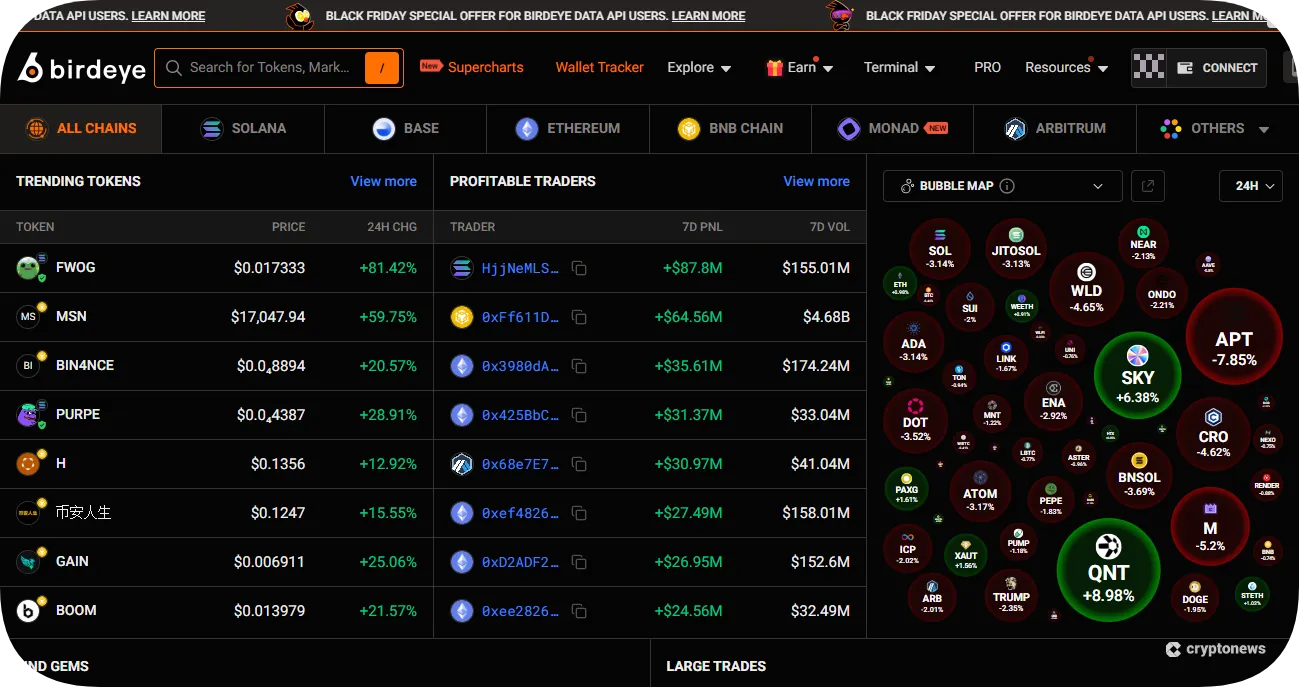
Birdeye has more features than a single user or business can take advantage of. Despite this, the pricing is affordable, even for individuals. The platform abstracts niche data from multiple angles, which is suitable for a wide range of users with differing strategies. These include everything from new listings to top gainers and losers.
- Supercharts: A chart extremely useful for financial analysis, integrated from TradingView.
- Birdeye Terminal: A dedicated dashboard for real-time alerts, watchlists, and wallet labels.
- Enterprise Solutions: Includes API and Websocket services, access to niche data (e.g., volume, price, base/quote, etc.), and more.
- Birdeye Bots: Provides up-to-date alerts through Telegram and Discord.
- Flexible payment methods in crypto and card payments
- Free access to P&L and win rates for individual traders
- In-app access to staking on Birdeye Plus and swaps on Jupiter
- Only provides three alerts on the free plan
- There have been complaints about price charts
3. Nansen – Best Solana Whale Wallet Tracker for AI-Empowered Insights
- Transactions Cap: 20 RPS (API)
- Free Version: Yes. Access to most services except the Smart Money dashboard, APIs, with limited AI usage and alerts.
- Real-Time Alerts: ✅
- Mobile App: ✅
Nansen is a blockchain analytics platform, powered by artificial intelligence (AI). It launched in 2019 and is backed by big-name venture capital firms, such as A16z, Tiger Global, and Coinbase Ventures. Many people use Nansen to track profitable wallets, identify early trends, and perform risk management.
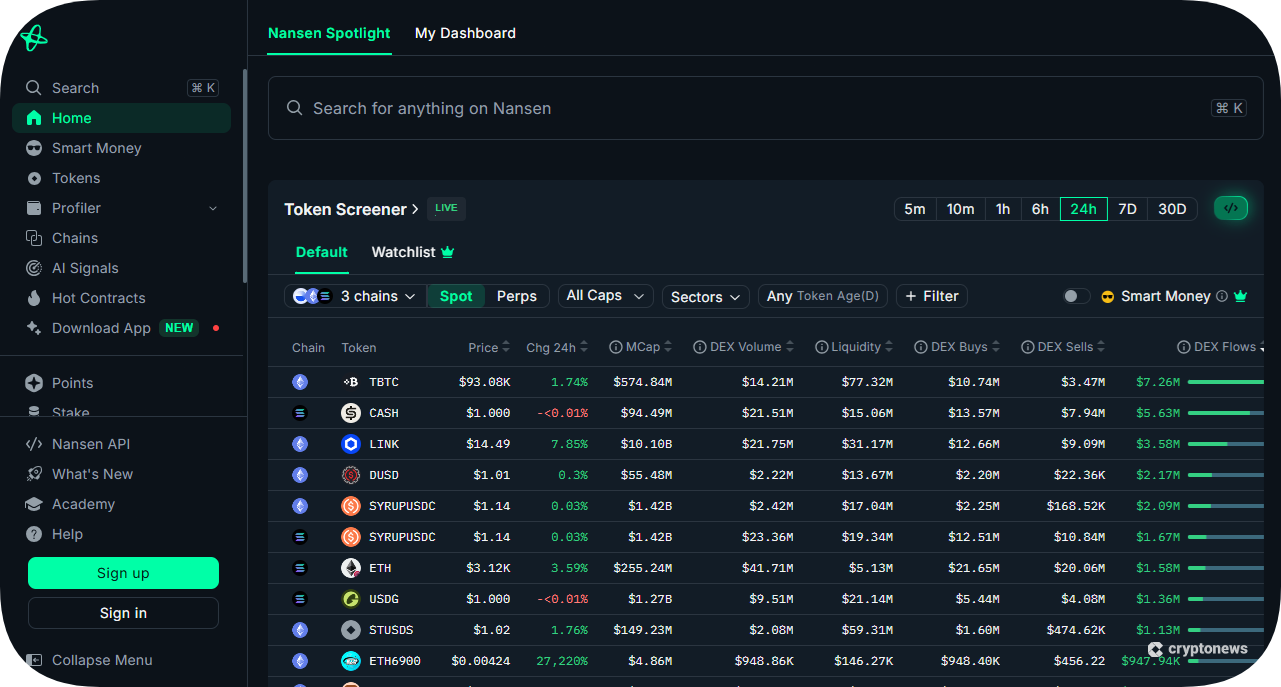
Nansen is not only a Solana whale wallet tracker; it provides you with deep research reports, access to data on multiple chains (such as hot tokens, smart contracts, and staking data), and uses AI to provide data-driven signals to users.
- Nansen Academy: A help center with over 100 articles on platform operations and strategies.
- In-App Staking and Points: Participate in points programs and stake directly from within the app, made possible by Nansen’s partnerships.
- Nansen Profiler: A toolkit that allows you to analyze how certain addresses interact on-chain to discover relationships and connections.
- Smart Alerts and Watchlists: Receive AI-powered alerts by simply describing them (Smart Alerts), and track wallets and tokens (Watchlists).
- Pricing has become more affordable over time
- Access to data on more than 20 blockchains
- Refine data by dozens of subcategories (e.g., by sectors, inflow/outflow, age, etc.)
- Multiple features are paywalled
- Several restrictions on usable features for free users
4. Raybot – Best Solana Wallet Tracker Telegram Bot
- Transactions Cap: 20 messages per minute
- Free Version: Yes. Free plans do not include Telegram Groups or Discord Webhooks, and limit the number of wallets you can track.
- Real-Time Alerts: ✅
- Mobile App: ❌
RayBot is a Solana wallet tracker bot that provides instant, customizable alerts that you can tweak to your particular needs. It’s particularly useful for those who want to build trading communities on social channels like Discord and Telegram.
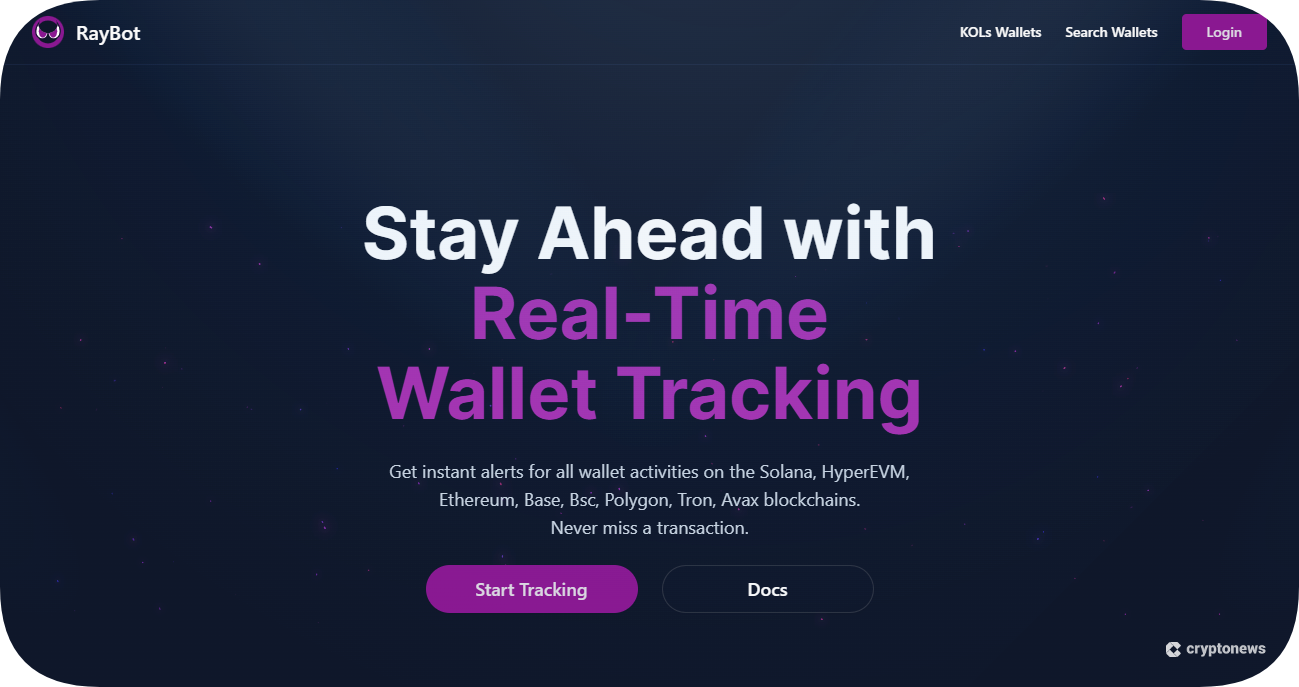
RayBot not only allows you to track wallets, but also transfers, buys, and sells, NFT activity, and protocol interactions. It doesn’t have a dedicated mobile application, but is available on Telegram and through a web interface. Furthermore, it is fully customizable, so you can track data relevant to your strategies or needs.
- Wallet Tracker: You can not only track whales by creating a curated list, but you also receive analytics based on your customized list of addresses.
- Token Tracker: Make swaps directly inside Solana Tracker using the Jupiter exchange with MEV protection.
- Trending Tokens and KOLs List: The platform tracks over 1.5 million wallets and trending tokens (only on Solana at the moment).
- Supports Multiple Blockchains: Supports almost a dozen other blockchains, including Hyperliquid, Story, and Plasma.
- Alerts are extremely customizable
- Free usage comes with a lot of useful features
- Extremely useful for creating trading communities
- Limits are relatively restrictive compared to other platforms.
- The trending tokens feature is only supported on Solana.
5. Jupiter Portfolio – Best Wallet Tracker on Solana for Portfolio Management
- Transactions Cap: N/A
- Free Version: Yes. Jupiter Portfolio is free to use.
- Real-Time Alerts: ❌
- Mobile App: ✅
Jupiter Portfolio is a comprehensive platform of services managed by the Jupiter DEX. It allows you to track your portfolio, positions, loans, and more on the exchange. It also lets you develop your own products and services using Jupiter developer tools.
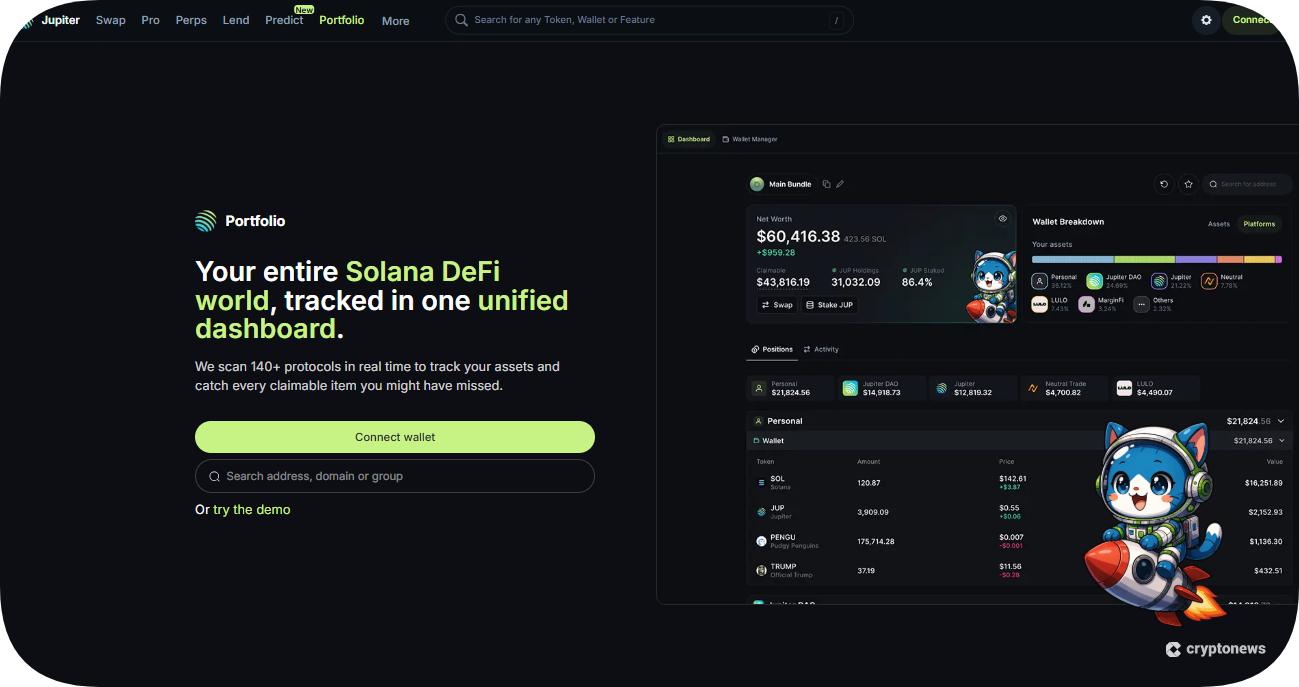
Jupiter Portfolio isn’t just a wallet tracker; it is a suite of tools. With it, you gain access to crypto metrics like trending tokens, launchpads, and analytics; however, it also connects you to the real world by integrating stocks and prediction markets inside the app.
- On-Ramp: Easily transfer crypto, pay with cards, and even create wallets through atypical methods, like an email.
- DeFi Integrations: Supports swapping, loans, staking, and trading (crypto or stocks), directly from your portfolio.
- Developer Tools – Integrate Jupiter onto your own platform, or build your own applications using code or no-code tools.
- Studio: Launch your own tokens and manage them with features like verification and liquidity management.
- The platform is specialized for the Solana ecosystem
- You can use Jupiter Portfolio for free
- It is a superapp that allows you to do most activities without leaving
- Does not have a dedicated wallet tracker/address list section
- Features for tracking your own portfolio are limited
The Best Solana Wallet Trackers Compared
Comparing wallet trackers isn’t so much about which platforms check off the most boxes as much as it is about what features you’re getting. Here’s a consolidated overview of the best Solana wallet trackers compared.
| Platform | Transaction Cap | Free Version | Real-Time Alerts | Mobile App | Best For |
|---|---|---|---|---|---|
| Solscan | 1,000-3,000 RPS (API) | ✅ | ❌ | ❌ | Native blockchain data |
| Birdeye | 1-1,500 RPS (API) | ✅ | ✅ | ✅ | Enterprise solutions |
| Nansen | 20 RPS (API) | ✅ | ✅ | ✅ | AI-empowered insights |
| RayBot | 20 messages per minute | ✅ | ✅ | ❌ | Social channels |
| Jupiter Portfolio | N/A | ✅ | ❌ | ✅ | Portfolio Management |
What is a Solana Wallet Tracker?
A Solana wallet tracker is any tool or application that lets users monitor their own or others’ Solana wallet activity.
Fast-moving data is difficult for the human mind to interpret, and blockchains generate huge amounts of data every second. Whether or not this data is useful depends on the viewer – and that is why we have Solana wallet trackers. They don’t make sense of the data; they do, however, organize it in a way that makes it easier for the user to interpret.
Think of a wallet tracker like a banking app, but for on-chain activity. A banking app accesses your account and displays your deposits, withdrawals, purchases, and account balances by accessing the bank’s database.
You can use this information to see how much you have earned, determine if you are spending too much money, see your next loan payment, and more. Similarly, a wallet tracker has a multitude of uses.
How Do Solana Wallet Trackers Work?
At a high level, Solana wallet trackers have a similar workflow; they provide users with a steady stream of real-time data.
- Wallet trackers pull data from the blockchain (via RPC nodes or indexers).
- Interpret account states and on-chain data.
- Stream the results back to users.
Blockchains store raw data, which is nearly impossible for the average person to understand in a meaningful way, and at a speed that would be useful. Wallet trackers parse this raw data and separate the information into things like staking positions, liquidity pool deposits, PNL, and so on.
This image shows what raw blockchain data looks like before a Solana wallet tracker interprets it. As you can see, the terminal is querying two RPC calls, “getTransaction” and “getBlock.” The responses return in a JSON format.
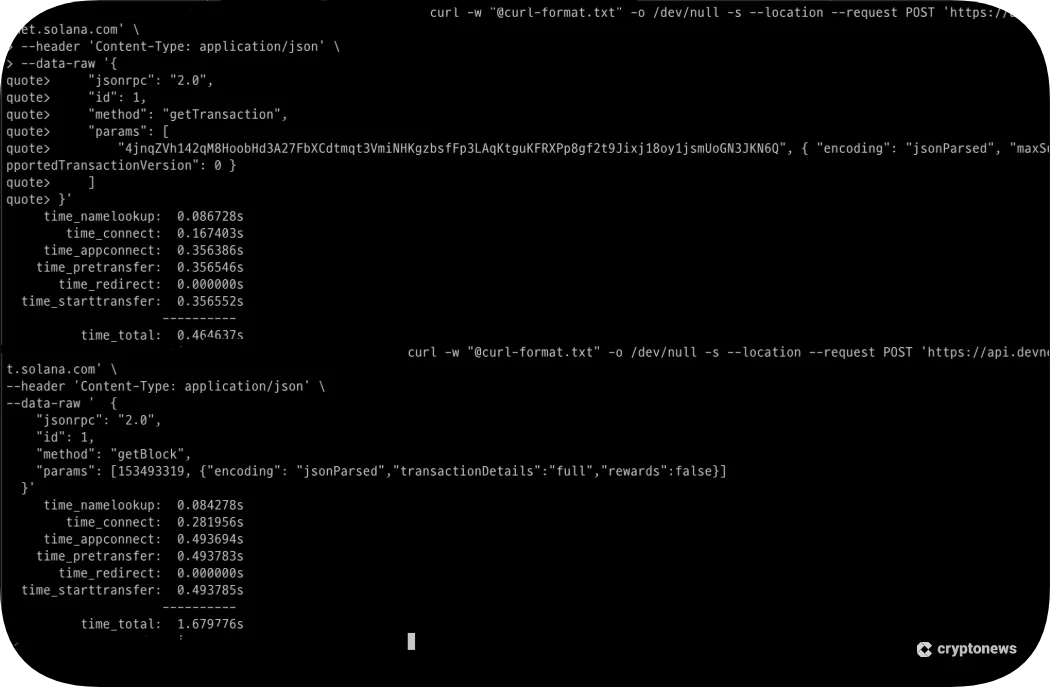
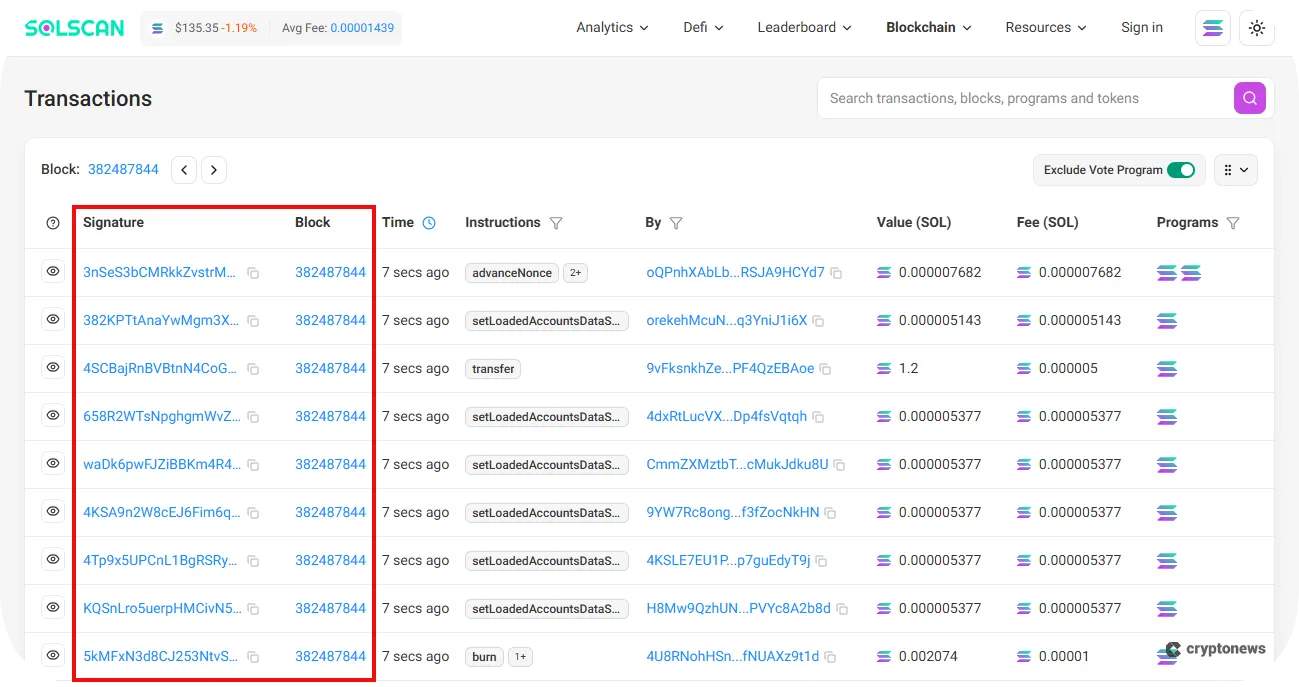
A Solana wallet tracker (such as a Solscan) would then retrieve this information via an API and display it in a dashboard or some other format:
Why Use a Solana Wallet Portfolio Tracker?
Many people use Solana wallet portfolio trackers because they improve the user experience of discovering and analyzing blockchain data. For instance, before wallet trackers became popular, traders and investors would have to:
- Search for successful protocols and tokens.
- Manually download Excel files of their transaction histories.
- Search for early adopters, item-by-item.
- Cross-reference them with other successful protocols.
- Create a list of whales or smart money that they found.
Learning scripting can speed up this process immensely, but if you’re not a programmer, this is an arduous task. Nevertheless, here are some of the most popular uses for wallet trackers:
- Tracking token balances (fungible or non-fungible tokens)
- Collecting address and transaction history
- Risk management
- Tracking Whale/Smart-money wallets (e.g., accumulation/sell-offs)
- Trading patterns (such as profit and loss (P/L) ratios)
- Automating data collection/analyzing cryptocurrencies
Most people use wallet trackers on Solana for three primary activities: to gain competitive trade or investment advantages, to do their due diligence when investing, or for investigations.
Collecting blockchain data is time-consuming, difficult, and accident-prone if you’re not careful. For example, it’s easy to confuse accounts, smart contracts, and transaction hashes; easy to lose track of transaction flows; and difficult to extract meaningful insights from pure data. Wallet trackers make these tasks a lot easier.
If you want to extract meaningful insights from on-chain data, wallet trackers are just the beginning. You may have to do research (e.g., search engines, social media, etc.), use AI, or learn a new skill (e.g., statistics, programming, etc.).
Factors to Consider When Choosing the Best Solana Wallet Tracker
If you want to pick the best wallet tracker on Solana, you need to understand your needs for features, budgets, and other aspects that reflect your strategies and goals.
📋 Core Features
You should prioritize core features over more features. Select a platform that suits your needs, based on the activities you plan on engaging in.
For example, Solscan’s features are more suited for personal analysis or investigations, while Birdeye, with its multiple data services, is better for building applications or services. Each platform has a specific audience that it appeals to. Learn what type of user you are, and you will understand what features you need.
🔒 Privacy and Security
Security and privacy are a must in crypto. Most wallet trackers don’t offer features that put the user at risk, but it’s something that you should remain aware of.
For our list, you should keep in mind that RayBot will create a wallet for you. However, with the simplicity of Telegram apps, it would not be outside the realm of possibility for you to accidentally expose your private keys using it. Also, Jupiter Portfolio will create a wallet for you via email and other methods, which may limit your recovery options.
📊 Data Depth
Not only do wallet trackers provide certain types of data, but they also provide depth of data. For instance, one platform may offer a simple list of whale wallets, while another may give you their profits, losses, and largest holdings. A good example of a platform with rich data depth is Nansen.
⚙️ Customizability
Customizability can mean everything from the data you track to the alerts you receive – it all depends. Some platforms are more rigid than others, and only allow you to receive preselected notifications or track specific data.
On the other hand, you can not only decide the data you want to track on other platforms, as with a tracker like RayBot, but you can also decide the platforms you receive them on and customize the alerts you receive.
💳 Free and Paid Versions
Cheaper trackers don’t always translate to a better tracker for you, nor do they necessarily mean lower quality tools. For example, Jupiter Portfolio is free; its tracking services are not as expansive as other options, but you rarely have to leave the app to engage in on-chain activity.
Likewise, Birdeye is extremely reasonable for the amount of services it offers, for both paid and free versions. Furthermore, even a more expensive platform like Nansen has reduced its prices over time while adding services as the platform grows.
📱 Device Compatibility
Naturally, you should select a platform that works on your device. You should take note that most wallet trackers operate from a web interface, but there are a few that support mobile devices. Conversely, there aren’t many wallet trackers available for desktop.
How to Track Solana Wallets: Step-by-Step Guide
In this next section, we’ll cover how to track a wallet using a wallet tracker. Understand that a wallet tracker’s use is context-dependent, meaning that the way you track a wallet differs on each platform.
Step 1 – Select a Wallet Tracker
Before you track a wallet, you will need to select a wallet tracker. This is an important step because it will determine how you track a wallet and what information you can extract with it.
For this guide, we’ll use Solscan because it shows a more direct view into on-chain data than most trackers (which abstract the data to make it easier for the user).
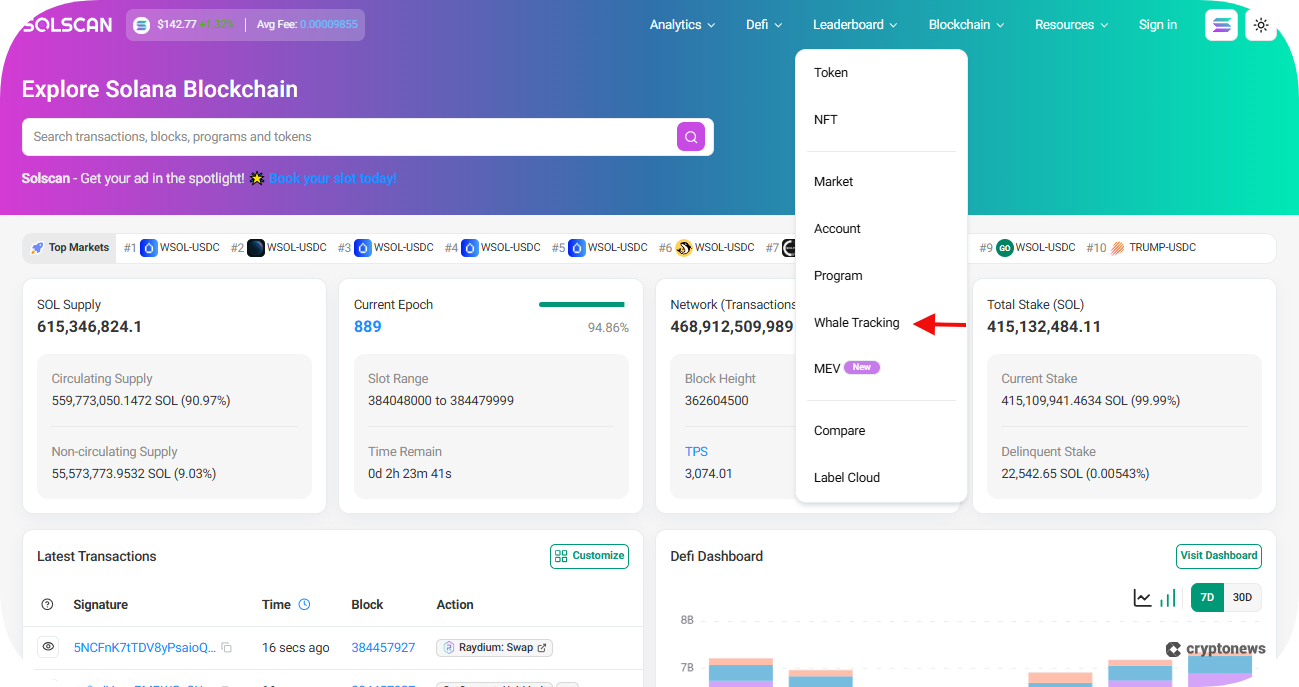
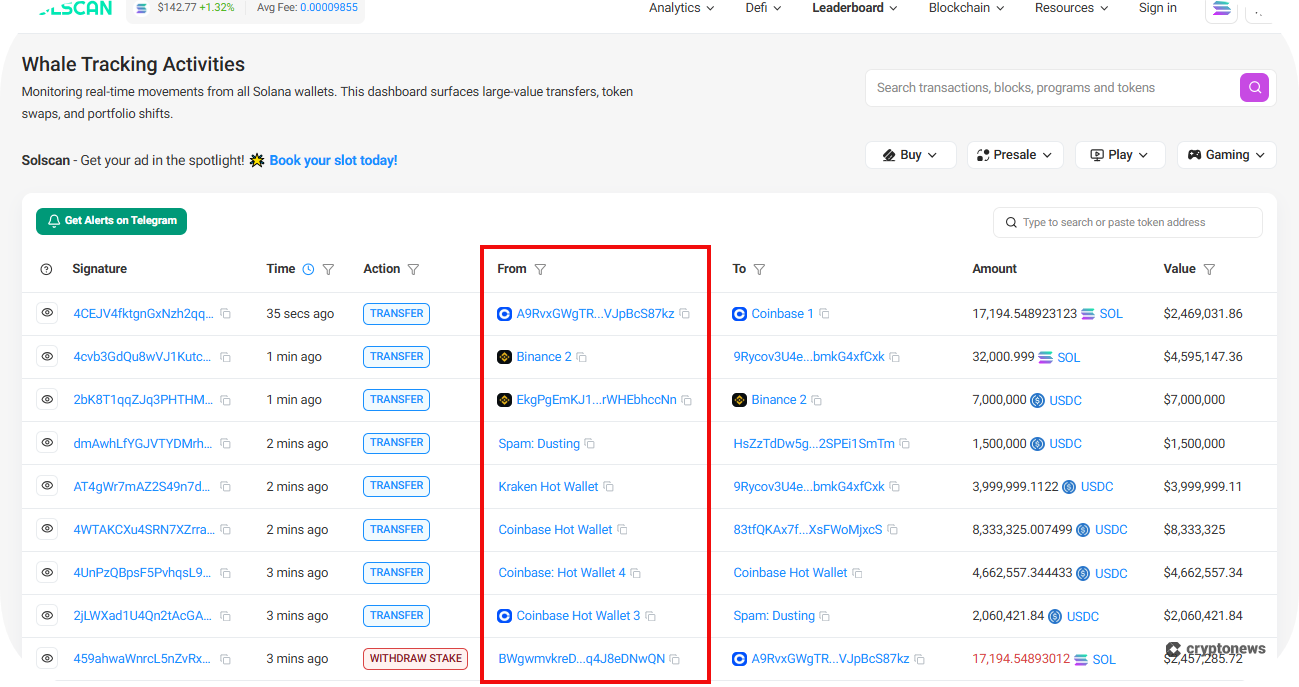
We’ll begin by finding an account to track. In the top menu, select Leaderboard, and then click on Whale Tracking.
Step 2 – Select a Wallet
For our next step, we’ll need to find a wallet to track. In the From column, look for an address to follow. On Solscan, the Whale Tracking dashboard simply shows a curated list of large valued transactions. For this guide, we have chosen this address.
Step 3 – Go to the Account’s Portfolio
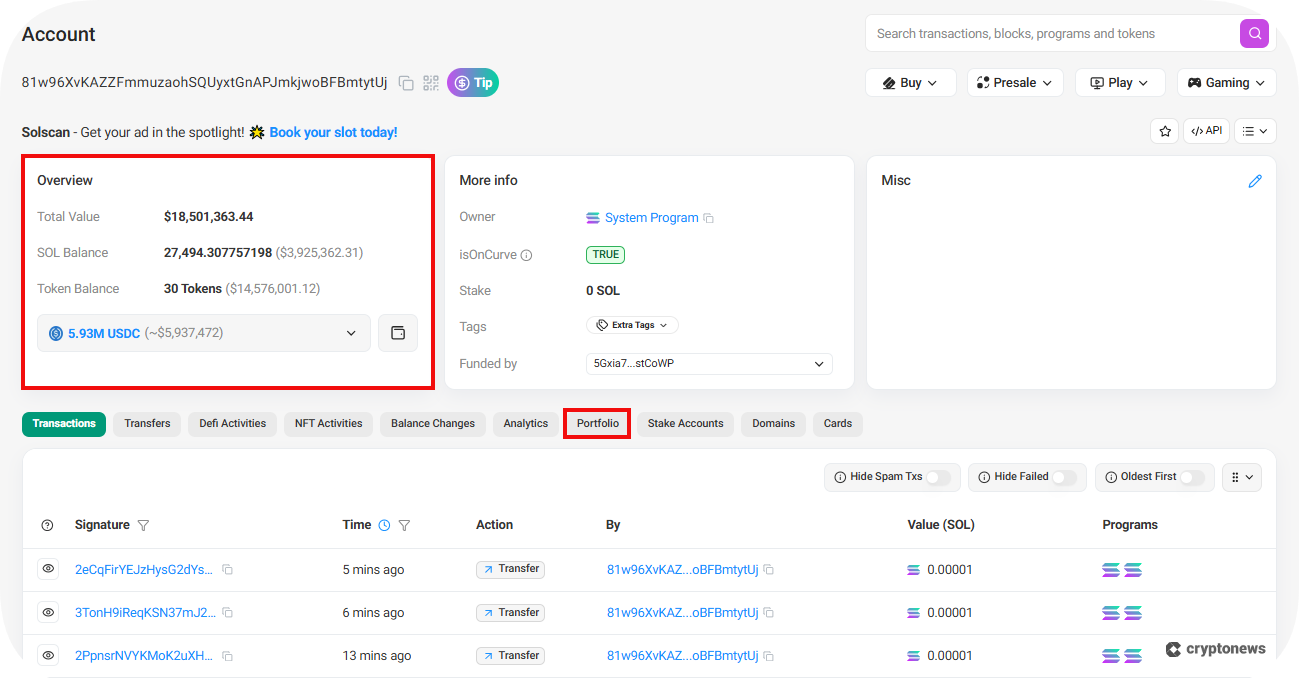
Ideally, you want to determine what information you are looking for before proceeding any further. Some of the information you may want to consider is large buys of new tokens, profitable trades, or suspicious activity.
To reiterate, most people will look for information for one of the three aforementioned uses: risk management, early trading advantages, or investigations (on-chain analysis). Because this tutorial was created as a general overview, we’ll simply navigate to the portfolio to see what we can find.
Step 4 – Analyze the Account
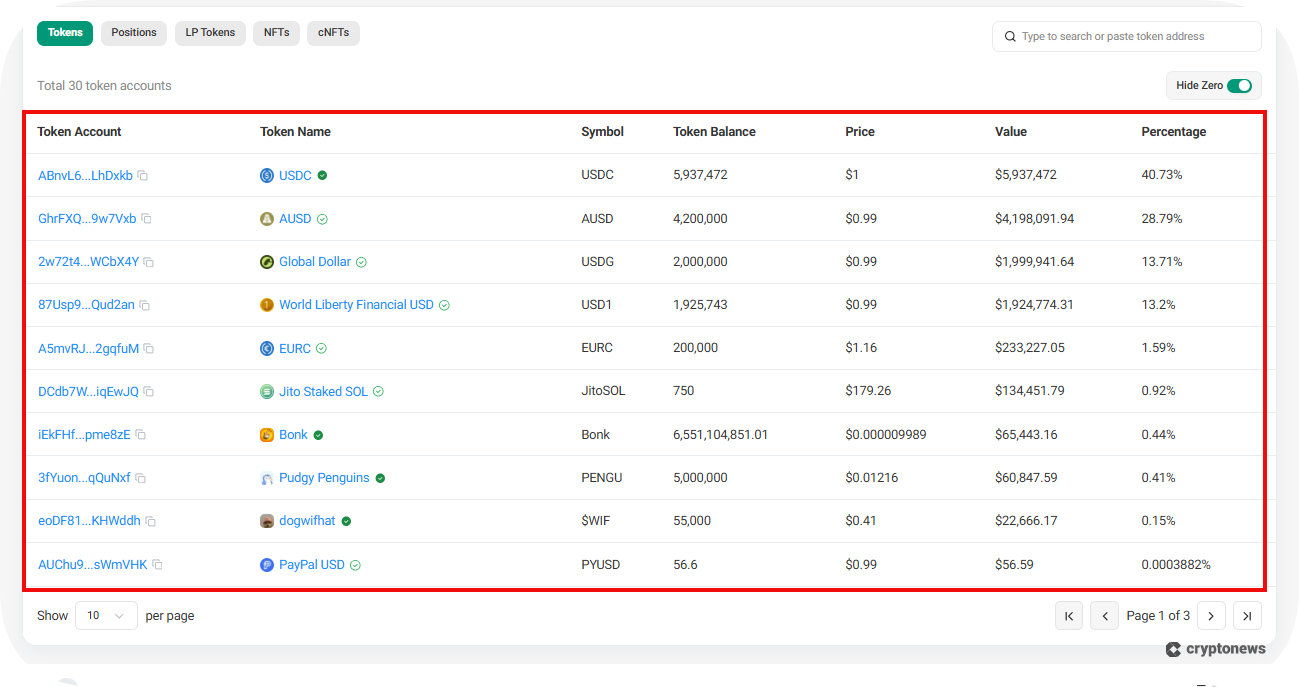
Here, we can see a large holding of various stablecoins (USD and EUR), some meme coins, and a liquid staking token. This information may be important later, but, as of now, nothing really stands out yet. Let’s proceed by seeing what we can find in the account’s transaction history.
Step 5 – Look for Patterns
Here is where the utility of using a Solana wallet tracker really stands out. Upon first look, we see a lot of confusing information. To dispel this confusion, you will have to look for patterns.
What we can see is that our account (purple boxes) has a large outflow of tokens to various addresses. Many of these receiving addresses, from what we can verify by the labels, belong to prominent exchanges (red boxes), such as Bitget and Binance. There’s also a single large inflow from the Bullish exchange (blue box).
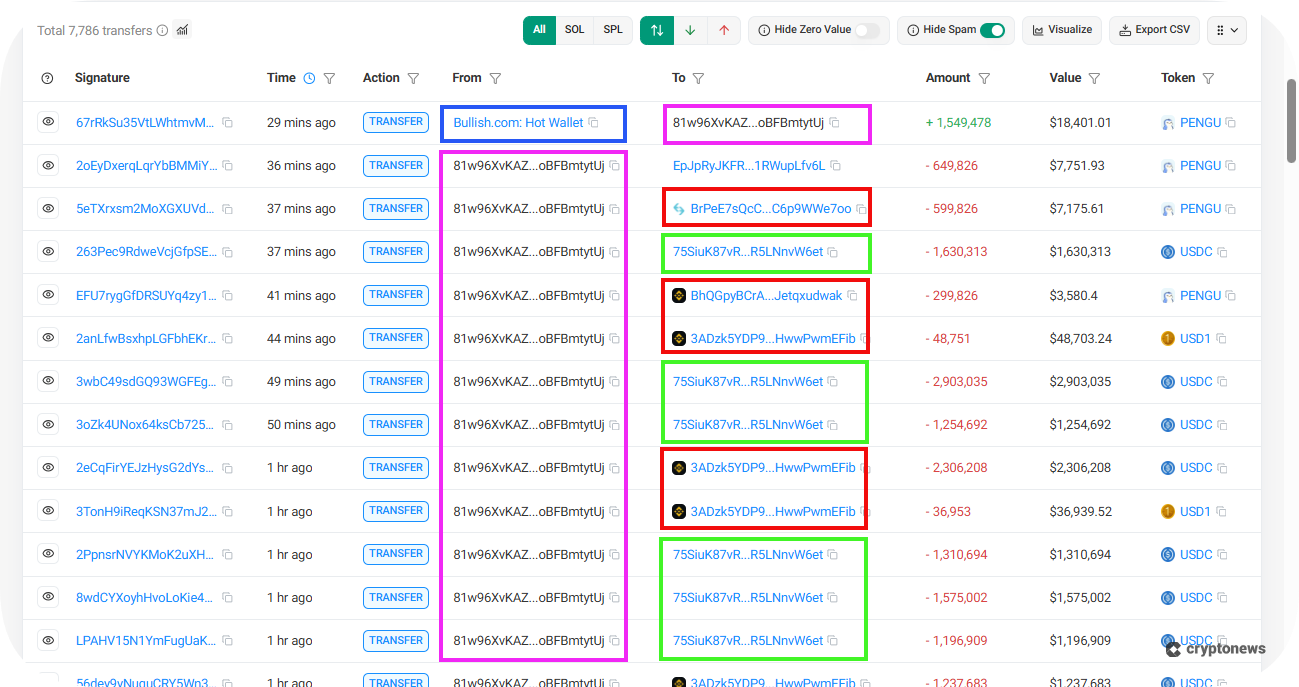
You can’t see it in this demonstration, but, upon further inspection, we also learn that:
- This account has more outflows (in volume) than inflows (95% of which exceed $1 million)
- Only receives high-dollar inflows from Bullish (with a total volume exceeding $5 billion)
- Often transacts with CoinEx USDC token (most likely an IOU on the CoinEx exchange)
- Regularly transfers to an address (green boxes) owned by the USDC Treasury address (an account used for issuances, redemptions, etc.)
From this information, we can conclude that this account is most likely an intermediate wallet used by a market maker for routing, managing inventory, and settlements.
This information isn’t necessarily useful for trading advantages or risk management, but it is useful for building investigative skills. It is also a perfect example of why you may want to choose one wallet tracker over another. Many wallet trackers will make sense of the data for you; otherwise, it would take hours to interpret this information.
Conclusion
The top Solana wallet trackers, such as the ones on our list, rank high in terms of user experience, affordability, and core features. It is important to remember that when it comes to wallet trackers, each one is better suited for a specific type of user.
While Birdeye and Nansen are better suited for more experienced or enterprise users, Solscan and Jupiter are better suited for retail crypto traders and investors. Simultaneously, RayBot is best for those who require customizability from their mobile devices.
If you ever find yourself lost on how to use a wallet tracker or which one to choose, just remember that they have three primary uses: strategic advantages, risk management, and on-chain analysis. As long as you understand this, you will have everything you need to use the best Solana wallet trackers.
FAQs
What are the disadvantages of Solana wallet trackers?
Can I use a Solana wallet tracker on my phone?
How much do Solana wallet trackers cost?
Are Solana wallet trackers safe to use?
Can I set up Solana wallet alerts without sharing my private key?
References
- Image adapted from “Questions about Solana RPC response time” by user minseong, posted on Solana Stack Exchange (https://solana.stackexchange.com/q/1732). Licensed under CC BY-SA 4.0. (Stack Exchange)
2M+
250+
8
70





 in numbers

About Cryptonews
Our goal is to offer a comprehensive and objective perspective on the cryptocurrency market, enabling our readers to make informed decisions in this ever-changing landscape.
Our editorial team of more than 70 crypto professionals works to maintain the highest standards of journalism and ethics. We follow strict editorial guidelines to ensure the integrity and credibility of our content.
Whether you’re looking for breaking news, expert opinions, or market insights, Cryptonews has been your go-to destination for everything cryptocurrency since 2017.
