


 Ellipal Wallet Review: The Best Cold Wallet to Use in 2026?
- Supports over 10,000 tokens & NFTs
- Air-gapped security with anti-tamper features
- User-friendly interface with a large touchscreen
In this Ellipal Wallet review, we will talk about this hardware wallet’s features and whether it’s a reliable enough storage solution.
Crypto is all fun, excitement, and gains until you’re hit by a hack or scam. This reality leads many to seek secure storage solutions. Effectively securing your crypto requires a hardware wallet. But with so many options, which one should you choose? Among all the available hardware wallets, Ellipal Wallet stands out for providing ultimate cold storage for your crypto assets.
Ellipal is a completely metal, airtight hardware wallet designed for mobile use but without network connections to ensure complete security against cyber and physical attacks. So, let’s see what Ellipal is all about and if it’s worth your time and money!
Ellipal Wallet Pros and Cons
Ellipal is known among the crypto community as one of the best non-custodial crypto wallets, and for a good reason. It supports 10,000 coins and tokens from multiple niches, such as AI, DeFi, gaming, memes, and metaverse. It can be integrated with third-party apps like MetaMask and WalletConnect, allowing you to access over 200 dApps. Plus, it supports NFTs on Ethereum and Polygon.
Ellipal is an air-gapped wallet, which means it is completely isolated from the Internet, i.e., it uses QR codes to send and receive transactions. Ellipal also uses anti-tamper and anti-disassembly features, and it has an EAL5+ certificate, which means it provides the highest level of protection. The Ellipal mobile app is compatible with Android and iOS devices. However, there is no desktop app, which is a bit disappointing.
Another thing that could discourage investors from choosing this wallet is its complexity when it comes to upgrades. Namely, you’ll have to upgrade its firmware manually via microSD cards, which may be challenging for non-tech-savvy users.
That said, here’s an overview of Ellipal’s main pros and cons:
Pros
- Support for more than 10,000 tokens & NFTs
- No data transmission, only QR codes
- Mobile app for Android and iOS devices
- Big screen & user-friendly interface
- Integration with third-party apps like MetaMask & WalletConnect
- Air-gapped design offers ultimate offline storage
- Hardware design is durable, portable, & tamper-proof
- Support for multiple languages
Cons
- Updates are done manually, via microSD cards, which non-tech-savvy users may find complicated
- Only mobile app support, no desktop compatibility
What is Ellipal Wallet?
Founded in 2018 during the bear market by David Tian and Tong Chen, Ellipal is a self-custodial, cold wallet that gives you exclusive access to your crypto funds. Developed to “create the ultimate hardware wallet,” Ellipal has established itself as the market-leading, air-gapped cold wallet that offers features like swaps, staking, dApp support, a wallet app, and a better user experience.
|
Type of Wallet |
Non-custodial Hardware Wallet |
|
Price |
$99 – ELLIPAL Titan Mini Wallet $169 – ELLIPAL Titan 2.0 Cold Wallet |
|
Number of Supported Coins |
10,000+ |
|
Mobile App |
Android and iPhone |
Ellipal Wallet: Supported Coins
While conducting our Ellipal wallet review, we found that Ellipal supports 10,000 coins and tokens and 40 blockchains. These include Solana, Ethereum, Bitcoin, Hedera, Algorand, Cardano, Binance, Tether, XRP, Avalanche, XDC, Fantom, Polygon, Theta, Tron, Cosmos, Polkadot, Kusama, Zcash, and more. In the most recent update, Ellipal now supports native SegWit address types for BTC and LTC.
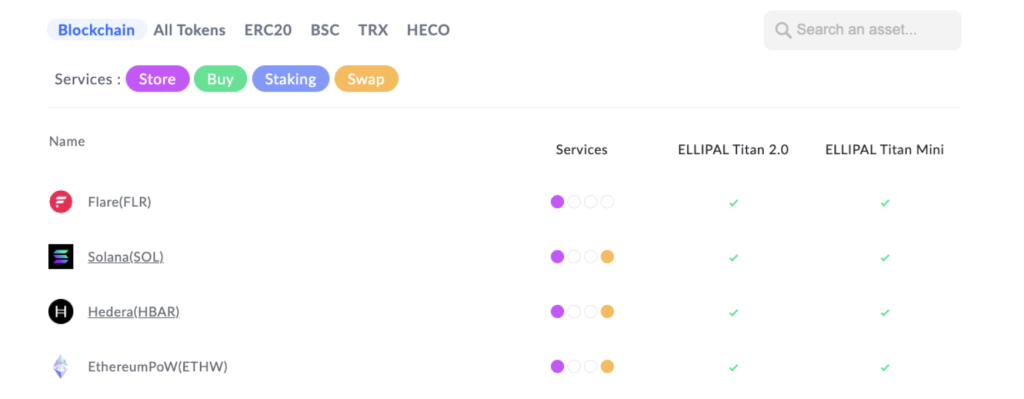
As for the type of tokens that Ellipal supports, it has all kinds of categories, ranging from layer 1s, AI, gaming, meme coins, DeFi, metaverse, and more. It is also constantly adding new assets to keep up with the growing number of fresh projects launching every day. Ellipal is a one-stop solution for users to buy, sell, store, swap, and stake tokens.
The wallet further allows you to secure your non-fungible tokens (NFTs), protecting them from both online and offline threats. Ellipal supports NFTs on Ethereum and Polygon, offering robust compatibility. Additionally, the wallet can be connected to 50+ NFT marketplaces, enabling you to sell, buy, and trade NFTs directly. You can also view your NFT collections in the mobile app.
Understanding Ellipal Wallet’s Pricing & Fees
Now, let’s talk about the prices. Ellipal offers two types of products, each with a different price tag in line with its features. The more affordable option is the ELLIPAL Titan Mini Cold Wallet, priced at $99. This air-gapped wallet comes with a secure CC EAL5+ chip and support for QR codes. As for the physical device, this fully metal-sealed wallet weighs 112g, has a 2.4-inch screen, and has a 600 mAh battery with a standby time of 50 hours.
The ELLIPAL Titan 2.0 Cold Wallet, on the other hand, will cost you $169. Much like the mini device, this one is air-gapped and has a QR scanner, CC EAL5+ security, a MicroSD card, and a fully metal-sealed body. Compared to the Ellipal mini, Titan 2.0 is bigger, weighing 140g, and has an IPS Display, a 4-inch screen, and a 1400 mAh battery.
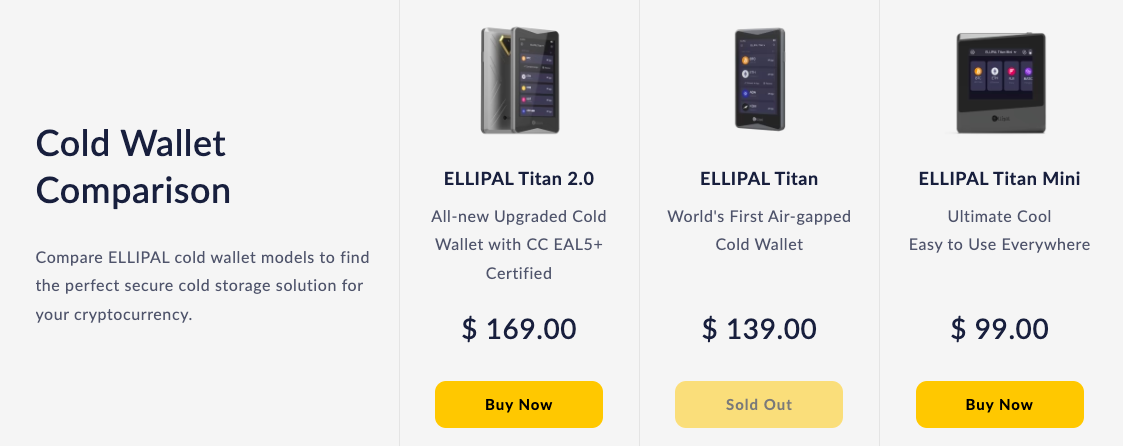
When buying either of the devices, you’ll get a comprehensive package that includes a hardware wallet, a Type-C charging cord, one security adapter, one Micro SD Card, two seed phrase recovery sheets, and a user manual.
As for the transaction fees when using the wallet, you only have to pay the fees charged by the network you are using, such as Ethereum or Solana. You can manually select the network or gas fees to make sure that your transaction is successful. Swapping or buying coins directly inside the app or the device is also free of any charge.
Visit EllipalIs Ellipal Safe?
To ensure user fund safety, Ellipal makes use of several security measures, and in this Ellipal review, we will take a look at all of them:
Air-Gapped for 100% Security
Ellipal cold wallets protect your assets from online and remote attacks by ensuring complete isolation. Here, your private keys never come into contact with the internet, which is why Ellipal doesn’t provide support for any kind of wireless connection, be it cellular, Bluetooth, USB, WiFi, or NFC.
In crypto, air-gapped wallets represent the pinnacle of full online protection. They achieve this by completely separating your device from others, thereby shielding you from exploits, malware, hacks, or other types of cyberattacks.
These wallets make use of QR codes or a microSD card to send or receive transactions from an outside wallet. Ellipal’s QR codes are offline, public, and verifiable. This way, air-gapped wallets like Ellipal give you full control over your coins and enhanced security, making them an ideal option to store your crypto fortune for the long term.
Even the firmware can be updated without an internet connection. This process involves downloading the latest software from Ellipal’s website and putting it on a microSD card. The card is then placed into the device, which will check and install the software. However, users who are not technically savvy may find the updating process complex.
Certified Security with EAL 5+
EAL, or Evaluation Assurance Level, is a grade given to an IT product following a security assessment based on Common Criteria. This level signifies the depth of testing the product has undergone. Under this internationally recognized standard, the lowest grade is EAL1, and the highest grade is EAL7.
To achieve EAL5+, a product must demonstrate the highest possible level of security against penetration testing. In crypto, Ellipal is among the top hardware wallets like Ledger and Trezor that use secure element chips with an EAL 5+ certification.
Anti-Disassembly & Anti-Tamper
While many hardware wallets in the crypto industry claim to offer the highest possible online security, they may not always be fully secure from offline attacks. This is where Ellipal distinguishes itself by ensuring the product’s safety even before you get your hands on the device.
Supply chain attacks pose just as much of a problem as hacks and phishing links, with popular hardware wallets like Ledger having actually experienced them. To safeguard your devices from a supply chain attack, Ellipan employs anti-tamper and anti-disassembly features.
Under the anti-tamper feature, the wallet automatically deletes its data in case a breach is detected, such as a hacker cracking open the wallet, making the device unusable. The anti-disassembly feature, meanwhile, is the wallet’s ability to resist being forced open by hackers. With these features, Ellipal ensures complete protection of your cryptocurrencies.
Additional Measures
In addition to these security measures, Ellipal Wallet offers PIN and password protection whenever you use the device and your account. In case you forget your password, the recovery phrase will help you get back into your accounts.
Ellipal’s automatic self-destruction, meanwhile, ensures no one gets to your assets even if they steal your device by erasing everything on it if someone enters the wrong password 10 times.
Then, there’s an easy-to-use open-source private key generator called ELLIPAL Joy, which is equipped with a random number generator that produces 32-bit random numbers for absolute security.
Another security feature of Ellipal wallets that is a must to highlight in this Ellipal cold wallet review is the secret secondary wallet option, under which you can set up alternate accounts. So, if you are ever in a really dangerous situation, you can unlock an alternate account by using a different password.
Is the Ellipal Wallet Easy to Use?
The Ellipal wallet is pretty sleek, simple, and easy to use. It has a big touch screen with a black background, so you can see everything clearly. There are no buttons here, just the touchscreen that allows you to perform all the actions, such as creating accounts, adding coins, sending and receiving coins, staking tokens, and more.
The wallet also features a camera to scan QR codes, enabling you to connect with the mobile app and manage your assets. Starting your Ellipal journey is as easy as following initial instructions to connect to a cold wallet or add a hot wallet. In the settings section of the wallet, you’ll find languages to select and a screen lock option to set your pattern and time for the same between 15 seconds and 30 minutes.
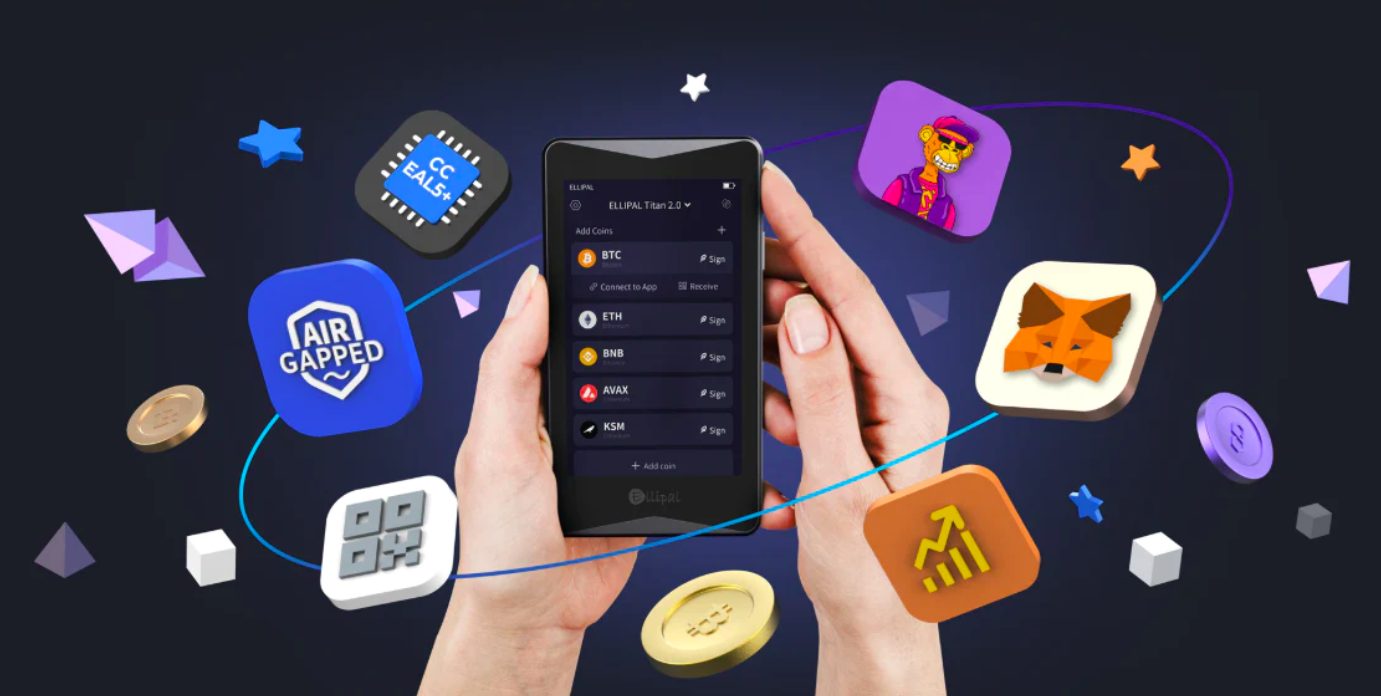
The cold wallet is designed to be connected to the mobile app, which comes with a guide section to help you set up as well as use the wallet. Right on the main page, you’ll find your cold wallet option, along with the assets, markets, and profile options at the lower end of the screen.
To move your assets, you simply have to click on the cryptocurrency you want to transfer, and you’ll find your crypto address and balance, as well as send and receive options. You’ll also find your transaction status in the history, whether the asset has moved out, in, or failed.
Overall, it was clear to us during our Ellipal wallet review that it offers a user-friendly experience for managing your crypto holdings. As for the wallet’s reputation, on the customer review site Trustpilot, Ellipal has an average rating of 3.1, with primary issues around orders. Ellipal has a higher rating than Ledger, which has a 1.9 rating on Trustpilot, though Trezor has a higher rating of 4.5.
Key Features of the Ellipal Wallet
Now, let’s cover different features that you can access on Ellipal:
A Hot Wallet in a Mobile App
For starters, you can download a mobile app on both Android and iOS devices. Both Titan Mini and Titan 2.0 support all mobile systems. Android users can download the app from Google Play, where it has a 3.7-star rating and 100k+ downloads. Meanwhile, Apple users can download it from the App Store, where it has a 3.7 rating and is compatible with iPhone (iOS 14.0 or later), Mac (macOS 11.0 or later), and Apple Vision (visionOS 1.0 or later).
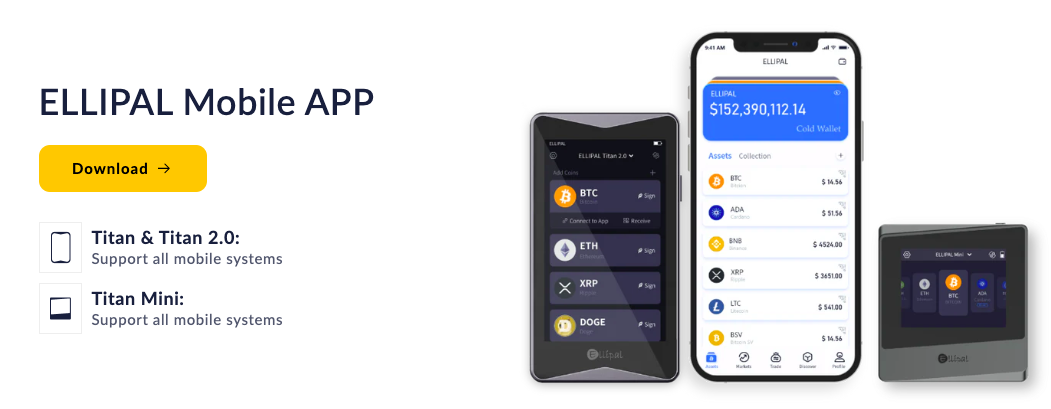
The air-gapped setup of these cold wallets necessitates using the app to initiate transactions, as it serves as a proxy. You can connect your app to Titan Mini and Titan 2.0 using QR codes.
On its own (separate from the hardware wallet), the app works as a hot wallet. Through the Ellipal mobile app, you can buy, sell, trade, and invest in crypto with ease, with the buying feature powered by Moonpay, Simplex, and Banxa. To make a purchase, you just have to complete KYC, and then you can use Visa, Mastercard, or Apple Pay to purchase crypto right from the app.
Moreover, the one-stop app not only allows swaps between two cryptos, a feature powered by Changelly and SWFT, but it also integrates with software wallets like Metamask. This integration allows you to connect to dApps (either regularly or by scanning a QR code) and explore the vast and vibrant Web3 ecosystem. Recently, Ellipal even introduced the seamless linking of accounts with Metamask via a QR code.
Earn Passive Income with Staking
At Ellipal, you can also enjoy earning opportunities by simply locking up your tokens. For those unaware, staking is a popular way to earn passive income in the crypto world and is widely available across wallet providers.
Staking on Ellipal is pretty easy to do. You can simply use the QR code scanner and directly stake from the wallet. However, the available options are extremely limited.
We found during the Ellipal wallet review that you can only stake a total of just five crypto assets with Ellipal Titan Mini and Titan 2.0, which are as follows:
- Cardano (ADA)
- Cosmos (ATOM)
- Polkadot (DOT)
- Kusama (KSM)
- Tezos (XTZ)
Vast World of dApps
With Ellipal wallets, you can enjoy a wide range of decentralized apps that are often free for anyone to use worldwide. These cover a diverse range of areas, including payments, gaming, metaverse, lending, social media, and much more.
Ellipal facilitates this through popular Web3 wallets like MetaMask and WalletConnect, enabling you to use more than 200 dApps. Here, you can swap, lend, borrow, game, and NFT on ETH, BSC, and Huobi’s HECO ecosystems.
To get started, just get to the Ellipal App, discover MetaMask to connect, scan the QR code, and start exploring.
Is Ellipal Wallet User-Friendly?
Ellipal is a user-friendly cold wallet with an intuitive mobile app and tools that facilitate trading. The app will allow you to buy, send, and receive NFTs, convert coins, and stake ADA, ATOM, XTZ, DOT, and KSM. However, at the time of writing, Ellipal doesn’t offer a desktop app, which users who prefer to conduct trades on their computers may find limiting.
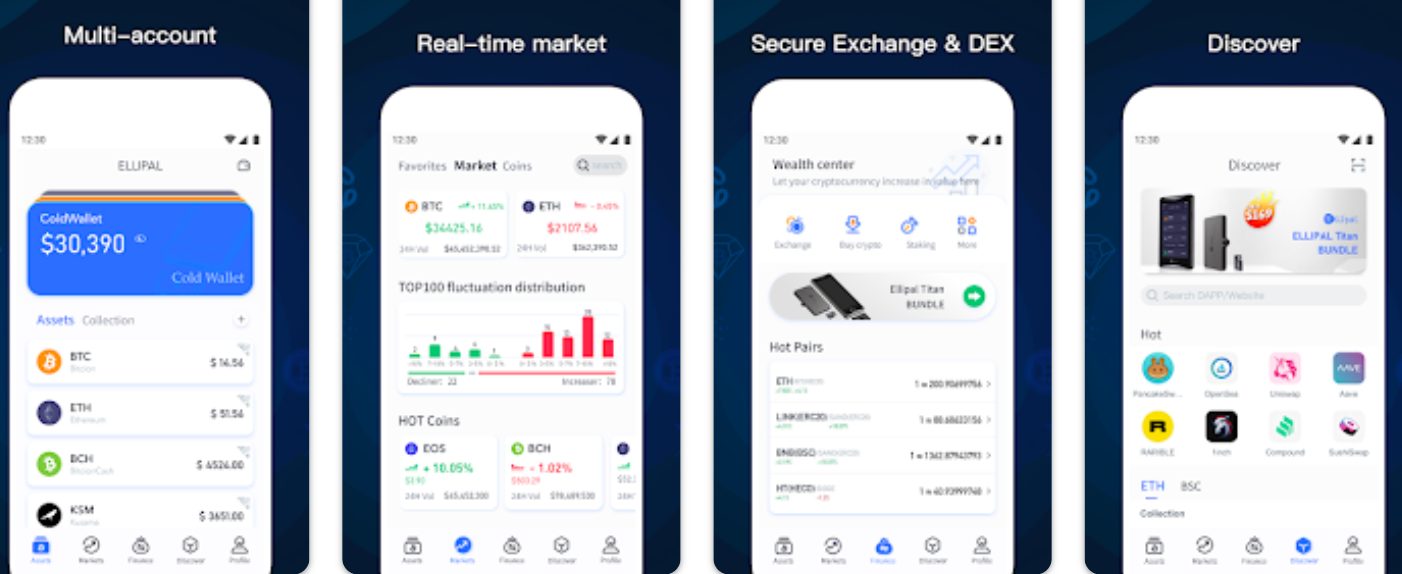
Ellipal uses the air-gapped transaction mechanism, which means that it uses QR codes to conduct transactions. You’ll also have to approve the transaction using your private keys. Before the transaction is approved, you must enter the gesture password and the account password.
However, the tricky part comes with updating the firmware since you’ll have to use a microSD card. First, you need to format the SD card to FAT32. Secondly, you need to download the update file on your computer and transfer it to your SD card. Insert the card into the adapter and hold the power button for 3 seconds to turn it on. Now, go to settings and select Update.
Once Ellipal recognizes the update file, the blue light will start flashing. Ellipal will automatically extract the update file. Once the files get extracted, the wallet will reboot. The updating process can be challenging for users who are not tech-savvy.
Ellipal’s Customer Service
Customer service isn’t crypto’s strongest suit due to the industry’s decentralized nature. With no single centralized authority in control, this makes sense. However, with mainstream, non-technical users getting in, it’s prime time for crypto products and service providers to offer prime assistance to their consumers.
We found in our Ellipal Titan review that the hardware wallet provider has a help center. This center provides an FAQ section, a user manual, information about orders, shipping, and warranty, and the refund policy. Its blog section, meanwhile, covers a wide range of industry topics to help its users stay informed and remain secure.
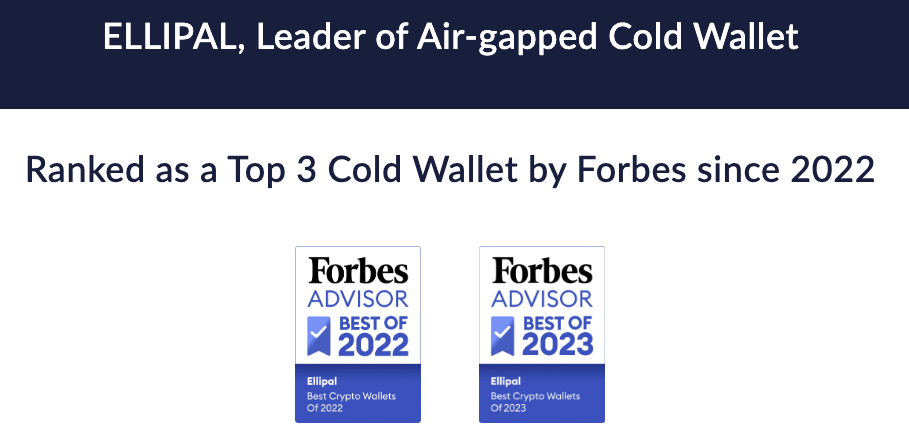
To contact the firm, you can write to Ellipal’s customer service at [email protected]. The company has also provided its Hong Kong address and other emails for contact. It further has a bounty program to fortify its wallet security.
However, there was no live chat or phone number. Ellipal’s social media, meanwhile, covers X (previously Twitter), Facebook, Instagram, TikTok, and YouTube.
How to Use Ellipal Wallet
In this section, we’ll help you get started with Ellipal Wallet:
1. Download the App
Once you have purchased the Ellipal Titan device, you first have to select the language. Then, it’s time to download the app. To do so, take your phone and scan the QR code from your wallet, or you can just go to the Apple Store or Google Play Store. You can also head to the Ellipal website to download the ELLIPAL App.
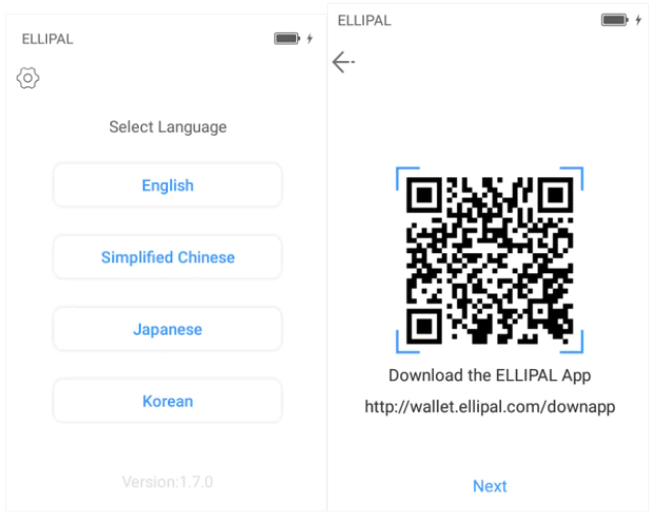
2. Connect/Add Wallet
The first step in your Ellipal journey is choosing between connecting to a cold wallet or adding a hot wallet.
3. Set Up a Recovery Phrase
Now comes the most important part: writing down the 12 or 24 words that the device presents to you. These random sets of words, called mnemonic phrases, are the backup for your private keys. You should not misplace them because if someone else gets hold of these words, they will gain access to your funds.
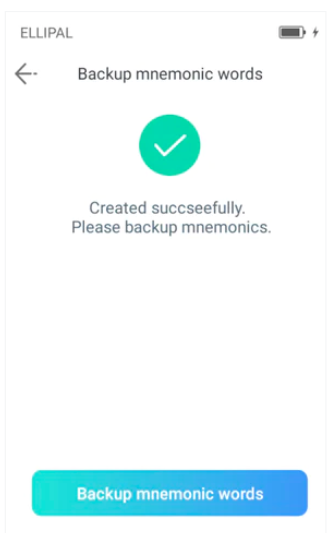
So, write them on a piece of paper. Do not write them on your phone’s notes app, the Google sheet, or take a picture, because then they run the risk of being compromised as they are online. Once written, store them in a secure place. If you ever lose your device, these words will help you restore your wallet.
Your device will then ask you to confirm your mnemonics. You just have to select them in the correct order.
4. Add Coin Addresses
Before moving your crypto to the wallet, you have to add it first. Just select the coins you want to store in this account. Once added, Ellipal will create an address for the chosen coins.
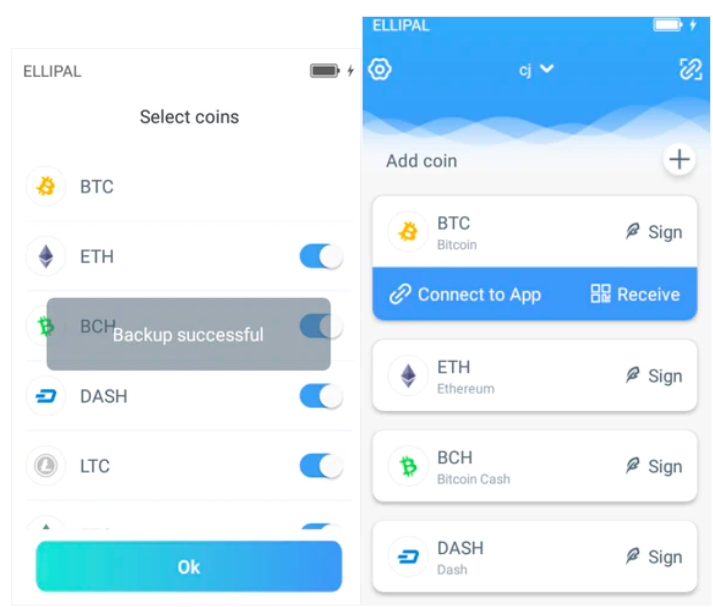
5. Connect to the App
Now, to connect your account to the app, select your account. In the upper right corner of the screen, click on the icon. This will take you to ‘Connect to App.’
On the app, you can tap on ‘Connect to Cold Wallet,’ which will turn on your phone camera. Then, just scan the QR code.
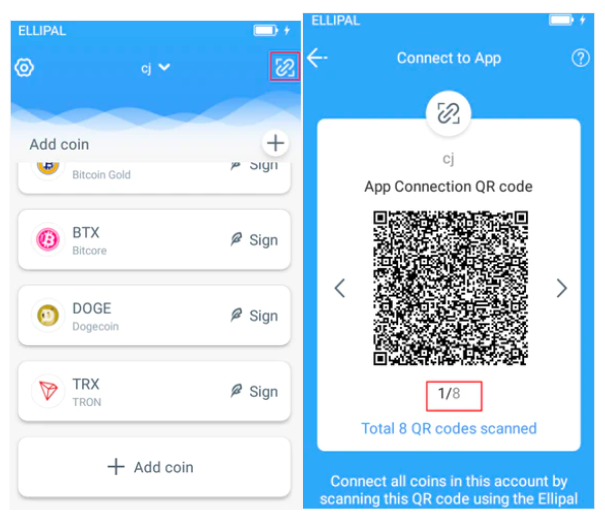
As your app and wallet connect and all your information is synchronized, you can add assets right from your app, check your balance, and transfer your assets.
6. Make the Transaction
On the Ellipal app, go to assets and select the crypto you want to use. Then, you’ll see three options: ‘Send’, ‘Receive,’ and ‘Exchange.’ Tapping on the send option will take you to a page where you have to fill in the amount of crypto and the address to which you want to send it. You can then choose the fees and submit the transaction.
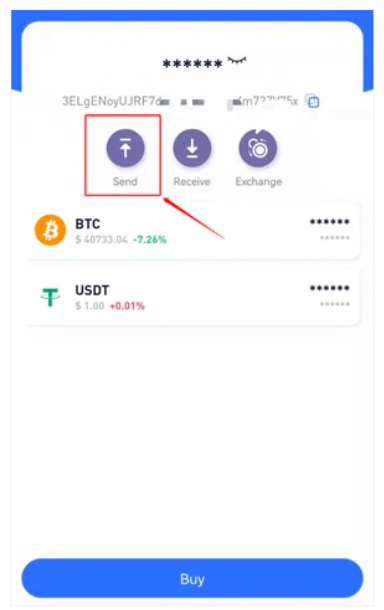
On your cold wallet, go to your account, select the asset, and tap the ‘Sign’ icon. After entering the password, your camera will turn on. Use it to scan the QR code displayed on your app.
Now, your wallet will generate a ‘Signed Data QR code’ that you have to scan on the app to finish the transaction. To check the status of your transfer, simply look at your transaction history on the app.
Ellipal Vs Other Top Hardware Wallets
Ellipal’s main competitors are Ledger, Trezor, Cypherock X1, and Tangem. Here’s how these cold wallets compare to each other.
Ellipal Vs Ledger
Ledger is a hardware wallet known for its multi-currency support, user-friendly interface, and compatibility with over 50 software wallets. The main difference between Ledger and Ellipal is in the way they are connected. Ledger connects via USB and Bluetooth, which makes it more vulnerable to online attacks. Ellipal is an air-gapped wallet, meaning it’s isolated from the Internet (it uses QR codes to transfer data).
Another difference is the size. Ellipal Titan is larger and heavier than Ledger Flex and Ledger Stax devices. It also has a 1400 mAh battery that will keep the device running up to 259 hours, which is significantly longer compared to the Ledger Flex, which comes with a 200 mAh battery. However, Ledger’s firmware is not fully open source, which is perhaps its biggest drawback.
Ellipal Vs Trezor
Trezor hardware wallets stand out with their open-source design and robust security features, such as Shamir backup, address poisoning protection, and scam airdrop protection. Trezor supports 1,000+ cryptocurrencies and 30+ decentralized apps, much less than Ellipal, which supports 10,000 coins and 200+ dApps. It uses a USB-C connection for data interaction, while Ellipal uses QR codes to sign transactions.
Ellipal wallets are more suitable for mobile users since they are designed to work exclusively with mobile devices. Ellipal’s mobile app is compatible with both Android and iOS devices, while Trezor’s app is only available on Android. What’s more, the Ellipal app works individually as a hot wallet. On the other hand, Ellipal doesn’t have a dedicated desktop app, while Trezor’s app is compatible with Windows, macOS, and Linux.
Ellipal Vs Cypherock X1
Cypherock X1 is one of the best decentralized hardware wallets for cold storage. It uses Shamir’s Secret Sharing to split the private keys into 5 parts for maximum protection. Ellipal and Cypherock X1 differ in the way you operate. The former communicates via QR codes while the latter uses NFC technology to verify transactions.
Ellipal wallets are CC EAL5+ certified, while Cypherock X1 uses CC EAL6+ certified secure elements, which provide a higher level of protection. The difference between these two wallets can also be seen in their design. Ellipal uses a touchscreen, while Cypherock X1 uses an OLED screen and a joystick for navigation. Moreover, if you use Cypherock, you’ll have to use its X1 cards to interact with the vault, which makes it more complex to use.
Ellipal Vs Tangem
Tangem is a cold wallet designed like a credit card. It uses NFC technology to enable its users to interact with the wallet. The wallet comes with a set of 2 or 3 cards that are resistant to dust, water, and extreme temperatures. Both Ellipal and Tangem wallets are designed for mobile use. I.e., they are compatible with Android and iOS devices, and they lack a desktop app.
Tangem is a seedless wallet, while Ellipal uses a standard BIP39 12- or 24-word recovery phrase, which makes it more compatible with other wallets. The biggest downside of the Tangem wallet is its lack of built-in display, which means that you’ll have to rely on its mobile app.
Is Ellipal Wallet Worth It in 2026? Our Verdict
Having been in the market for 7 years now, Ellipal boasts a successful track record with its crypto cold wallet. Its air-gapped device ensures full protection from online threats, while its anti-tampering, anti-disassembly, and self-destruction features prevent any offline attacks.
By using this cold wallet with the Ellipal mobile app, you can further enhance your security, buy and swap coins, manage thousands of tokens and NFTs, boost your holdings with staking, and explore the exciting dApp space.
Use the ELLIPAL&CLICKOUT coupon code for a $20 discount at checkout. However, please note that while all cold wallets from the Titan series, including bundles, are eligible for this discount, accessories are not.
In short, it was clear to us during our Ellipal Titan 2.0 cold wallet review that Ellipal is one of the best cold wallets for storing and managing your Bitcoin, altcoin, and NFTs. So, to protect your crypto fortune, check out an Ellipal Wallet today!
Visit EllipalFAQs
Is Ellipal wallet legit?
Is Ellipal better than Ledger?
What are the cons of Ellipal?
Where is the ELLIPAL wallet made?
Has Ellipal ever been hacked?
Is the Ellipal Titan waterproof?
Is the Ellipal Titan better than Ledger?
References
- What is Air-gapped Security? (Ellipal)
- Evaluation Assurance Level (EAL) (TechTarget)
- Anti-Tamper Feature Preventing Supply Chain Attacks (Ellipal)
- Mnemonic Seed (Learn me a bitcoin)
- What is Shamir backup? (Trezor)


