


 Crypto.com Onchain Wallet Review 2026
- Supports 4,000+ tokens across 30+ blockchains
- Multi-layer security with easy seed phrase backup
- Offers advanced features like perpetuals trading and DeFi protocol access
Onchain Wallet is Crypto.com’s newly revamped non-custodial crypto wallet offering secure crypto asset storage and extensive Web3 functionalities. Users don’t need a Crypto.com account to create a wallet, nor do they need to complete a KYC process.
We explored the Crypto.com Onchain Wallet ourselves after installing the app and testing its core features, usability, and performance. In this Crypto.com Wallet review, we break down our findings to show who we think will benefit the most from the hot wallet.
While it features a user-friendly interface with many educational resources, Crypto.com Wallet is primarily geared towards advanced users familiar with Web3 tools. The wallet offers extra benefits for those with Crypto.com Exchange accounts, enabling them to transfer funds seamlessly between the centralized platform and the Onchain Wallet.Our Take on Crypto.com Onchain Wallet
Based on our analysis, the Crypto.com Onchain Wallet is a trusted decentralized wallet with multi-chain compatibility and plenty of on-chain services like dApp access, staking, and NFT management. It supports 30+ blockchains and thousands of tokens and is available as both a mobile app and a desktop browser extension.
Crypto.com Wallet: Pros and Cons
Crypto.com Wallet is highly suitable for those looking to manage a diverse crypto portfolio safely. It supports any tokens across over 30 blockchains. This broad token compatibility complements its numerous on-chain offerings, like staking, dApp access, and perpetuals trading.
The decentralized wallet is also built for convenience and flexibility. The Crypto.com Onchain app is available on Android and iOS devices and via a desktop browser extension. Built-in fiat onramping services make it easy to purchase tokens using traditional currencies.
Certain aspects of the app, such as DeFi protocol staking, fluctuating network fees, and managing potential security vulnerabilities on unsecured mobile devices, could be difficult to grasp for beginners. Users should also be aware of certain geo restrictions for on-chain services (earnings platform, perpetuals, and on-chain swaps).
Pros
Cons
What Is Crypto.com Onchain Wallet?
Crypto.com Onchain Wallet is a rebrand of the exchange’s DeFi Wallet, which is why the current version offers many of the same features found in Crypto.com DeFi Wallet reviews.
DeFi Wallet was launched in 2020 by the leading centralized crypto trading platform Crypto.com. The wallet provided Crypto.com users with access to basic decentralized services, such as token swaps and passive income opportunities in crypto.

In November 2024, Crypto.com renamed DeFi Wallet to Onchain, reflecting the app’s renewed vision of being the only platform users need to engage with and explore the Web3 economy. In seconds, users could connect to top dApps, perform cross-chain swaps, and view real-time token prices.
Today, Crypto.com continues to improve and update Onchain for both its mobile and browser extension versions. Some of the latest upgrades on mobile include a dark mode toggle, an added search feature for any token available, and a revamped home screen layout.
Notably, Crypto.com Onchain operates as a standalone product from Crypto.com Exchange and Crypto.com App. This means you can open an Onchain Wallet without an account on Crypto.com.
Is Onchain Wallet Safe?
Next, let’s examine Crypto.com Onchain Wallet’s security features in more detail.
From private key storage to the platform’s design, Crypto.com Onchain Wallet implements various security mechanisms that keep users’ funds, account information, and payments safe.
The wallet’s first security layer is via a passcode, which is required to open the Crypto.com Onchain platform. Optionally, users can set up biometric authentication instead of the passcode through Face ID or fingerprint verification.
Users can set up two-factor authentication (2FA) to add another layer of protection. The wallet uses a One-time Password (OTP) that sends a unique 6-digit code to a linked authenticator app, ensuring that only you can approve actions affecting your digital assets.
The most crucial part of any self-custody wallet is the recovery phrase or seed phrase. Crypto.com Onchain Wallet makes it easy for users to securely store their seed phrases by allowing them to back them up via iCloud or Google Drive. Alternatively, they can view the recovery phrase, write it down, and store the note in a safe location.
Crypto.com Wallet Supported Coins and Networks
Crypto.com Onchain wallet holders can store over 4,000 cryptocurrencies, including many of the best cryptocurrencies to buy. This includes tokens like Bitcoin (BTC), Ethereum (ETH), XRP (XRP), BNB (BNB), and Solana (SOL).
Many of these tokens are new Crypto.com listings that investors track once added to the exchange for potential price growth.
For Crypto.com users who are part of and continue using the exchange ecosystem, Onchain can connect to the Cronos Chain and supports the Cronos (CRO) native utility token.
The wallet is also compatible with popular stablecoins, including Tether (USDT), USDC (USDC), Athena USDe (USDE), USDS (USDS), and Dai (DAI).
Furthermore, Onchain Wallet supports various Layer-2 chains, including the following:
- Base
- Polygon
- Arbitrum
- zkSync Era
- Optimism
Crypto.com Wallet Features
In this section, we discuss Crypto.com Onchain Wallet’s key features, explaining how they work and who can most benefit from them.
Self-Custody
True digital asset control is the foundational feature of Crypto.com Onchain Wallet. By managing their own private keys, wallet holders can manage their cryptocurrencies without needing to reveal personal information to a third party.
Instead of keeping digital assets with a custodian, like a centralized exchange, holding them in a self-custody wallet like Crypto.com Onchain Wallet avoids loss of funds when the platform that stores your cryptocurrency fails. This is precisely what happened in the 2022 FTX collapse, where billions of dollars’ worth of digital assets were lost.
Users can also back up their seed phrases online, allowing them to recover their digital assets should they lose their mobile devices with the Crypto.com Onchain app.
Crypto.com Exchange Integration
Users with a Crypto.com account can connect their Onchain Wallet with the Crypto.com exchange to easily transfer funds across both platforms. This is especially useful for long-term Crypto.com ecosystem users who have a significant number of cryptocurrencies in the centralized trading platform.
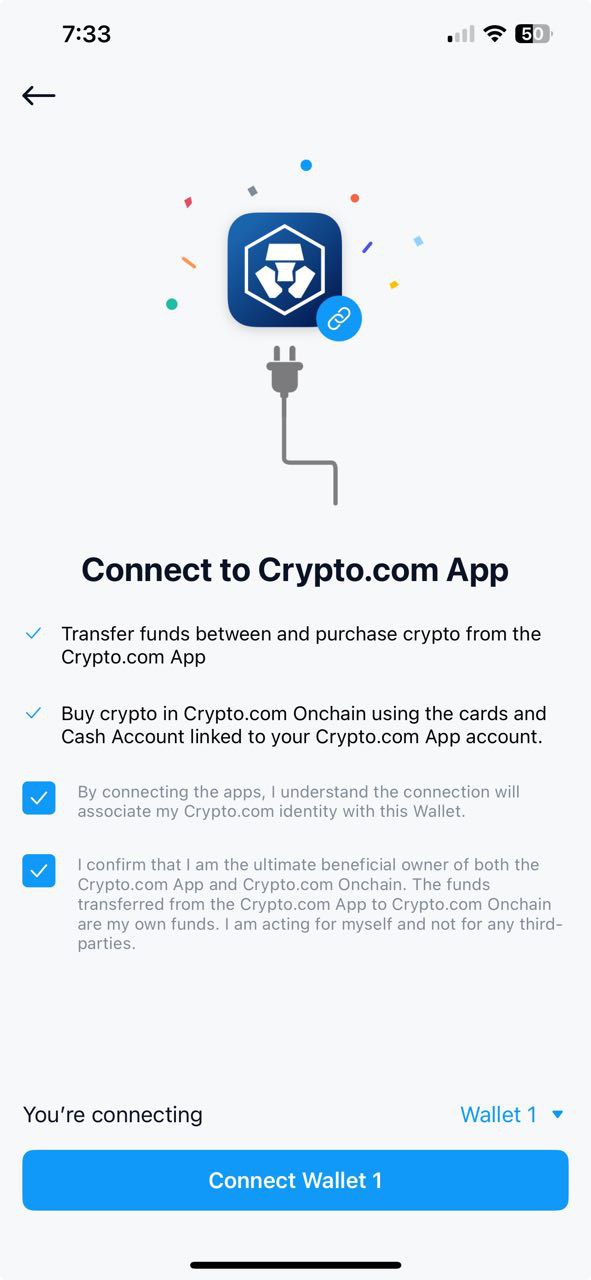
Once the Crypto.com App is linked to the Onchain Wallet, users have the option to use cards and cash from their Crypto.com account to buy cryptocurrencies in Crypto.com Onchain.
However, this does sacrifice anonymity as it ties the Crypto.com App identity with the Onchain Wallet, which is something that privacy-focused users should consider before making the connection.
To learn more about the centralized trading platform itself, check out our full Crypto.com review.
Buy, Swap, and Trade
One of Crypto.com Onchain Wallet’s core offerings is its native swap tool, which lets users transfer tokens between blockchains, buy new cryptocurrencies, and complete cross-chain swaps. With this built-in function, you can trade over 1,000 tokens across major networks, like Bitcoin, Ethereum, and Solana.
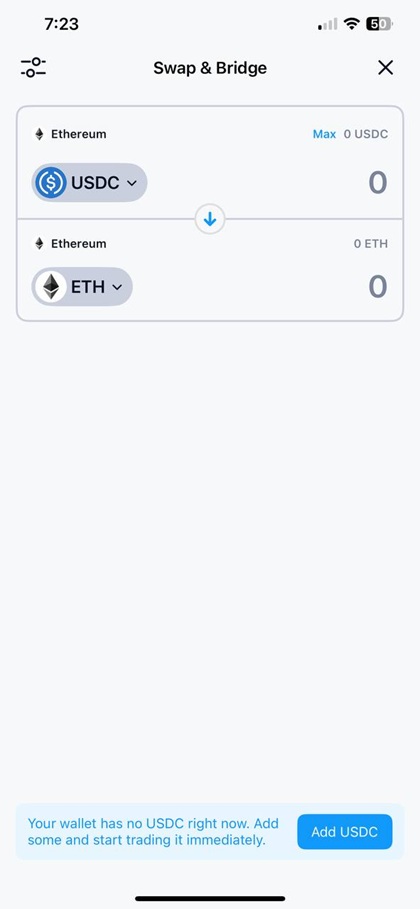
Onchain’s Trade tool also enables users to buy tokens using fiat currencies with Crypto.com Pay, its integrated fiat onramping service. Accepted payment methods include e-wallets (Apple/Google Pay) and bank cards. It’s perfect for beginners, as it eliminates the need to access an outside platform and perform additional steps to deposit cryptocurrencies.
Onchain’s Perpetuals platform offers futures trading on over 200 tokens with up to 200x leverage for seasoned traders looking for high-leverage trading opportunities. The feature connects to Fulcrom and dydX, some of the top decentralized crypto futures trading platforms.
dApp Support
As part of our Crypto.com Wallet review, we explored Onchain’s Web3 browser and found that the app already features some of the top dApps. Accessing these listed platforms greatly reduces the risk of entering potentially vulnerable sites and phishing scams.
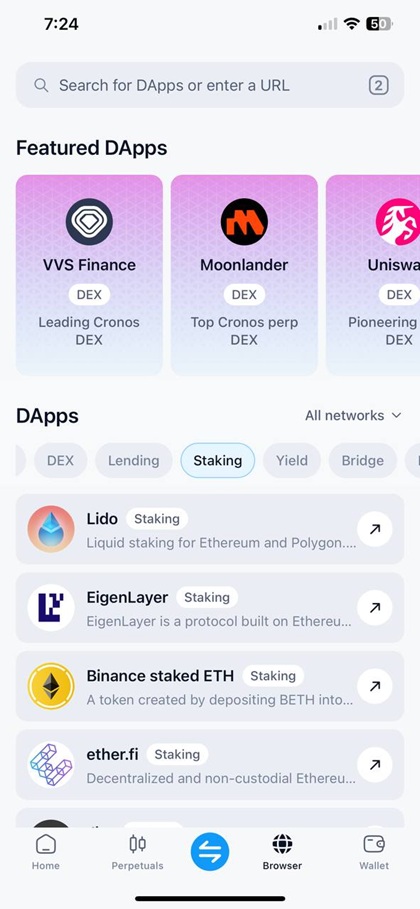
Crypto.com Onchain Wallet’s featured dApps range from popular decentralized exchanges (DEXs) to top lending platforms and staking apps. Some examples of supported dApps include:
- Uniswap (DEX)
- Jupiter (DEX)
- Curve Finance (DEX)
- AAVE (Lending)
- Morpho (Lending)
- Sky (Lending)
- Lido (Staking)
- EigenLayer (Staking)
- ether.fi (Staking)
NFT Management
Creators, collectors, and enthusiasts who actively showcase and manage NFTs can significantly benefit from Crypto.com Wallet’s NFT management platform. It supports Ethereum-based ERC-721 and ERC-1155 tokens, Cronos POS Chain NFTs, and Cronos Beta NFTs.
The NFT management interface allows holders to curate their NFTs into different sections to highlight different pieces. Additionally, users can share their NFTs on social media with customizable templates without leaving the OnChain platform.
Crypto.com Wallet Staking
The Earn feature on Crypto.com Onchain enables users to earn crypto passive income by depositing tokens into DeFi protocols, which in turn, grow their holdings. It offers staking, lending, and liquidity farming options from protocols like Compound, Yearn, Aave, and Cosmos.
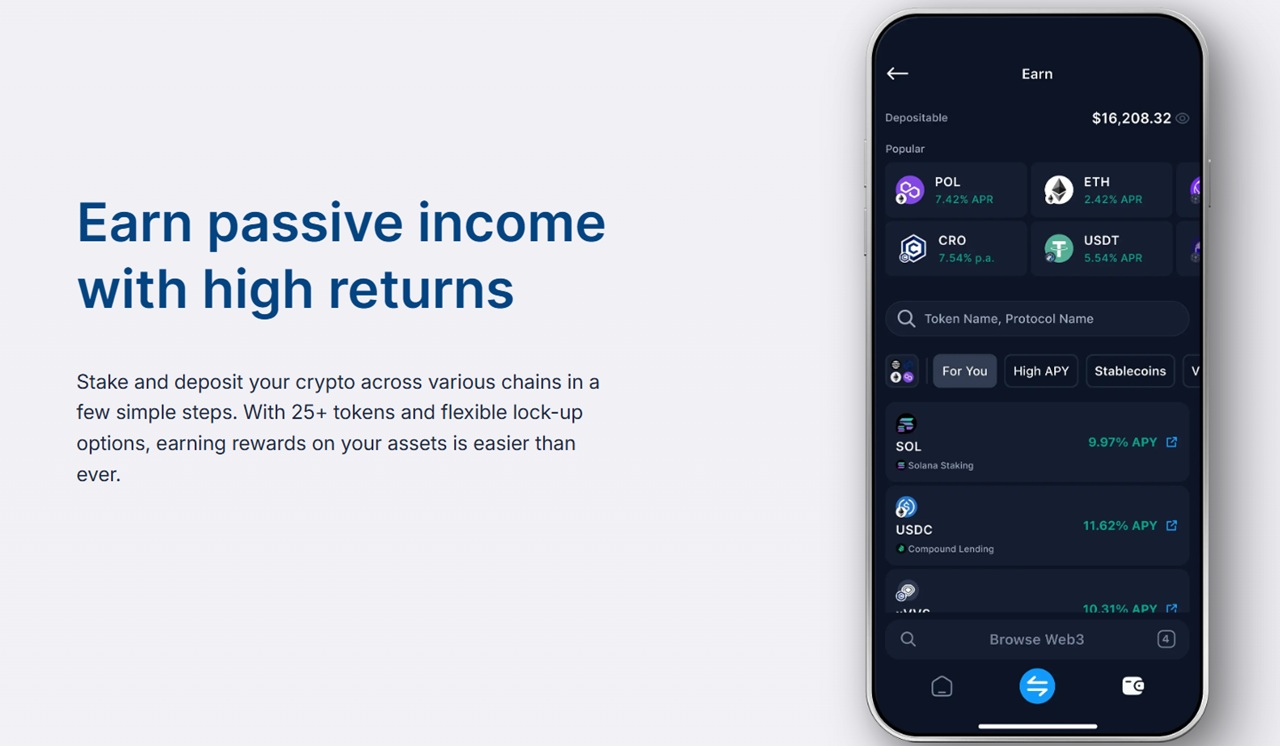
This feature is ideal for long-term crypto holders looking to earn from their idle token investments without exposure to centralized platforms. However, the complexity of the Onchain Earn service makes it best suited for advanced users who understand how to take advantage of the different protocols and risks.
Here’s a list of some of the available crypto staking tokens on Onchain with their respective yields:
- Cosmos (ATOM) – 16.37% p.a.
- Cronos (CRO) – 6.30% p.a.
- Solana (SOL) – 7.54% APY
- Ethereum (ETH) – 3.24% APY
Crypto.com Wallet Fees
The Crypto.com Onchain Wallet platform, including mobile, browser extension, and installation, is free to use. Users can receive and store cryptocurrencies at no additional cost.
The main fees that should be taken into account are network (gas) fees and third-party onramping fees. When sending cryptocurrencies to another wallet, users must pay the required network fee, which is determined by blockchain activity. Crypto.com Onchain does not apply extra charges on top of this.
Network fees also apply when using the native cross-chain token swap feature and earning function, as these require depositing cryptocurrencies to wallet addresses as well.
Users should be aware of both the transaction fee and network fee when buying cryptocurrencies with fiat payments. Crypto.com Pay charges a 3.99% transaction fee on fiat onramping, plus an additional network fee, which is included in the total payment amount.
Is Crypto.com Onchain Wallet User-Friendly?
We tested the mobile and browser extension versions of the Onchain platform for our Crypto.com Wallet review, and we found that both supported platforms offer a consistent and responsive experience.
The browser extension automatically pops up when opening Web3 applications, making it easy to access decentralized protocols and authorize transactions on a desktop. With the recent Onchain extension update, users can instantly view their digital asset balances and easily switch between networks.
On mobile, it took us just a few minutes to become familiar with the Onchain Wallet interface. We also found that you can set up a wallet or import an existing wallet in less than a minute.
One core functionality of the app is multi-wallet storage, which allows users to manage multiple wallets in one app. This meets the needs of users who prioritize clear asset visibility and flexibility in portfolio management.
We found the Crypto.com Onchain Help Center especially helpful for beginners and new users who need detailed information for key activities. Step-by-step instructions are provided for onboarding, trading, and recovery phrase management.Crypto.com Wallet Customer Support
Onchain Wallet users receive the same level of customer support as Crypto.com users, which includes live chat, FAQs, and extensive educational resources. The Crypto.com chat support typically replies in under 15 minutes, while its AI agent answers instantly.
Crypto.com Onchain Wallet Limitations
While Crypto.com Onchain Wallet offers many useful features and benefits, the platform has certain limitations that users, especially beginners, should consider.
Extensive support for DeFi protocols in its Earn feature may overwhelm new users unfamiliar with the decentralized staking process and its risks. Without prior experience, users may mistakenly lock up funds in high-risk pools or incur easily avoidable losses.
Another limitation is the wallet’s geo-restrictions for certain core features. Crypto.com Onchain Wallet bars access for Earn, Perpetuals, and Swap functionalities for certain regions. For instance, the Perpetuals platform is restricted to users in the United States, the United Kingdom, Canada, and other countries.
A complete list of these restrictions can be found in the Crypto.com Onchain Help Center.
How to Use Crypto.com DeFi Wallet
This part of our Crypto.com Wallet review provides a step-by-step guide on how to get started with Onchain, including screenshots for iOS installation.
Step 1: Install Crypto.com Onchain Wallet
Visit the Crypto.com Onchain Wallet page and click ‘Download Onchain.’ Scan the QR code with your smartphone and complete the installation process.
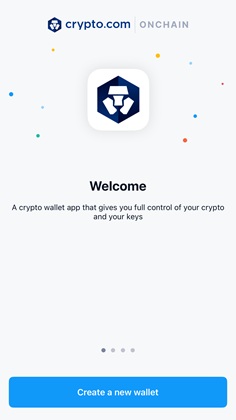
The entire setup should take just a few minutes to complete.
Step 2: Create a New Wallet
Open the Onchain Wallet app and tap ‘Create a new wallet.’ Type a secure 6-digit PIN, which will be used to unlock the wallet.
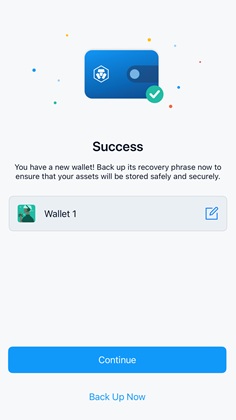
Once you have access to your wallet, you can enable biometric authentication via Face ID as an alternative verification method.
Step 3: Backup Your Recovery Phrase
While you can start using your wallet immediately, we recommend backing up the recovery phrase first.
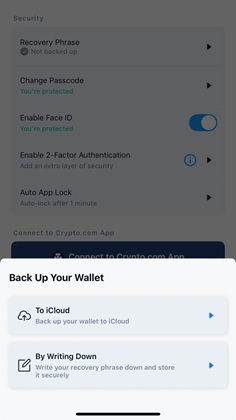
Tap ‘Back Up Now,’ and choose to back up your seed phrase either via online (iCloud) or by writing it down. Check the prompts to reveal your recovery phrase and verify the seed phrase in the app.
Step 4: Add Funds
The last step is to add funds to your wallet so you can interact with the many Web3 apps. On the dashboard, tap the light blue swap button in the middle and select ‘Buy.’ Choose a fiat payment method and complete the steps to add cryptocurrencies to your wallet.
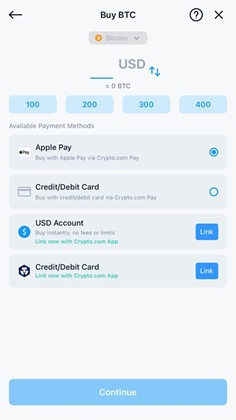
If you have cryptocurrencies in another platform, you may transfer them to your Onchain Wallet by tapping ‘Receive.’ Select the token you wish to transfer, and a wallet address and QR code will be revealed for scanning.
Conclusion: Is Crypto.com Onchain Wallet a Good Option in 2026?
Overall, our Crypto.com Wallet review indicates that the wallet is best suited for users with a strong grasp of decentralized finance. Its main selling point is the added benefits for those who are already part of the Crypto.com ecosystem.
Additionally, the wallet’s compatibility with over 30 blockchains and more than 4,000 tokens makes it a top choice for users with diverse crypto portfolios. For Web3 users with prior experience using DeFi apps and non-custodial wallets, Crypto.com Onchain Wallet provides a versatile and secure platform.
We also reviewed in-app features, including private key backups, Crypto.com account integration, token management (buy, swap, and trade), dApp access, and the NFT gallery. Last but not least, our methodology included a thorough inspection of Crypto.com’s wallet security features and fee structure.Our Methodology: How We Tested and Reviewed Crypto.com Wallet
Our Crypto.com Wallet review is based on hands-on research designed to give readers a clear, honest, and updated evaluation of the platform. After downloading and installing the Onchain Wallet, we explored its supported networks and cryptocurrencies while assessing usability, system stability, and overall performance.
FAQs
Can I connect the Crypto.com wallet to the Crypto.com exchange?
What is the difference between Crypto.com and Crypto.com DeFi Wallet?
Is Crypto.com Wallet legal in the US?
Does Crypto.com Onchain Wallet report to the IRS?
References
- Introducing Crypto.com Onchain: The New and Improved DeFi Wallet (Crypto.com)
- Introducing the New Crypto.com Onchain Extension (Crypto.com)
- Cronos (CRO): Overview and Examples in Cryptocurrency (Investopedia)
- Rise and fall of crypto exchange FTX (Reuters)
- Crypto.com Onchain (Crypto.com Help Center)


