 Trust Wallet Wallet Review 2026
- Store, swap, and manage 10 million tokens across 100+ networks
- In-wallet staking for passive income
- Real-time security alerts
In this Trust Wallet review, we’ll evaluate this software wallet, basing our research on hands-on testing and user feedback. We’ll cover its security features, supported coins and networks, fees, and trading tools. We’ll also compare Trust Wallet to Best Wallet, Zengo, Binance Wallet, and MetaMask, to single out its main strengths and limitations.
Keep reading to learn more about this decentralized digital wallet and find out what makes it one of the best software wallets for traders with diverse portfolios.
Our Take on Trust Wallet: Pros and Cons
Trust Wallet is used by over 200 million users worldwide. This beginner-friendly crypto wallet gives its users full custody and authority over their cryptocurrencies. That means you can use Trust Wallet without registering for an account or sharing any personal information. Trust Wallet is compatible across multiple devices – as a smartphone app on Android and iOS, and as a browser extension.
Trust Wallet supports over 10 million cryptocurrencies across 100+ blockchains and over 600 million NFTs. This creates a good opportunity for investors to diversify their investment portfolios. Its other standout features include hardware wallet integration, built-in DEX, dApp browser, NFT spam filter, and in-wallet staking.
On the downside, hardware wallet integration is only available through the Trust Wallet browser extension. What’s more, Trust Wallet doesn’t have a 24/7 live chat feature.
Pros
- Non-custodial wallet
- Supports over 10 million cryptocurrencies and over 600 million NFTs
- Undergoes regular independent audits
- Can be integrated with hardware wallets
- Built-in DEX and NFT spam filter
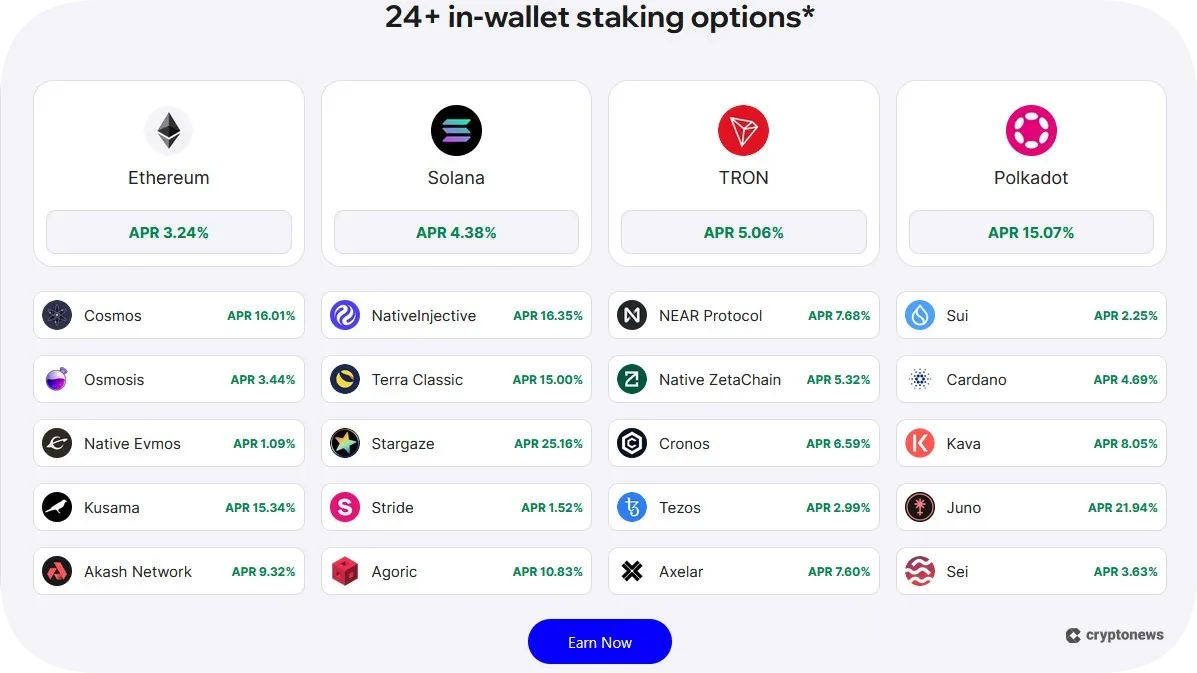
- 24+ in-wallet staking options
- Built-in dApp browser
- Trust Wallet doesn’t charge storage, swap, deposit, or withdrawal fees
Cons
- Hardware wallet integration is only available through the Trust Wallet browser extension
- No 24/7 live chat feature
- Lacks support for Polkadot and Sui token swaps
What is Trust Wallet?
Trust Wallet is a software cryptocurrency wallet launched in 2017 as a mobile app. However, it quickly became very popular among traders, which led to its acquisition by Binance a year later. Its customer base now consists of more than 200 million users, which is a significant achievement given the current competition. As the wallet grew, it decided to accommodate more people and thus extended to web browser support.
Trust Wallet will enable you to trade over 10 million digital assets across 100+ blockchains. Its main features include direct access to DeFi and dApps, in-wallet staking, swapping, and NFT management. You can also connect Trust Wallet with Ledger hardware wallets to keep your private keys offline.
Is Trust Wallet Decentralized?
Trust Wallet is one of the best decentralized digital wallets. This means that you’ll have full authority and control over your digital assets and private keys. Most users prefer decentralized wallets over centralized ones because they don’t involve a third-party intermediary.
Besides being decentralized, Trust Wallet is also non-custodial, meaning you won’t be required to register or undergo identity verification to perform transactions. This makes it a go-to anonymous wallet for users who value privacy.
Is Trust Wallet Safe? Security Features Reviewed
After thoroughly assessing its security features, we can conclude that Trust Wallet is safe to use.
This wallet has an AAA security rating on Cer.live, and a 91 security score on CertiK Skynet, which demonstrates its commitment to security. However, hardly any software wallet is immune to hacks.
That said, Trust Wallet held an impeccable security record until 2018, when hackers found a vulnerability in its open-source code. This vulnerability was caused by two functions that were intended to be used only for testing. However, Trust Wallet developers accidentally incorporated them into the iOS app, which enabled hackers to guess the private keys of wallets created between March and July 2018.
The second incident occurred in 2022, when hackers discovered a vulnerability in Trust Wallet’s browser extension, which affected wallets created between Nov. 14 and Nov. 23, 2022. This incident resulted in a loss of nearly $170,000.
These incidents have forced Trust Wallet developers to strengthen their security measures. For example, in 2022, they launched the Trust Wallet Security Scanner, a built-in feature that flags potentially dangerous transactions.
However, Trust Wallet’s browser extension was compromised again on December 25, 2025, leading to losses of $6 to $7 million. Bad actors found an exploit in the extension’s 2.68 update and managed to extract seed phrases and drain wallets. Changpeng “CZ” Zhao, Trust Wallet owner and former Binance CEO, stated on X that all users who lost funds in the attack will be reimbursed.
With that in mind, let’s discuss the key security features of Trust Wallet:
Encryption
Trust Wallet encrypts private keys using the Advanced Encryption Standard (AES) algorithm, which is also used by banks across the globe. Moreover, the passcode you set will be hashed before being saved on your mobile device. You can also use encrypted cloud backups to additionally secure your crypto holdings.
Security Monitoring and Alerts
Trust Wallet will notify you if it detects any potential threats or suspicious activities, allowing you to terminate dangerous transactions before signing them. In addition, you can take advantage of its built-in risk monitoring tools, which will protect you from scams and malicious smart contracts.
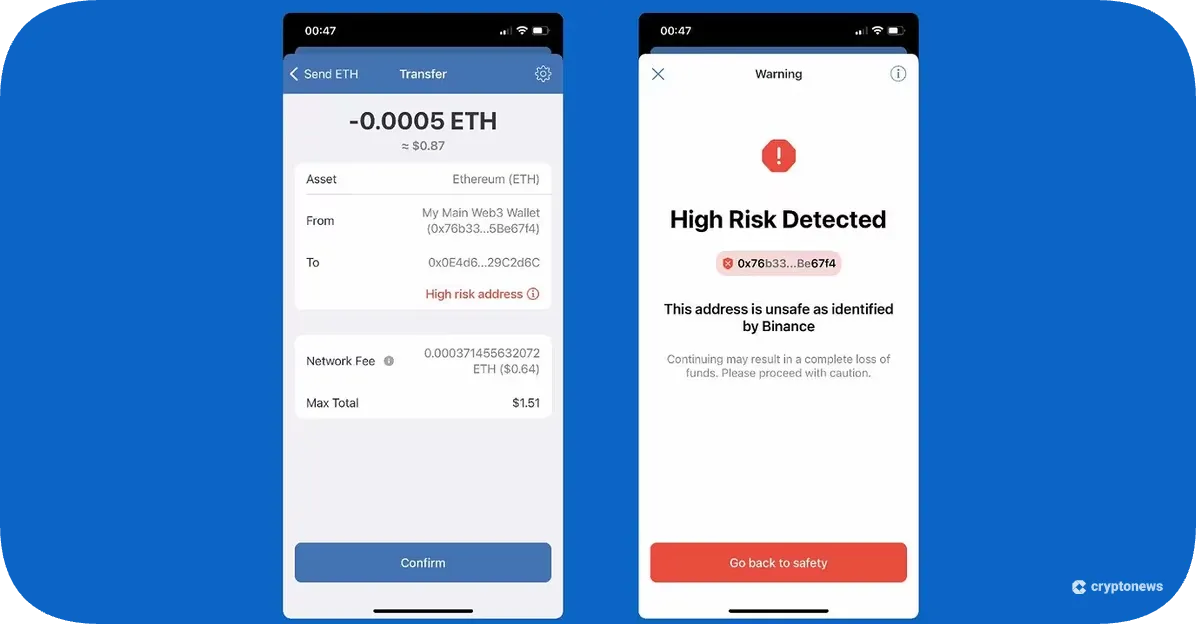
The wallet will also periodically send you security notifications, alerts, and warnings.
Independently Audited
Trust Wallet holds ISO 27701 and ISO 27001 certificates, which means it meets the highest security standards. The former shows that Trust Wallet complies with the general data protection regulations, while the latter demonstrates its compliance with the privacy regulations. Trust Wallet is also regularly audited by Certik, Cure53, and Halborn.
Hardware Wallet Integration
Trust Wallet can be integrated with one of the best cold storage crypto wallets – Ledger. You can connect your Ledger device to the Trust Wallet browser extension to store your private keys offline. However, this option is currently not available on the Trust Wallet mobile app.
NFT Safety Features
Trust Wallet utilizes a wide range of security features that you can use to protect your NFT transactions. For example, you can hide and report unsafe NFTs and take advantage of its built-in NFT spam filter.
Trust Wallet Supported Coins and Networks
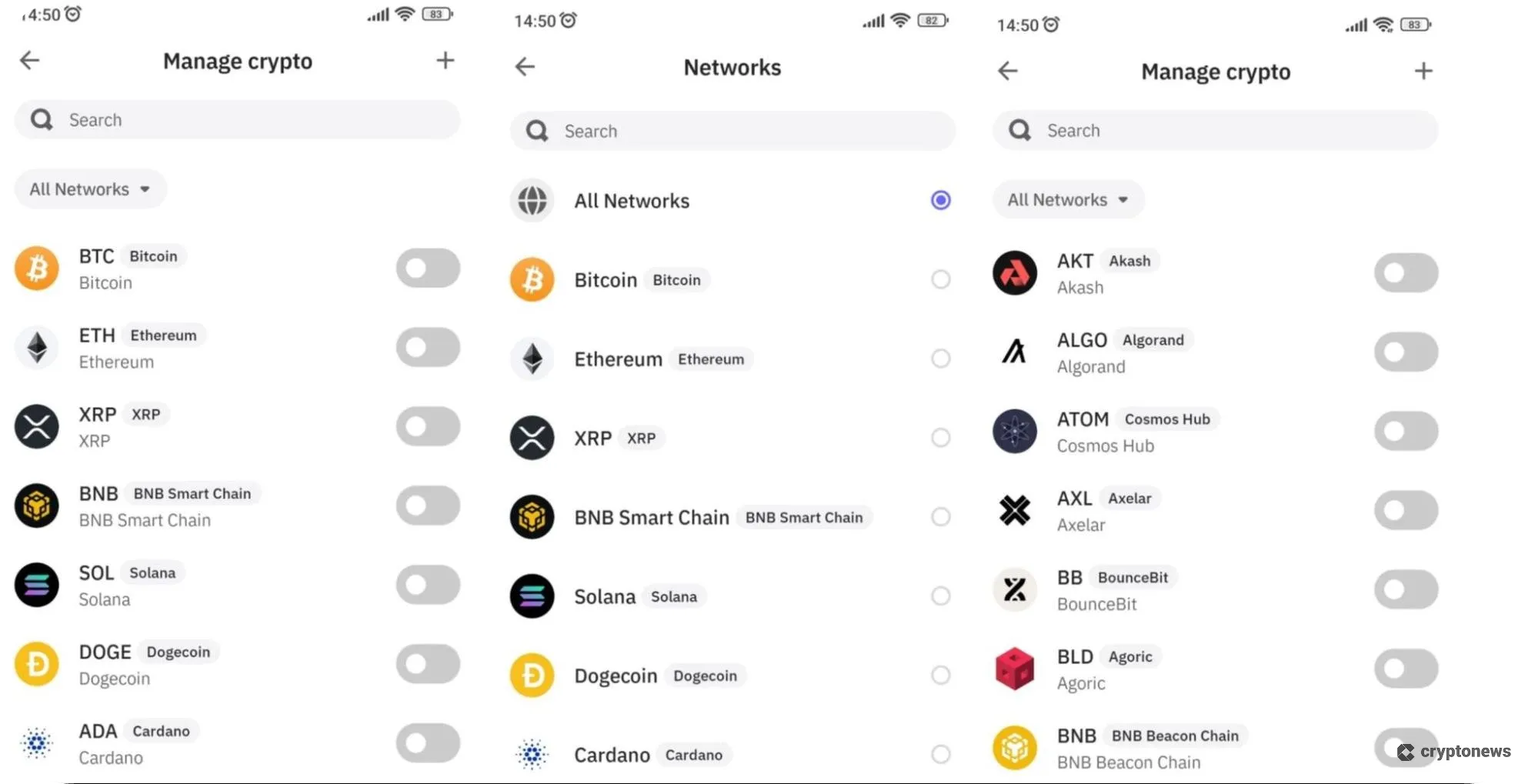
Trust Wallet supports 10 million digital assets across 100+ blockchains, from Bitcoin and Ethereum to BNB, Solana, and XRPL. This variety makes Trust Wallet a suitable option for those who want to diversify their crypto portfolios. You can also add custom tokens by tapping the + button (upper-right corner), entering the token’s contract address, name, symbol, and decimals, and clicking the Import button.
We noticed that in 2024, Trust Wallet discontinued support for the BNB Beacon Chain, while some older blockchains (like Decred or UTXO) are currently marked as “Not Supported.”
Trust Wallet Key Features
In this segment of our Trust Wallet review, we’ll discuss its main features, from trading, swapping, and staking to NFT management and dApp integrations.
Buy, Sell, and Swap Crypto
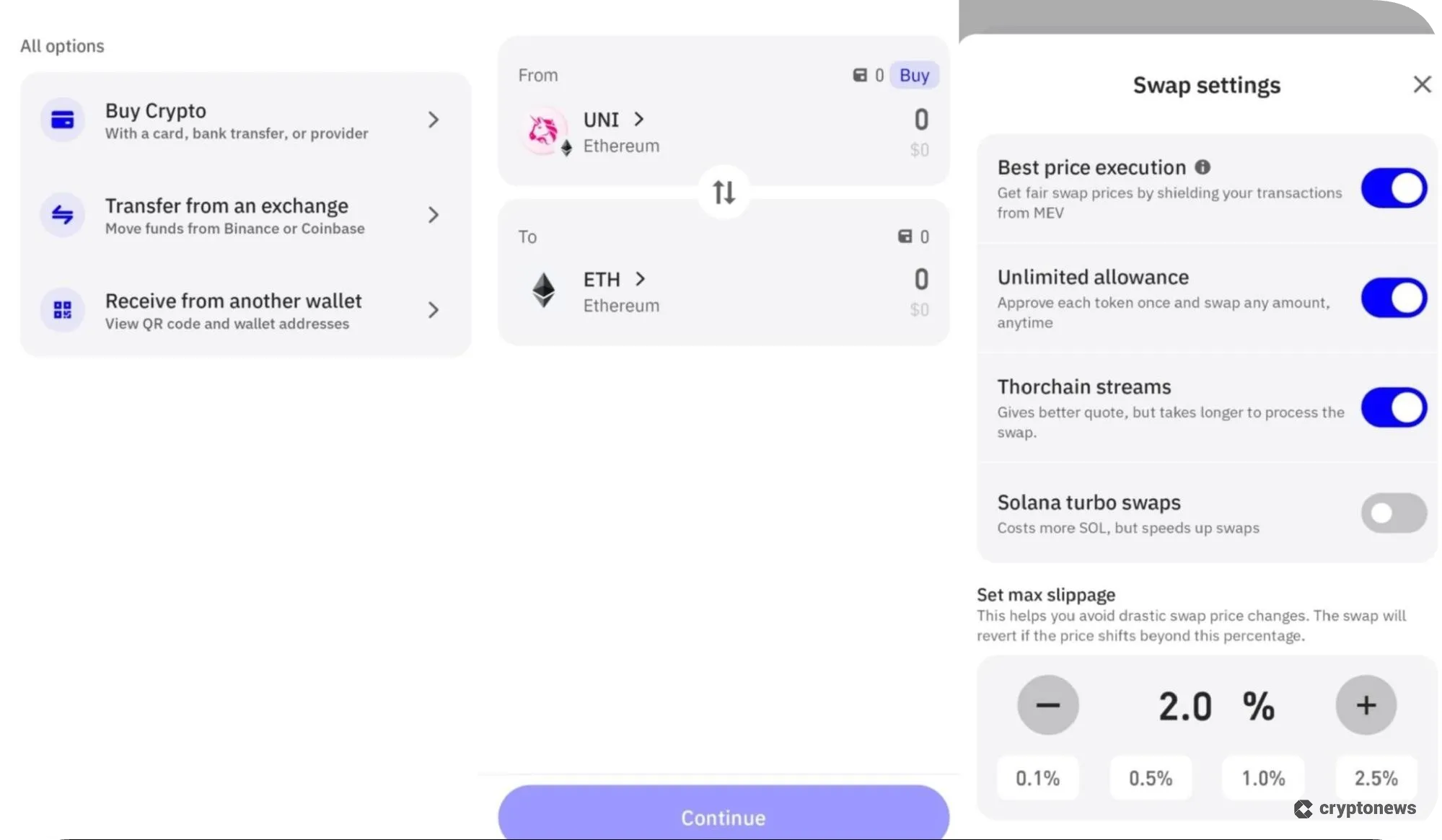
Trust Wallet is partnered with third-party onramp providers, such as Alchemy Pay, Banxa, Mercuryo, Moonpay, Ramp, and Transak. This means you’ll be able to buy and sell crypto using 110+ fiat currencies and multiple payment options, including credit/debit cards, bank transfers, SEPA, and Google Pay. You can also fund your wallet by transferring your assets from exchanges like Binance, Coinbase, or another wallet.
Trust Wallet has a built-in DEX that allows you to swap 1 million crypto pairs at the best rates. The wallet supports both same-chain and cross-chain swaps. If you go to settings, you can set maximum slippage manually and turn on the Solana turbo swaps option to speed up your swaps. However, you won’t be able to swap DOT and SUI.
On the positive note, Trust Wallet has recently introduced swaps on the highest-performing EVM blockchain – Sonic. This will allow you to swap between $S and Sonic-native tokens, such as ZAP, GEM, WARP, and FURY.
In-Wallet Staking
Trust Wallet supports 24+ in-wallet staking options, including ETH, BNB, SOL, TRX, and DOT. If you go to the ‘staking’ section on the Trust Wallet website, you’ll find a calculator, which will provide the estimated earnings from the current APR. The calculator even breaks it down into daily, monthly, and annual earnings. Trust Wallet doesn’t impose staking limits, while rewards will be distributed periodically, depending on the staked token.
You can also earn daily rewards by depositing stablecoins, like USDT, USDC, DAI, and USDA.
DeFi and dApp Access
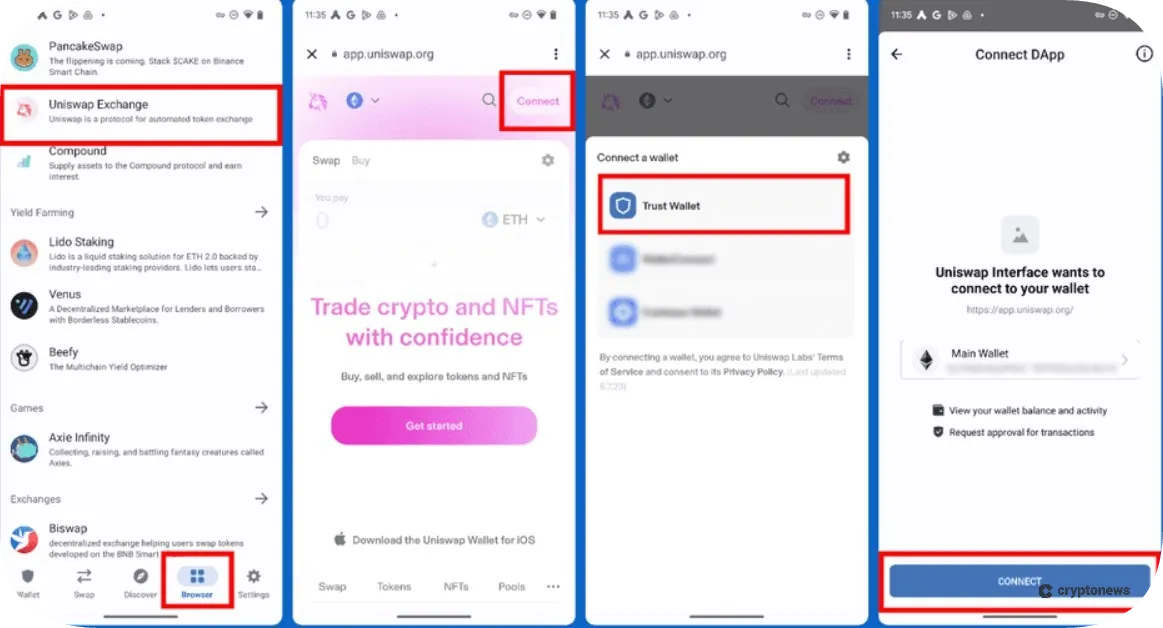
Trust Wallet has a built-in dApp browser extension that gives you access to various dApps, from DeFi platforms such as Uniswap, Aave, PancakeSwap, to NFT marketplaces like Magic Eden, OpenSea, and Blur. You can access the dApp browser directly from the wallet by navigating to the Discover section. Here you’ll find a curated list of dApps divided into different sections (games, social, liquid staking, DEXs, etc.).
As mentioned before, the wallet uses a security scanner to identify risky dApps and proactive alerts to warn you about risky dApp connections.
NFT Management
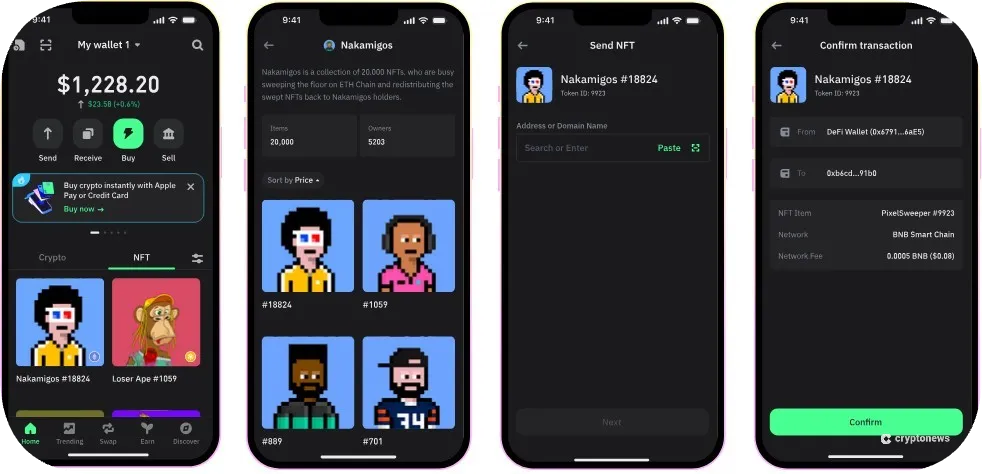
Trust Wallet supports NFTs on Ethereum, BNB Smart Chain, Optimism, Solana, Tezos, Avalanche, xDai, Arbitrum, and Polygon. You can use it to trade and manage over 600 million NFTs and connect to popular NFT marketplaces, like OpenSea, Rarible, Solanart, and Axie (Infinity).
Trust Wallet has a built-in NFT spam filter that will automatically hide spam NFTs. However, keep in mind that this feature doesn’t work on the Ronin and Moonriver blockchains.
SWIFT: Smart Contract Wallet
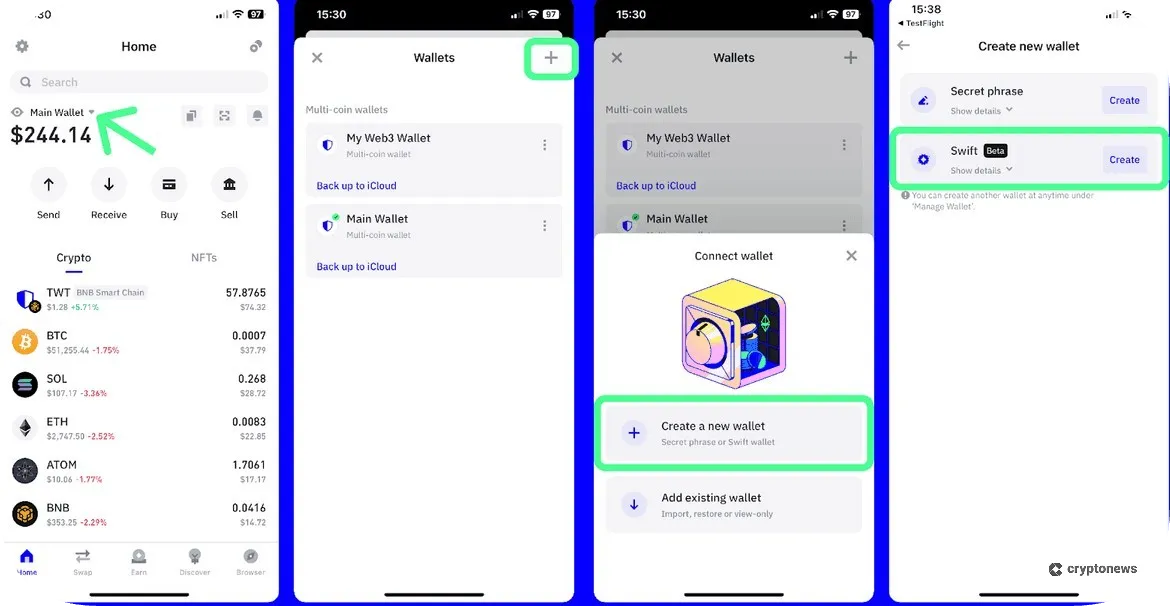
Trust Wallet SWIFT is a smart contract wallet powered by Account Abstraction, a technology that allows you to use smart contracts as your accounts. This simplifies Web3 access by enabling you to pay gas fees using 200+ tokens. You can also take advantage of features like one-click transactions and biometric-protected passkeys.
SWIFT supports crypto trading, swaps, dApps, and NFTs. However, you won’t be able to use it for staking. Moreover, this wallet is currently only available for iOS and Android devices (no support for desktop browsers).
On a positive note, you can use Trust Wallet and SWIFT together, as the latter comes as an additional option within the Trust Wallet app.
Trust Wallet Wallet Fees
Trust Wallet is available free of cost. You can download and install the mobile apps or browser extensions for free. It also doesn’t charge storage, swap, deposit, or withdrawal fees, meaning you’ll only need to cover the gas fees.
As we mentioned, you can also buy crypto using 110+ fiat currencies. The fees will depend on the provider and payment method. For example, Alchemy Pay charges a 4% fee on credit card purchases, while MoonPay charges a 1% fee for bank transfers and a 4.5% fee for credit card purchases.
| Installation Fee | None |
| Storage Fee | None |
| Transaction Fee (Receiving Funds) | None |
| Transaction Fee (Transferring Funds) | Gas fees only; network-dependent |
| In-Wallet Swaps | No fee is charged, but please note the exchange rate |
| Credit/Debit Card Purchases | Depends on third-party payment providers (1% to 5%, in most cases) |
Is Trust Wallet User-Friendly?
In this segment of our Trust Wallet review, we’ll discuss its functionality, responsiveness, and design.
After testing this wallet, we can conclude that it has a very intuitive interface. Even if you have no experience with crypto wallets, you’ll be able to easily navigate through its apps. For example, at the top of the home page, you’ll find four icons – Send, Swap, Fund, and Sell – while on the navigation bar at the bottom of the page, you’ll find five main buttons – Home, Trending, Swap, Earn, and Discover. By tapping these, you can view popular tokens, activate the swap function, access earning options, and open the dApp browser.
The popularity and positive user experience of Trust Wallet apps are well-documented by their reviews on Google Play and App Store. On that note, Trust Wallet has a 4.5/5 and a 4.7/5 rating on the mentioned platforms based on 2.38 million and 194,000 reviews, respectively.
The Trust Wallet browser extension is compatible with Chrome, Brave, Edge, and Opera. The differences between Trust Wallet apps and browser extensions are small, as far as design is concerned. However, hardware wallet integration is only available through the Trust Wallet browser extension, while Trust Wallet SWIFT is only available for iOS and Android devices.
Trust Wallet Customer Support
Trust Wallet doesn’t offer a 24/7 live chat feature like most crypto wallets. However, you’ll be able to reach its support team via X (ex Twitter), Instagram, Facebook, Reddit, Warpcast, and TikTok. You can also join the Trust Wallet community on Telegram. If you click the Support icon, you’ll find answers to frequently asked questions. Another way to reach its customer support is by submitting a ticket.
You can also use the Trust Wallet chatbot (currently in beta) to get answers to basic questions, such as how to set up the wallet and how to use the NFT spam filter. However, for more complex issues, we suggest submitting a ticket.
How to Set Up and Use Trust Wallet
Before wrapping up this Trust Wallet review, let’s go over the steps that you need to follow to open a new wallet:
Step 1 – Install Trust Wallet App or Extension
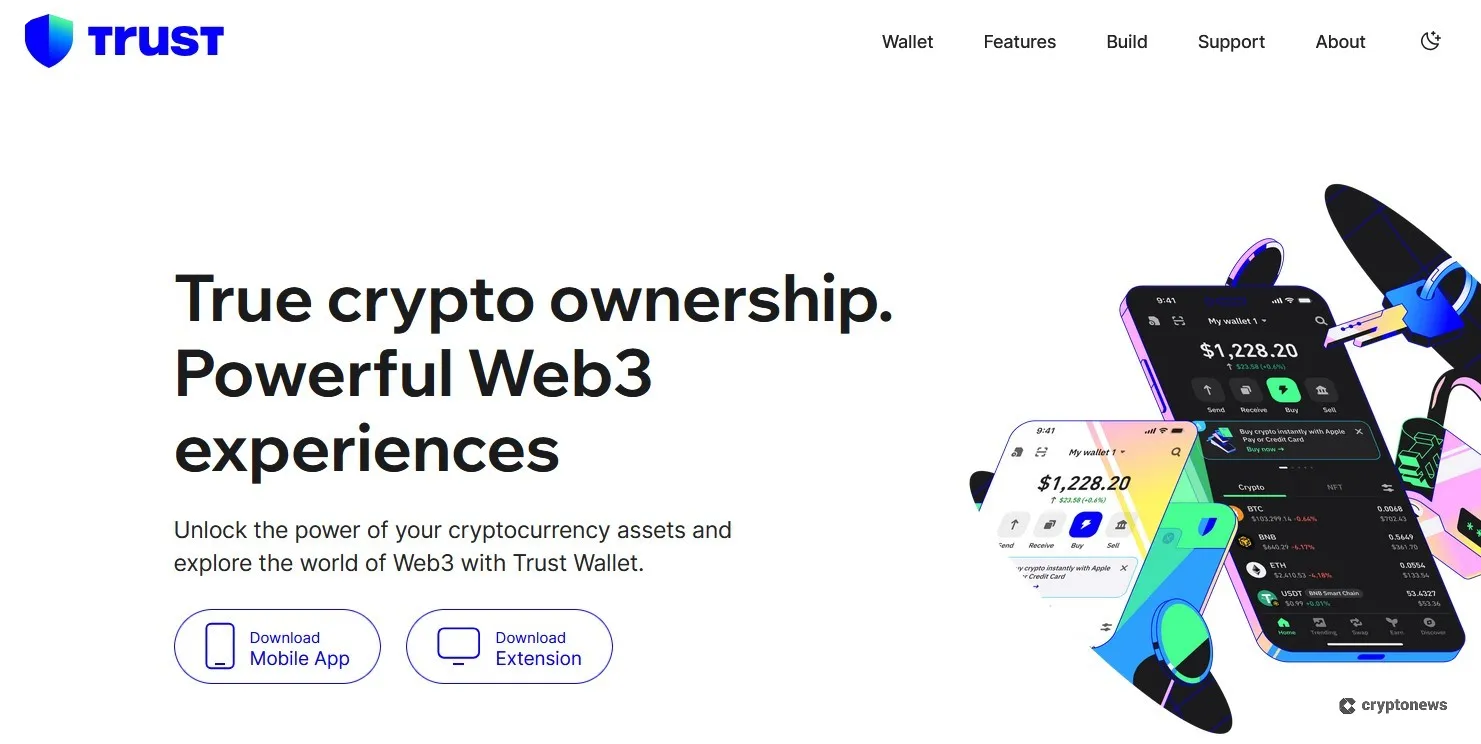
Visit the Trust Wallet’s official website and tap the Download mobile app or download extension button.
Step 2 – Create a New Wallet
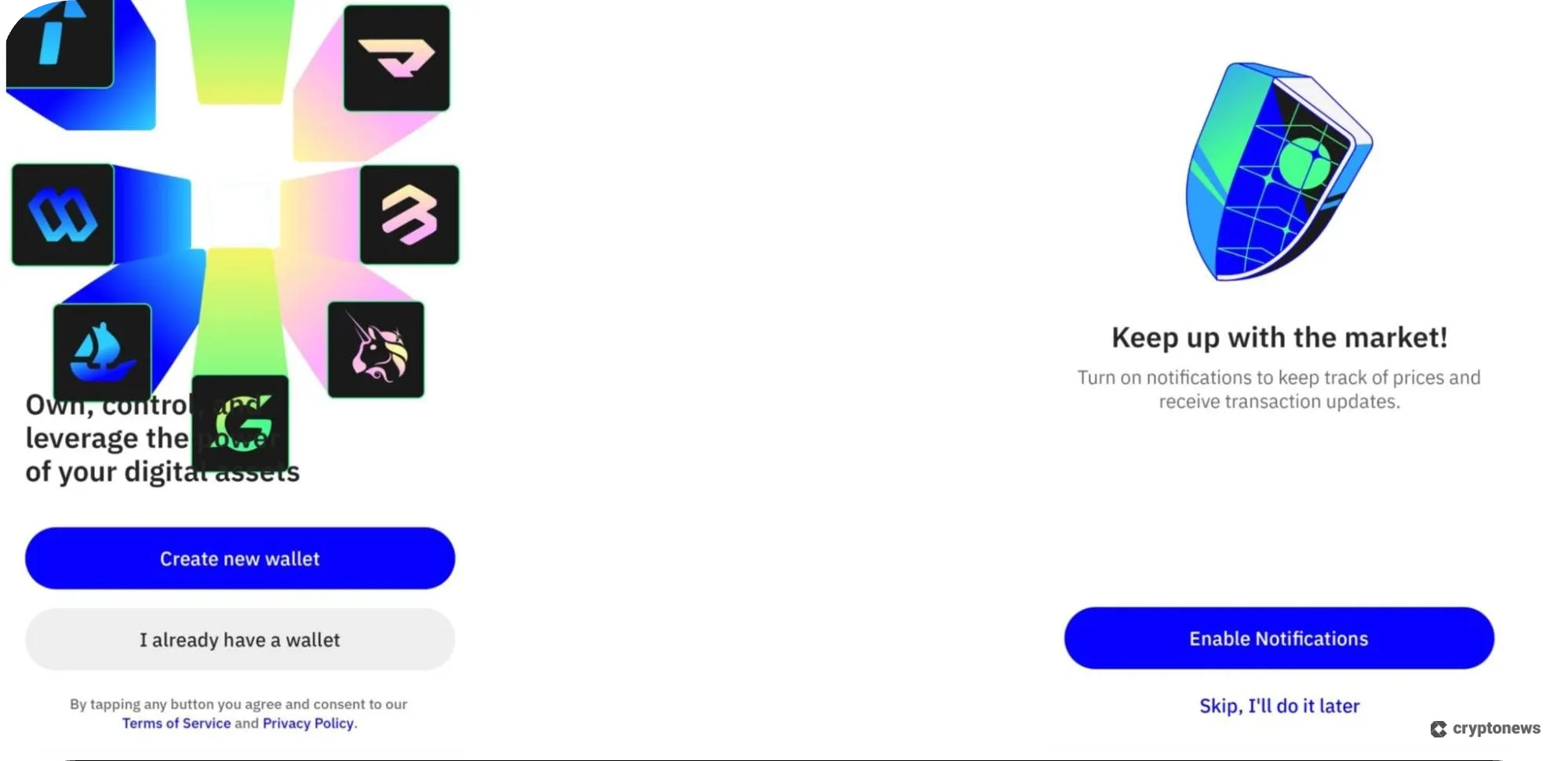
Once you have successfully downloaded the app, open the Trust Wallet app, tap the Create new wallet button, and create a 6-digit passcode. Confirm your passcode by re-entering it. You can also choose to enable notifications or skip this part.
Step 3 – Buy Crypto
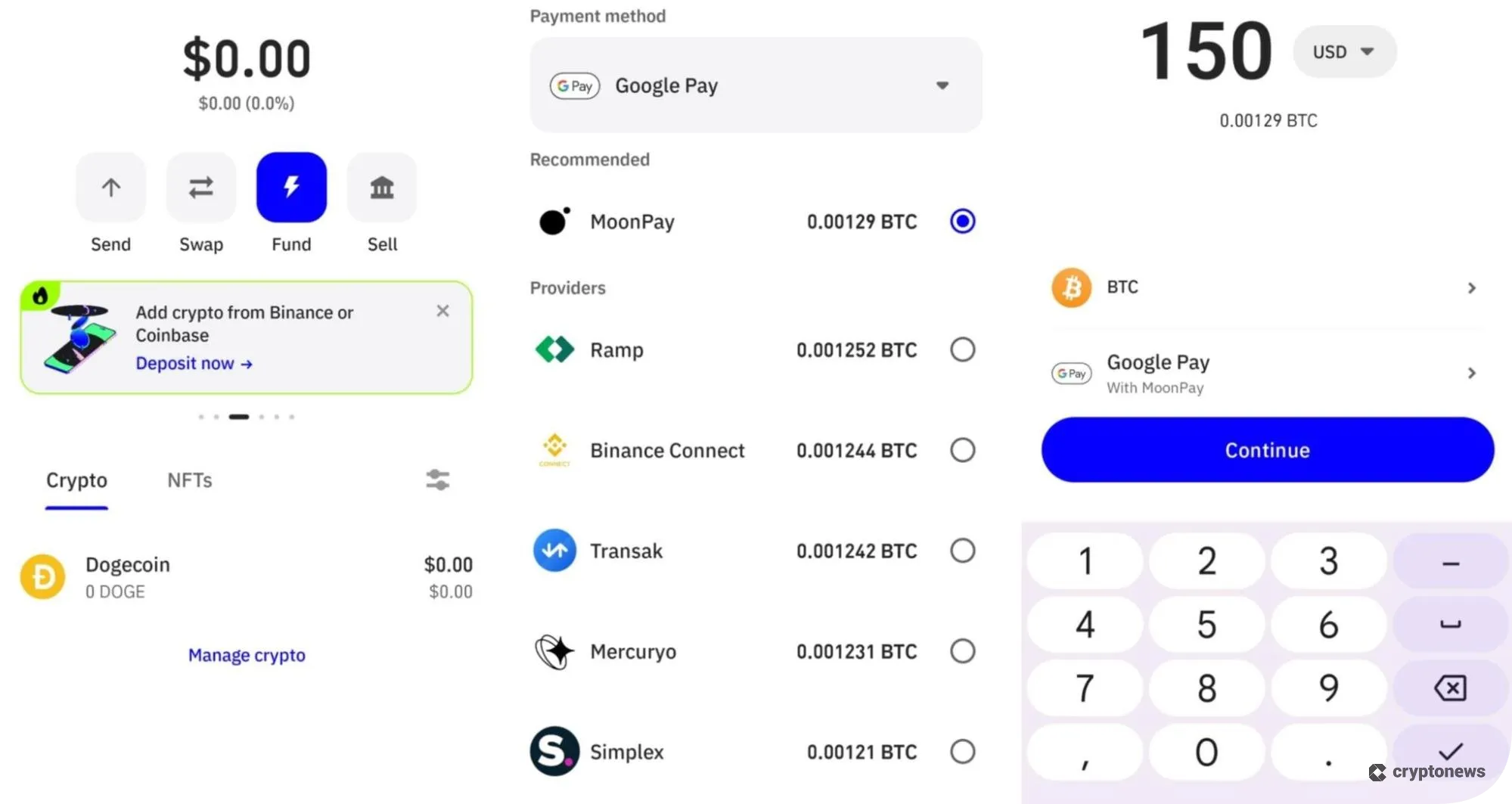
Tap the Fund button and choose between three options:
- Buy crypto with a card, bank transfer, or a provider
- Deposit funds from Binance or Coinbase
- Receive funds from another wallet
To buy crypto with a credit card, tap the first option, select the crypto you wish to purchase, and enter the amount you want to buy. Choose a payment method and click on the Continue button. Once the payment provider is selected and KYC is completed, the newly bought crypto tokens will be added to your wallet.
Trust Wallet Limitations
Trust Wallet has several disadvantages that you should keep in mind. First of all, this is a software wallet, which makes it more vulnerable to hacks since it’s connected to the Internet. Moreover, it doesn’t have a native desktop app, only a browser extension, which is compatible with Chrome, Brave, Edge, and Opera, but not Firefox.
Secondly, you’ll be able to connect your hardware wallet to Trust Wallet, but only via the browser extension. And finally, Trust Wallet doesn’t offer support via live chat. This means that you’ll be able to reach its customer support only through social media channels.
Trust Wallet Alternatives
Some of the best Trust Wallet alternatives include Best Wallet, Zengo, Binance Wallet, and MetaMask. Here’s how these wallet providers compare to Trust Wallet.
| Installation Fee | None |
| Storage Fee | None |
| Transaction Fee (Receiving Funds) | None |
| Transaction Fee (Transferring Funds) | Gas fees only; network-dependent |
| In-Wallet Swaps | No fee is charged, but please note the exchange rate |
| Credit/Debit Card Purchases | Depends on third-party payment providers (1% to 5%, in most cases) |
Trust Wallet Review Conclusion: Who Is It Best For?
Trust Wallet is a software wallet that will benefit both beginners and experienced traders. This non-custodial wallet supports over 10 million coins and tokens across 110+ blockchains, and over 600 million NFTs. It has all the features that users may seek in a reliable wallet, such as security, a user-friendly interface, built-in staking and swap features, etc.
The wallet gets extra points for keeping its charges free or minimal, thus making it a good choice for new users who want a beginner-friendly multi-chain wallet for everyday use.
Our Methodology: How We Tested and Reviewed Trust Wallet
We wanted to create an unbiased Trust Wallet review to help you decide if this wallet is right for your trading style. To do that, we downloaded the wallet and tested its security and trading features, which helped us evaluate its performance and usability. In addition to that, we checked its security ratings on sites like Cer.live and CertiK Skynet, and reviewed its ISO 27701 and ISO 27001 certifications to make sure they were legitimate.
Next, we tested its in-app swap feature to see how long it takes to execute both same-chain and cross-chain swaps. We also tested its in-wallet staking feature and dApp browser to make sure there are no technical bugs. And finally, we compared Trust Wallet with other hot wallets and analyzed the experiences of other users to identify its biggest strengths and limitations.
Based on our research, Trust Wallet is suitable for beginners and traders with diverse portfolios due to its user-friendly design and a large list of supported coins and NFTs. On the other hand, hodlers and those who hold large crypto balances should opt for a hardware wallet.
FAQs
Is Trust Wallet legit?
Is Trust Wallet the same as Binance Wallet?
Is Trust Wallet safe to use in the USA?
Who runs Trust Wallet?
Is Trust Wallet untraceable?
References