


 SafePal Wallet Review 2026: How Reliable Is It?
- Affordable air-gapped hardware wallets with strong security features
- Free software wallet supports 200+ blockchains and 10,000+ tokens
- Built-in features include swaps, staking, dApp access, and fiat purchases
SafePal is a popular crypto wallet that offers non-custodial storage across software applications and hardware devices. While many crypto investors rate the storage provider highly, this SafePal wallet review helps you make an informed decision.
Learn how SafePal compares with other digital asset wallets for security, pricing, supported networks, and other key factors. Our research team tested each available device type and operating system to ensure accuracy and impartiality. Read on to discover our findings.
Those with large crypto balances opt for SafePal’s hardware wallets. It offers three models, two of which use air-gapped security. Prices are highly affordable, too, ranging from $49.99 to $89.99. All wallet versions are suitable for asset diversification, as SafePal supports over 200 blockchains. This covers 10,000 pre-installed cryptocurrencies and millions of additional assets via custom tokens. One of the main drawbacks is a lack of desktop software support, which disappoints users preferring native applications for Windows, Mac, or Linux. Customer service is also subpar, with users (including paying customers) receiving support via online tickets only.Our Take on SafePal: Pros and Cons
SafePal is a reputable wallet provider that caters to multiple client use cases. Casual investors may prefer the free software wallet. It comes as a mobile app and browser extension, plus a wide range of side features like fiat facilities, instant swaps, and staking tools.
Here is a summary of the key pros and cons from our SafePal wallet review:
Pros
Cons
What Is SafePal Wallet?
SafePal is a crypto wallet manufacturer founded in 2018. Headquartered in Seychelles and receiving early strategic funding from Binance, more than 20 million people have purchased SafePal wallets since its inception. SafePal is one of the few wallet providers to offer both software and hardware solutions. Both versions offer non-custodial storage with encrypted private keys, ensuring users fully control their digital asset investments.
The software version offers a mobile app for iOS and Android, as well as a browser extension for Chrome, Firefox, and Edge. These hot wallets come pre-loaded with features like dApps, instant swaps, and fiat gateway purchases.
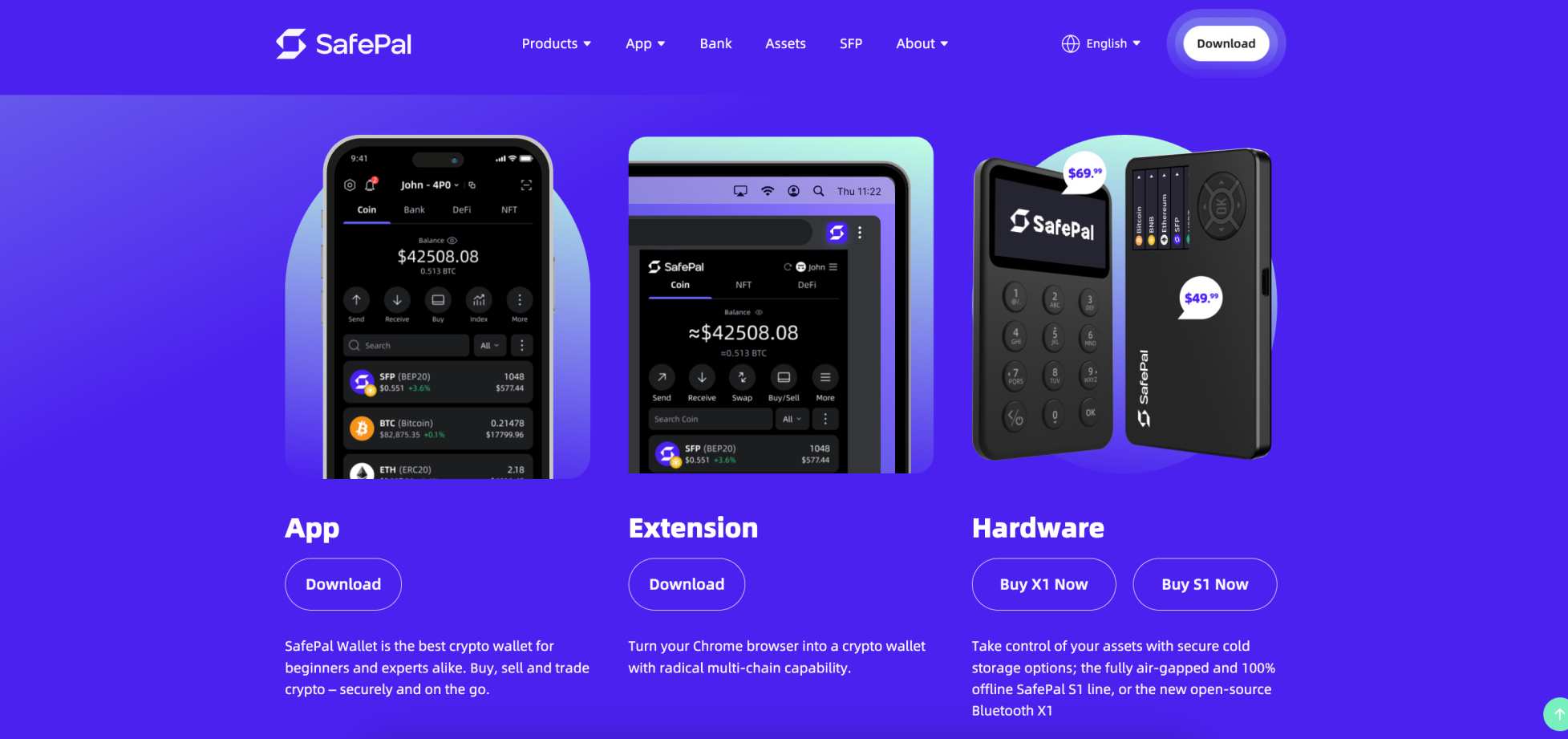
Investors with substantial crypto holdings prefer the hardware wallet. It stores private keys within a physical device, and users approve transactions via air-gapped technology. This security mechanism eliminates external connection risks, like the internet and Bluetooth. One of the hardware device’s best features is its built-in camera, so users can authorize transactions by scanning unique and time-sensitive QR codes (S1 and S1 Pro only).
While SafePal primarily specializes in wallet services, its ecosystem also offers crypto-centric bank accounts. These licensed accounts provide traditional banking services like global transfers and online purchases via MasterCard debit cards.
SafePal Wallet Types
SafePal offers software and hardware wallets. Each wallet type serves different use cases and client requirements.
This section of our SafePal wallet review covers each storage product.
Software Wallet
The SafePal software wallet offers hot storage on mobile and desktop devices. Supported operating systems include iOS, Android, Chrome, Firefox, and Edge. Both versions offer similar features and experiences, although the app appeals to users who prefer managing cryptocurrencies on the move. In addition, hardware device users need the mobile application specifically to authorize wallet movements (more on that shortly).
The software version is free, and users download and store encrypted private keys on their respective devices. As a non-custodial provider, only the user can access those keys and thus approve outgoing transactions and third-party connections.
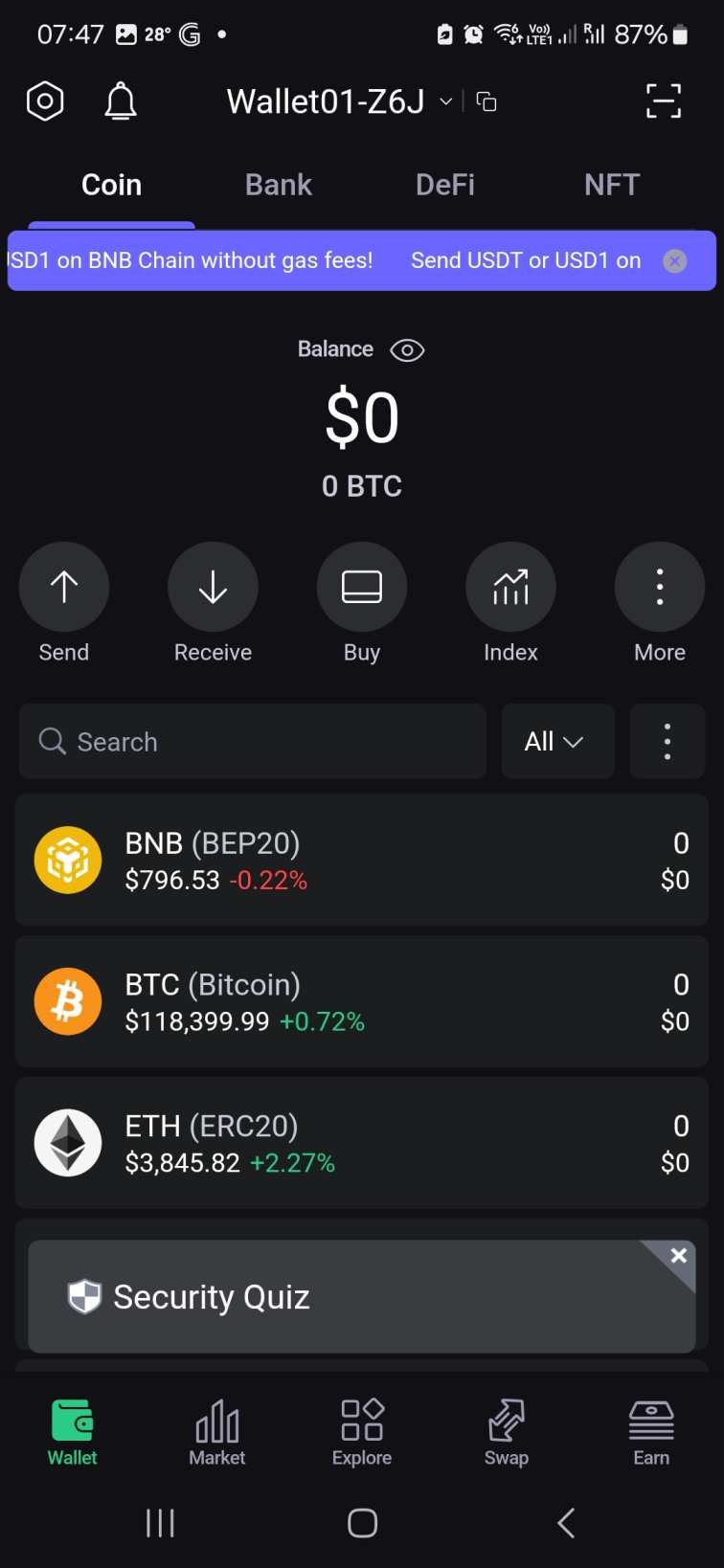
The SafePal app and browser extension support the same cryptocurrencies and networks as the hardware models. Asset coverage features 10,000 pre-loaded coins and tokens, including the best altcoins like Ethereum, Dogecoin, and Cardano. Users may add custom tokens via their smart contract addresses, expanding support to millions of digital assets.
Hardware Wallet
SafePal manufactures three hardware devices: S1, X1, and S1 Pro. They retail for $49.99, $69.99, and $89.99, respectively. Each model is highly rated and ensures safe and non-custodial storage, making them ideal choices for storing high-value crypto portfolios.
Budget users like the SafePal S1 for its affordable combination of air-gapped security and rechargeable battery. The air-gap system removes Bluetooth, USB-C cables, and, of course, remote internet threats. Users enter the transaction details on the SafePal app, which generates a unique QR code. They scan the QR code with the device’s camera, and finally, scan back using the mobile app.
The SafePal X1 wallet is a better fit for complete beginners, particularly those who aren’t comfortable with the air-gapped system. It resembles a small calculator and is the only SafePal model to rely on Bluetooth and USB-C connections. Users approve transactions by entering their PIN on the device.
The S1 Pro is the most premium SafePal model, yet it retails for just $89.99. The device offers stronger build quality, optimized camera placement, and longer battery life. For many, the device is worth the extra $20 or $40 compared to the cheaper models.
Here is a specification table comparing the SafePal S1, X1, and S1 Pro:
SafePal S1
SafePal X1
SafePal S1 Pro
Price (excludes VAT and duty)
$49.99
$69.99
$89.99
Display Size
1.3’
1.8’
1.3’
Resolution
320*320
128*64
320*320
Battery Capacity
400mAh
200mAh
500mAh
Connectivity
Air-gapped signing
Bluetooth or USB-C
Air-gapped signing
Chip Type
CC EAL6+
CC EAL5+
CC EAL6+
Security
100% air-gapped, tamper-proof safeguards, robust EAL 6+ independent chip
Encrypted Bluetooth, physical PIN approval, open-source framework
100% air-gapped, enhanced self-destruct, robust EAL 6+ independent chip
Blockchains
200+
200+
200+
Standout Feature
Approve transactions without Bluetooth or cables
Premium build
Best For
Budget-conscious
Beginners
Serious crypto investors
SafePal Wallet Supported Coins and Networks
Whether you opt for the software or hardware versions, SafePal is one of the best crypto wallets for asset compatibility. The wallet initially supports over 10,000 popular cryptocurrencies, from Bitcoin, Solana, Tron, and Ethereum, to BNB, Sui, Stellar, and XRP.
SafePal works with over 200 blockchains and networks, and users can manually add custom tokens if they aren’t available initially. Just add the token’s smart contract, and it appears in the wallet right away.
For these reasons, SafePal remains a top option for storing all digital asset investments in one safe place. There isn’t a need to manage multiple wallet interfaces, which in itself is cumbersome and risky.
While we discuss additional features shortly, not all supported assets are available for token swaps or fiat purchases. For example, wallet users can swap Cronos and Filecoin, but not directly buy these cryptocurrencies with traditional money. The simple workaround is to purchase a more established coin like Ethereum first and swap it for the destination asset.
Is SafePal Safe? Security Features Reviewed
SafePal remains one of the most secure crypto wallets on the market, yet experts recommend its hardware devices for storing large balances. Unlike the software version, SafePal devices offer cold storage, so users must approve transactions via air-gapped security or Bluetooth/USB-C cables, depending on the model.
Their cold solutions ensure the device never connects to live internet servers, preventing crypto investors from remote threats like viruses and malware.
No SafePal wallet has ever been hacked, ensuring a safe and credible experience for its 20 million customers. With a 4.9/5 and 4.5/5 rating on the App Store and Google Play, SafePal has one of the best reputations in the wallet industry.
In this section of our SafePal crypto wallet review, we examine key security features and safeguards in more detail.
Air-Gapped Design
The SafePal S1 and S1 Pro models each offer 100% air-gapped security. Blockchain experts explain that air-gapped wallets offer an extra layer of security, as devices are completely isolated from external network connections like Bluetooth and Near Field Communication (NFC). While rare, these network types may present malware infection risks, which isn’t possible with the air-gapped system.
If you’re wondering how users initiate wallet movements, SafePal uses a double-sided scanning system. First, users enter transaction details into the SafePal app, and a QR code is generated. The device has a built-in camera, which scans the QR code via the mobile app. Finally, the mobile app scans a QR code on the hardware device, and the transaction broadcasts to the blockchain. This framework is the most secure way to send and receive digital assets.
Secure Element Chip
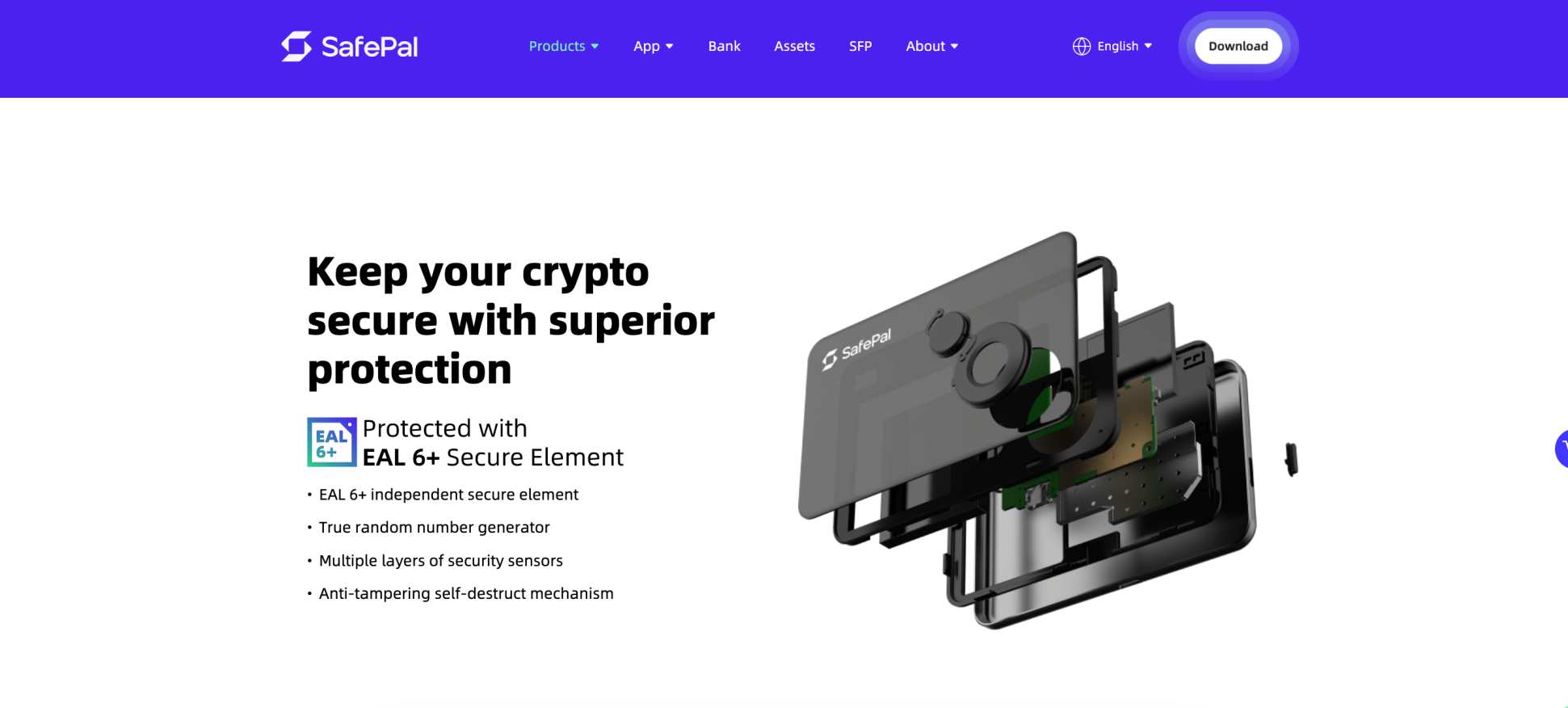
SafePal X1 has a secure element chip rated CC EAL5+, while the S1 and S1 Pro have the slightly more robust CC EAL6+. These are globally recognized standards for chip durability, and they ensure user-owned private keys are generated and stored securely.
The chips never expose keys, as the military-grade design signs transactions internally. They also resist side-channel attacks like voltage glitching.
Two-Factor Authentication
As one of the best decentralized crypto wallets, SafePal does not offer traditional two-factor authentication. This feature isn’t possible, as users manage and control their wallet balances, rather than any centralized third party (like Google Authenticator).
That said, outgoing transactions do require an extra step before the wallet approves them. The SafePal X1, for instance, requires the user to enter a physical PIN on the hardware device. S1 and S1 Pro users complete the air-gapped process by double-scanning QR codes.
Anti-Tampering Self-Destruct Mechanism
This security feature is offered by the SafePal S1 and S1 Pro models. It ensures stolen devices remain protected from tampering attempts, such as physically opening the device to perform invasive attacks like laser injection.
If a model is tampered with, the device automatically wipes the private keys from its memory, rendering it useless. The user may still recover the wallet balance remotely from the backup seed phrase, which we will explain shortly.
Firmware Anti-Tampering Protection
All SafePal models have firmware anti-tampering safeguards. These ensure firmware updates (required to update the device against the latest threats) use software-level defences. It confirms the firmware remains unmodified and that it cannot install nefarious malware.
PIN Code
SafePal X1 is a calculator-style device that requires physical PIN approval. Users choose their preferred 6-12 digit PIN when setting up the wallet, and enter it whenever they transfer funds or connect to third-party applications.
The air-gapped models do not have PIN features on the devices themselves, but users must enter a security password or biometrics to access the mobile app.
Passphrase
All SafePal versions have a backup seed phrase of 12, 15, 18, or 24 randomly generated words, depending on the user’s preference. It enables users to recover their wallet balance if they can’t log into the software app or extension, or if the hardware device is lost, stolen, or damaged. This security system is used by most non-custodial wallets.
The standout feature is the passphrase add-on. This is an additional, custom word (up to 60 characters) the user selects, and it creates a new set of private keys. Experts recommend memorising the extra word, as it ensures no physical trace exists.
SafePal Wallet Additional Features
Our SafePal wallet review explored the iOS and Android apps to test the built-in features and tools. They allow access to the broader crypto ecosystem while retaining the wallet’s institutional-grade security.
Here’s what to expect when navigating the SafePal app.
Swaps & Token Management
SafePal users trade cryptocurrencies without leaving the mobile interface. The app comes integrated with the Binance exchange, allowing users to access the world’s largest liquidity book across hundreds of markets.
SafePal supports decentralized exchanges (DEXs), too, including Uniswap, SushiSwap, and PancakeSwap. For the best crypto exchange rates, consider the 1inch aggregator. Users enter their swap cryptocurrencies, and 1inch finds the most competitive liquidity pools.
Cross-chain swaps are also possible. This feature means you trade digital assets on different network standards, such as ERC-20 (Ethereum) and SPL (Solana) tokens. Wallet owners never relinquish control of their private keys when trading cryptocurrencies, which ensures a trustless experience.
Remember that the software wallet supports swaps, but approval on the hardware device is required. This is unless you’re using the software wallet exclusively.
Alongside near-instant swaps, SafePal also offers portfolio management tools. Users track real-time prices and portfolio values simply by opening the app. Third-party data aggregation platforms like CoinGecko provide market prices.
Buying Crypto With Fiat
SafePay offers a fast and convenient way to buy cryptocurrencies with traditional payment methods. The feature supports dozens of international currencies like USD, AED, CHF, DKK, GBP, and JPY. Accepted payment methods range from debit/credit cards and PayPal to Skrill and Google/Apple Pay.
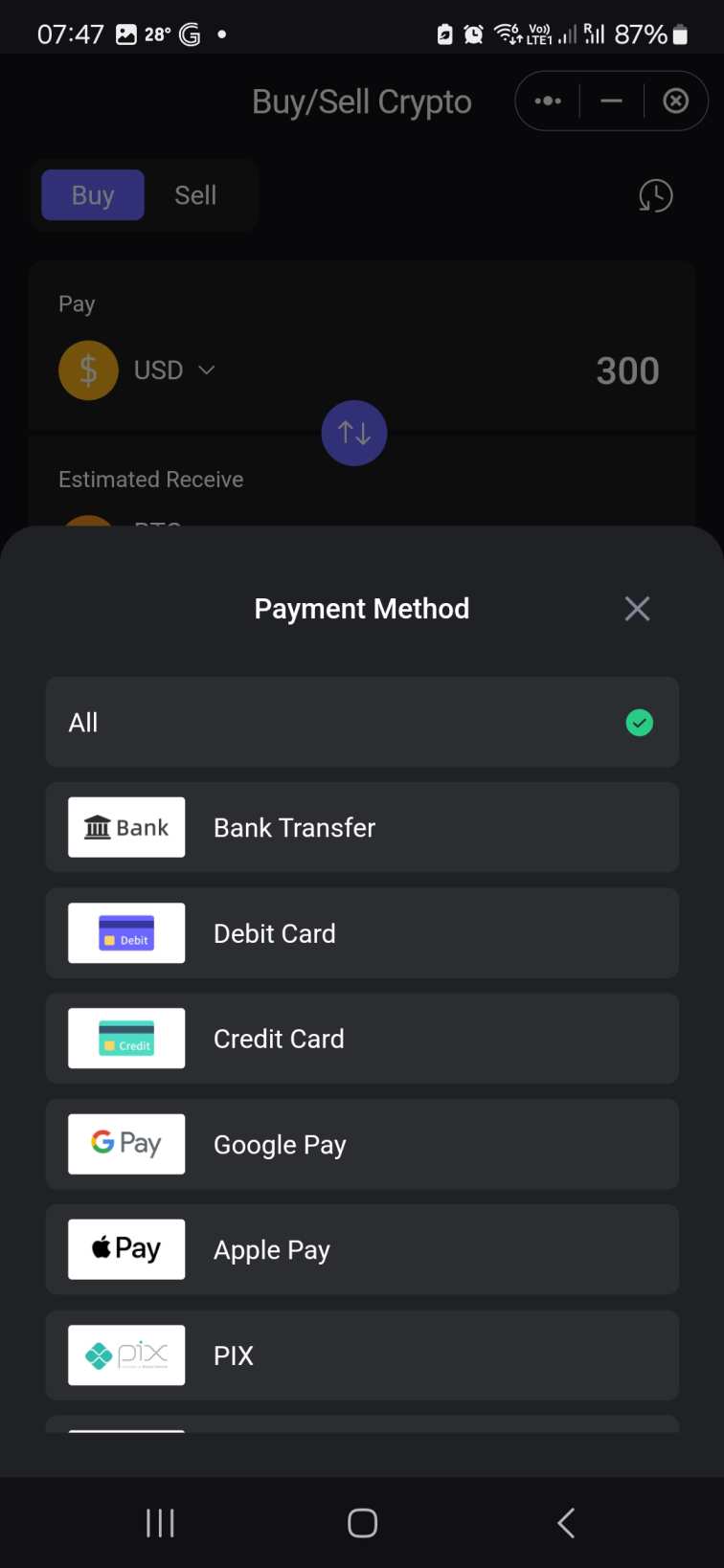
Three third-party gateways provide the fiat service: Binance, Simplex, and MoonPay. Once users enter their currency, purchase amount, and payment type, SafePal fetches prices in real-time.
Fees are built into the provided exchange rate. While this lacks transparency, most crypto gateway methods use the same system. Users should check whether quotes are competitive before they proceed. After completing the purchase, the gateway automatically transfers the coins or tokens to your SafePal wallet address.
The SafePal app also supports fiat withdrawals. Users swap their digital assets for local currency and withdraw the funds to their preferred payment method. Its fiat off-ramp services support fewer cryptocurrencies compared to the buy feature. This includes Bitcoin, Ethereum, USDC, USDT, Bitcoin Cash, and XLM.
If you need to sell a non-supported asset, use the app’s built-in DEX partners like Uniswap or PancakeSwap (depending on the network), and then complete the fiat sale.
DeFi and dApp Access
As an all-in-one ecosystem, the SafePal app supports decentralized finance (DeFi) products. Users allocate their cryptocurrencies to various DeFi solutions to earn passive rewards, rather than leaving them idle in the wallet balance.
The built-in staking tool supports the best cryptocurrencies to stake, and SafePal automatically matches users with approved validators. The APYs are competitive, with Solana, Dai, and Ethereum yielding 7.46%, 5%, and 4%.
SafePal also connects with Binance Earn. The centralized exchange provides fixed and flexible yield accounts, yet APYs remain less competitive than the primary staking feature. Ethereum, for instance, yields just 1.32%. Binance Earn does, however, support a much wider range of tokens.
SafePal users also have access to decentralized applications (dApps). Both the iOS and Android apps have pre-approved dApps across a wide range of Web 3.0 categories. This includes popular DEXs like Jupiter, HyperLiquid, and Aster, as well as on-chain yield protocols such as Pendle, Magpie, and Cian Bera.
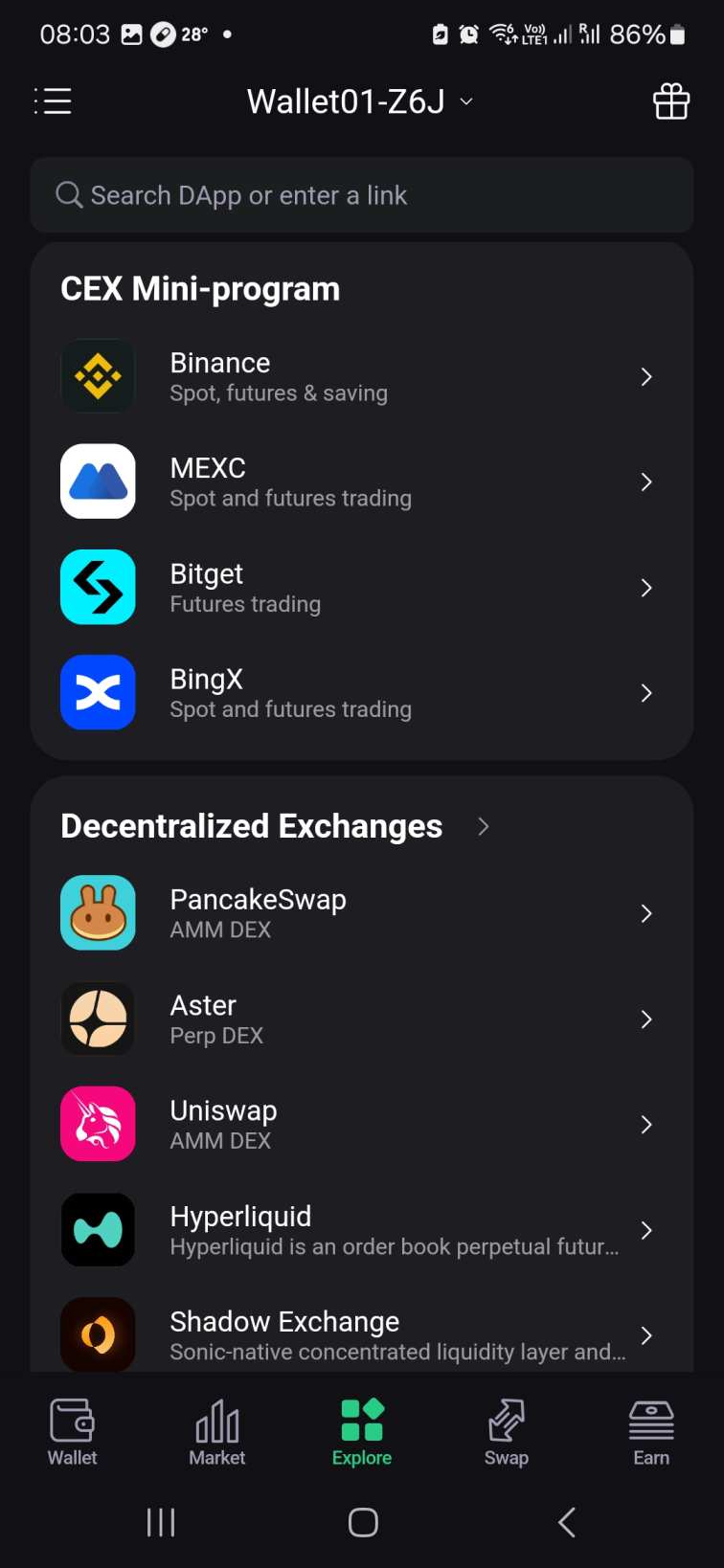
Users can also lend or borrow digital assets through Aave, JustLend, Spark, and other blockchain financing platforms.
If the required app isn’t listed, users have additional options. They can enter the application’s URL via the dApp browser or link the wallet via WalletConnect. Be careful when using either method, as scammers often create phishing dApps to deceive users. Connecting to these dApps can trigger a malicious smart contract that drains the wallet balance, so proceed with caution. Can’t Find a dApp on SafePal?
NFT Management
Although NFT volumes are a fraction of previous heights, interest has increased in recent months. SafePal wallet offers NFT stakeholders everything needed to safely manage their investments.
The decentralized wallet supports the most popular NFT standards like Ethereum, Solana, Polygon, BNB Chain, and Arbitrum. There is also support for up-and-coming NFT networks such as NEAR Protocol, TON, and Sui. The NFT tab features a gallery that lets users view their collections in full resolution.
dApp compatibility allows users to directly access the NFT trading markets. Connecting to popular platforms like OpenSea and Magic Eden permits NFT purchases and sales directly from the SafePal interface.
SafePal Cypher
SafePal Cypher is an additional product that offers enhanced seed phrase storage. Most users write their 12-24-word phrase on a sheet of paper to avoid online hacking risks. However, paper copies are easily lost or damaged, potentially preventing users from recovering their digital assets if they lose access to the wallet.
SafePal Cypher solves this issue through a waterproof and fireproof metal plate. It’s the most durable way to secure passphrases, as users enter each word with engraved letter slots.
According to our SafePal wallet review, the Cypher, which retails for $44.99, is a must-have for those with significant crypto investments. The metal plate perfectly accompanies SafePal’s hardware models for a highly secure storage experience.
SafePal Wallet Fees
SafePal’s software wallet is completely free, while the hardware version sells for $49.99 to $89.99, depending on the model.
The wallet does not charge fees to send, receive, or store cryptocurrencies. Like any wallet, users must cover network fees when transferring funds to another location. The respective blockchain network sets fees based on real-time demand, and SafePal adds no markups to the quoted amount.
In terms of side features, users incur a 0.2% surcharge when using SafePal’s swap service. This is in addition to the network and provider fee, which are built into the final exchange rate. To avoid the surcharge, connect to a relevant DEX and complete the swap. For example, if you want to swap ERC-20 tokens like Shiba Inu and USDT, trade via the Uniswap dApp.
Fiat facilities also incur extra charges, but again, these are built into the quoted rate. Research shows that fees vary widely depending on the currency, purchased asset, and payment type. SafePal does not publish whether it adds a markup or if it collects a commission from the gateway. Always check rates before finalizing the payment.
Is SafePal Wallet User-Friendly?
We tested all SafePal applications and models, including the iOS and Android apps, browser extensions, and hardware devices.
Starting with the S1 and S1 Pro, these hardware models offer the safest storage experience, yet there is a slight learning curve for first-time investors. The double air-gapped system takes practice, although it’s relatively straightaway after a few attempts. The X1 model is marginally more beginner-friendly, as users connect via Bluetooth or USB-C cables.
Irrespective of the model, hardware wallet customers need the mobile app to set up and authorize movements. We found that both the iOS and Android applications offer an excellent user experience. No prior knowledge is required, as each wallet feature is clearly highlighted.
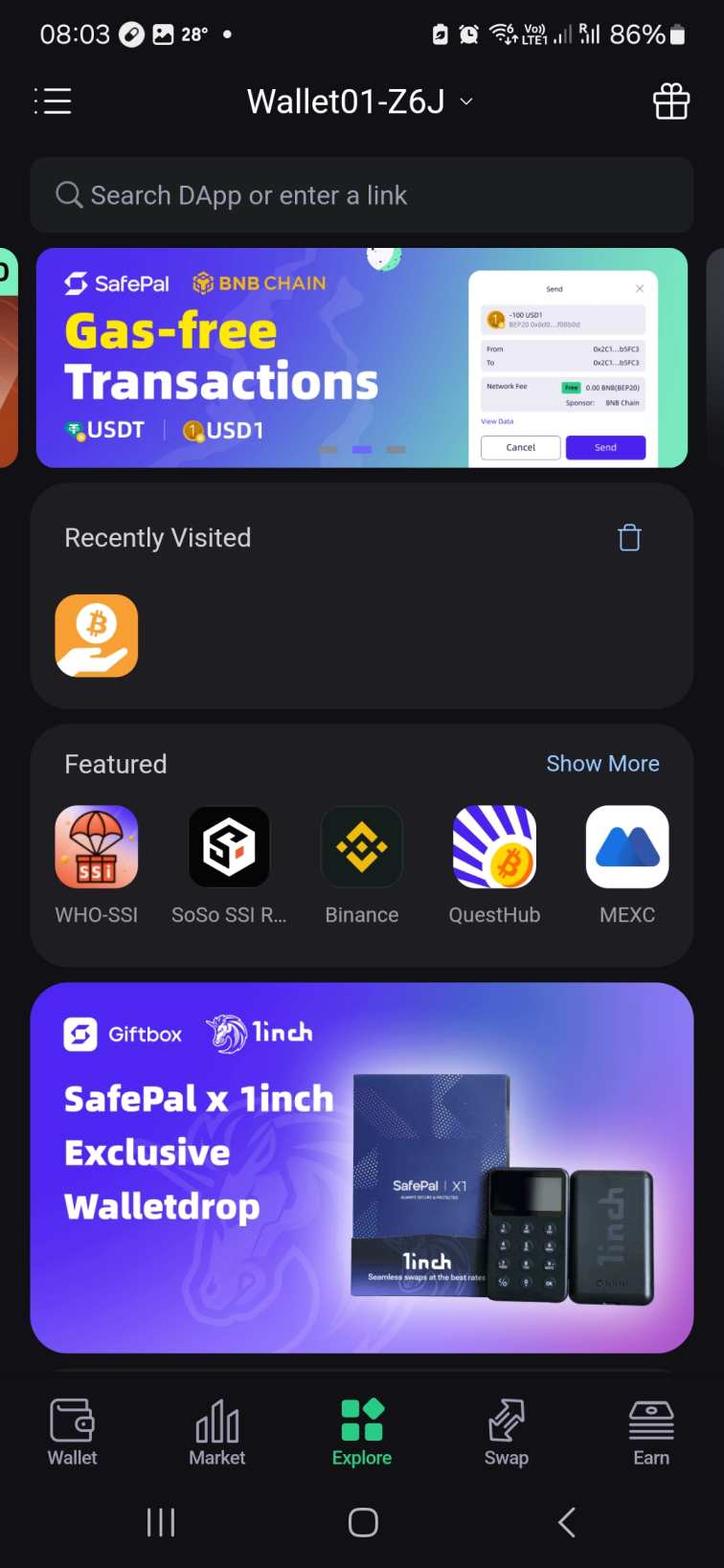
Depositing assets, for instance, simply requires users to click the crypto’s name, followed by “Receive”. This shows the wallet’s unique deposit address and QR code. Sending and swapping cryptocurrencies is also seamless, as is connecting to dApps or accessing the built-in DeFi features.
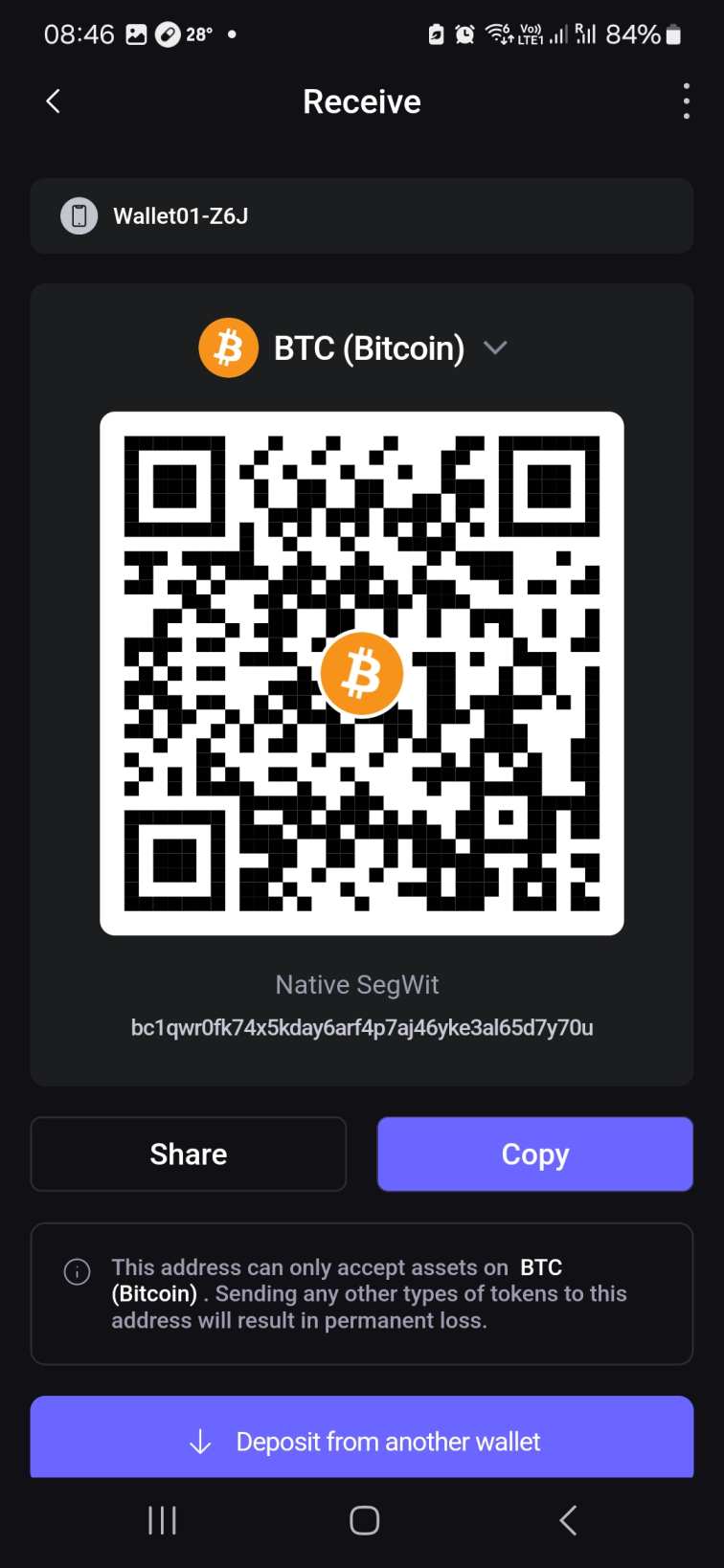
The SafePal browser extensions offer a similar user experience across Chrome, Edge, and Firefox. While most features are available, the extension lacks fiat gateway facilities. This means you need the smartphone app to buy and sell cryptocurrencies with traditional money. The SafePal extension cannot be used to approve hardware wallet transfers, either, making the app a core requirement.
Customers are advised to contact SafePal on social media (e.g., X or Reddit) for urgent issues, since public posts often prompt faster responses. However, caution is advised. Ensure you’re speaking with a real SafePal representative, as scammers impersonate support for nefarious objectives. There are also third-party platforms listing SafePal telephone numbers. These are fake, so make sure you get contact links directly from the provider’s website. SafePal Wallet Customer Support
SafePal offers limited customer service. The wallet provider uses support tickets exclusively, so users cannot speak with agents via telephone or live chat. Average response times are not published on the SafePal website, and some Reddit users report slow or non-existent replies.
How to Set Up and Use SafePal Wallet
This section explains how to get started with the SafePal wallet app. The app is required even if you purchase a hardware wallet, so follow these steps for a smooth installation process.
Step 1: Download the SafePal App
Visit the SafePal website, click the “Download” button, and scan the QR code with your mobile device.
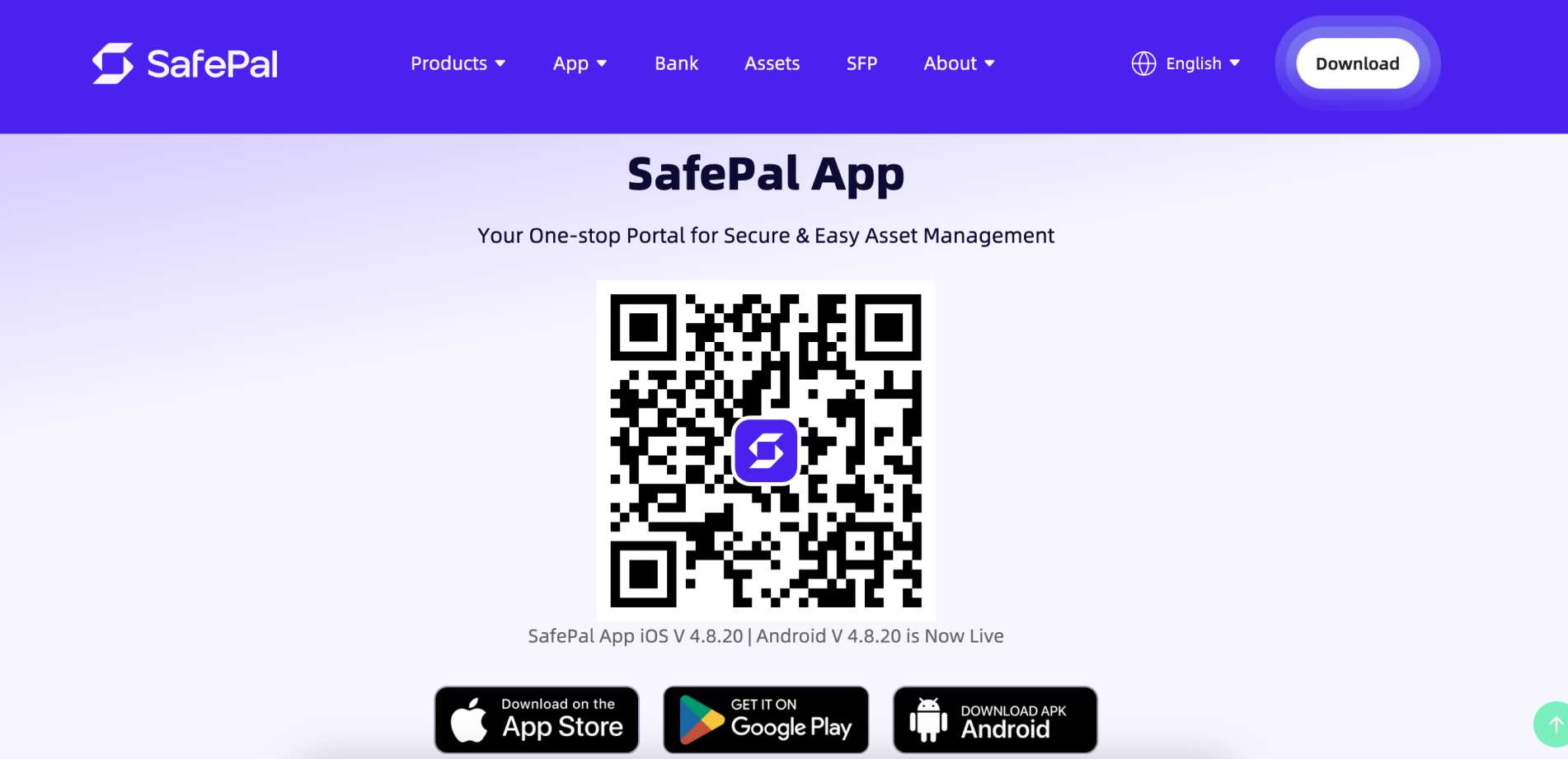
You will be redirected to the official download page on Google Play or the App Store.
Step 2: Create and Secure a New Wallet
Open the SafePal app and tap “Create New Wallet”. Choose a 6-digit password and reenter it when prompted.
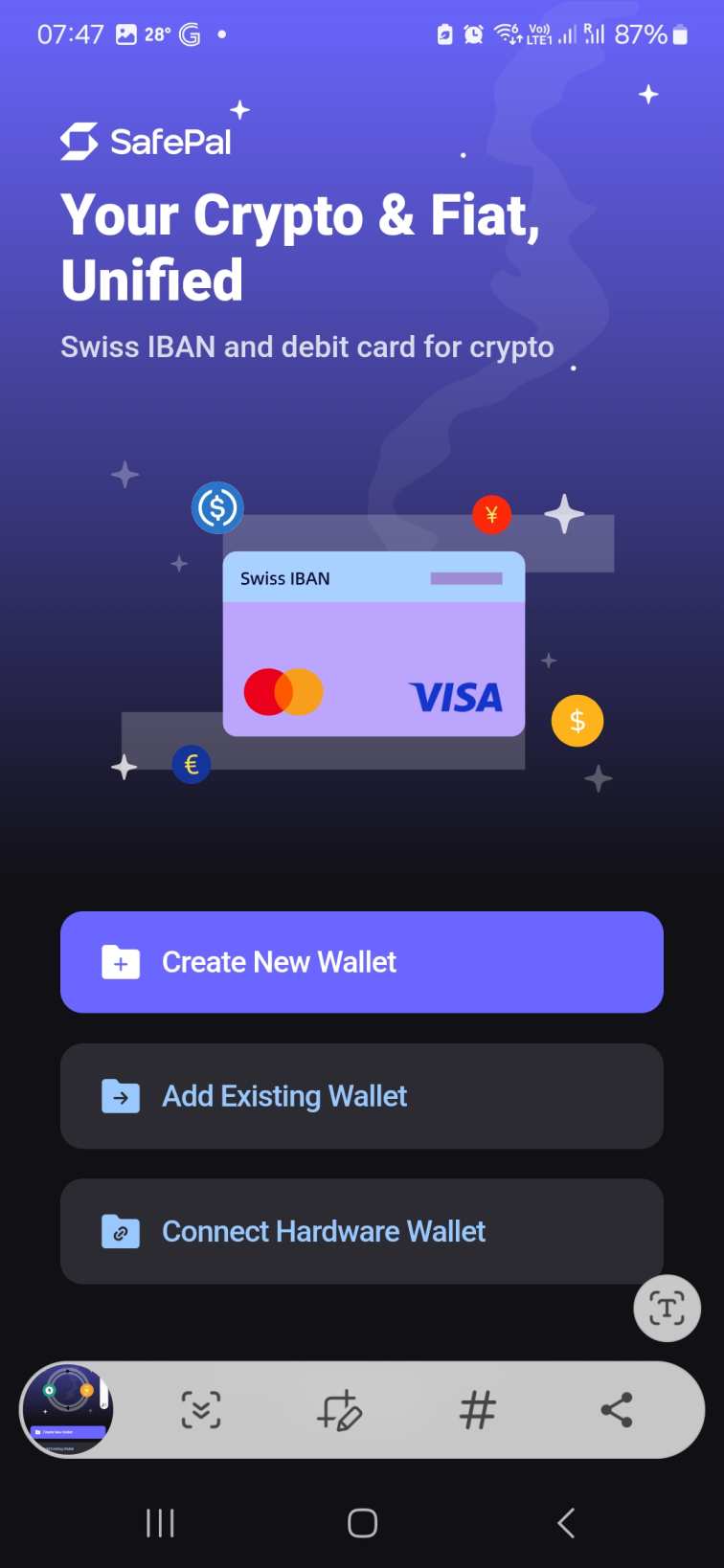
Note: If you already have a SafePal hardware device, select “Connect Hardware Wallet” and follow the on-screen instructions.
The app then displays your seed phrase. Write it down on a sheet of paper, or if you’ve purchased the SafePal Cypher, engrave it on the metal plate. Reenter the phrase to complete the setup steps.
Step 3: Deposit Crypto
Depositing cryptocurrencies into the SafePal wallet is very straightforward. Tap the “Wallet” icon and select the coin or token you want to add. Use the search button if the app does not initially display the asset.
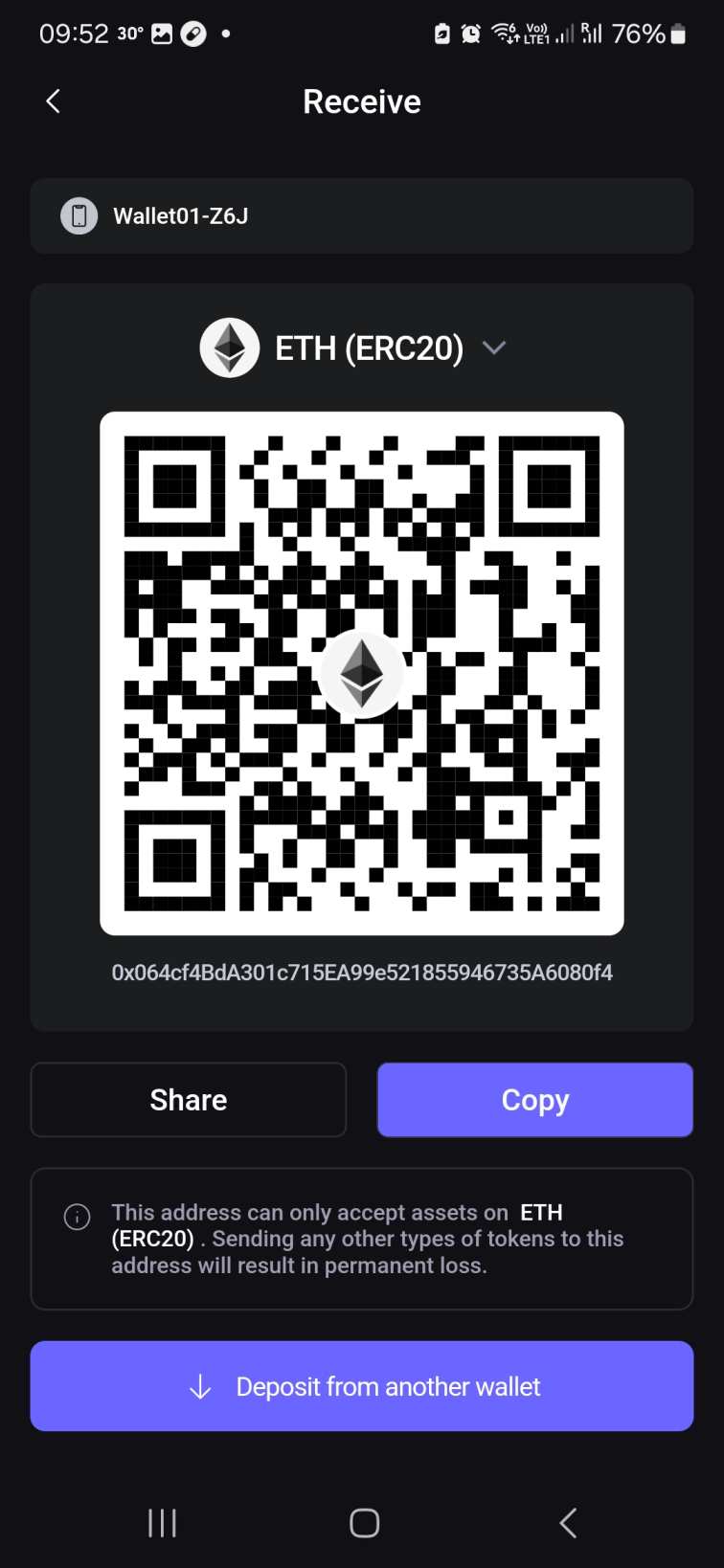
SafePal shows the unique deposit address once you tap “Receive”.
- Scan the QR code if you’re transferring funds from a mobile wallet on a separate smartphone.
- Otherwise, copy the wallet address manually and paste it into your wallet or exchange provider.
Once processed, it takes anywhere from seconds to 10 minutes for the digital assets to arrive in your SafePal wallet. The exact timeframe depends on the blockchain (Bitcoin is the slowest).
While SafePal supports millions of cryptocurrencies on over 200 blockchains, the application cannot feasibly list each one. There are about 10,000 assets preinstalled, so you must manually add new tokens if they aren’t supported. Go to the “Wallet” section, tap the three dots next to “All”, and select “Manage Coins”. Then tap the “+” icon, choose the network, and paste the token’s smart contract address. The tokens will now appear in your SafePal wallet balance. How to Add a Custom Token to SafePal Wallet?
Step 4: Send Crypto
To send digital assets on the SafePal app, select the crypto’s name. Tap “Send” and complete the transaction form, including the amount and the destination wallet address.
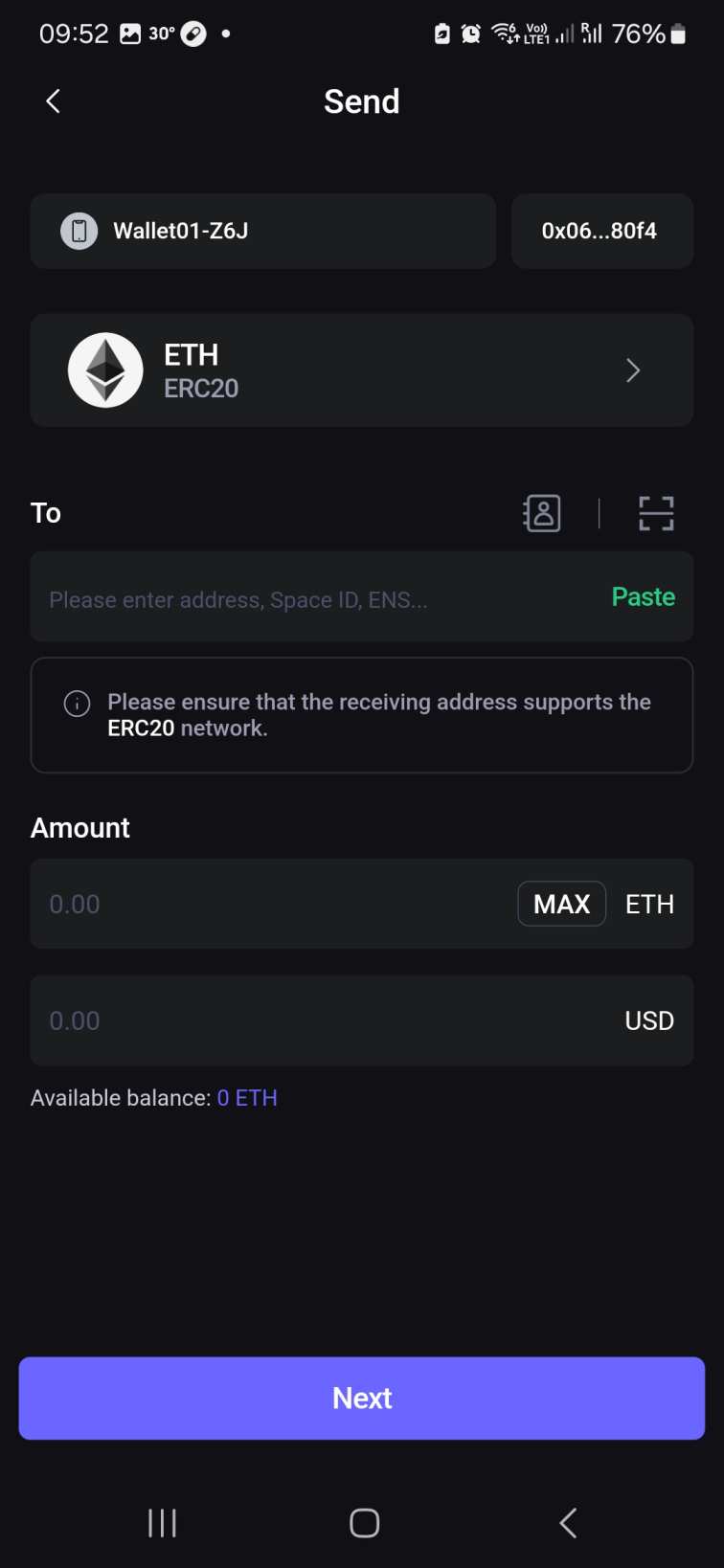
Confirm the transfer, and SafePal posts it to the blockchain instantly.
Step 5: Buy Crypto
If you need to buy cryptocurrencies with local money, SafePal supports debit/credit cards, bank transfers, and e-wallets like PayPal and Google/Apple Pay.
Tap the “Wallet” and “Buy”, then choose the currency. Select the digital asset you want to buy and enter the purchase amount. After selecting a payment type, SafePal obtains prices from its partnered gateways.
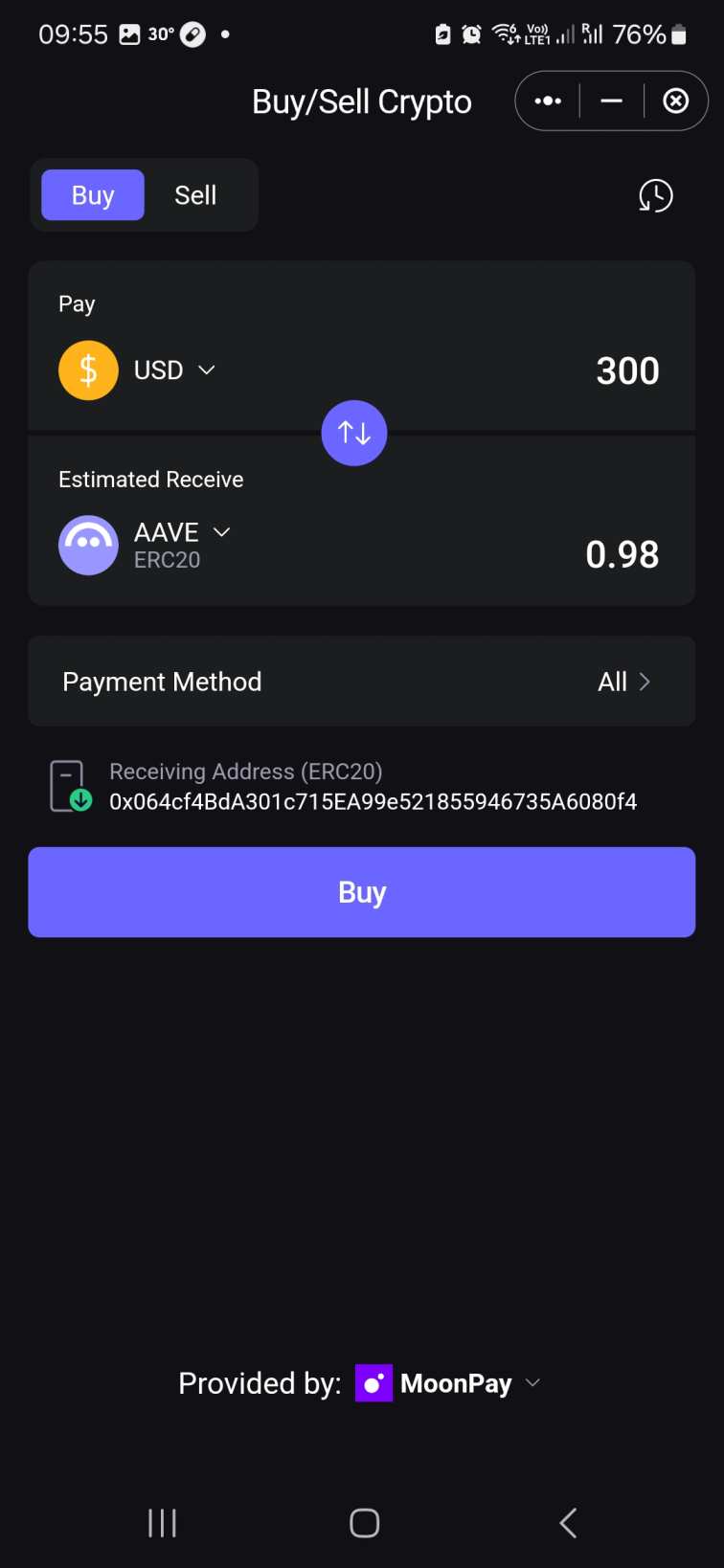
Check the quote to ensure you’re happy with the exchange rate, and tap “Buy” to proceed. You are then redirected to the gateway’s website to complete the payment. Transactions are executed instantly, and the provider transfers the coins or tokens to your SafePal wallet address.
Step 6: Swap Crypto
Users can swap cryptocurrencies directly on the SafePal app. It comes with a cross-chain bridge, too, which enables trades between different network standards.
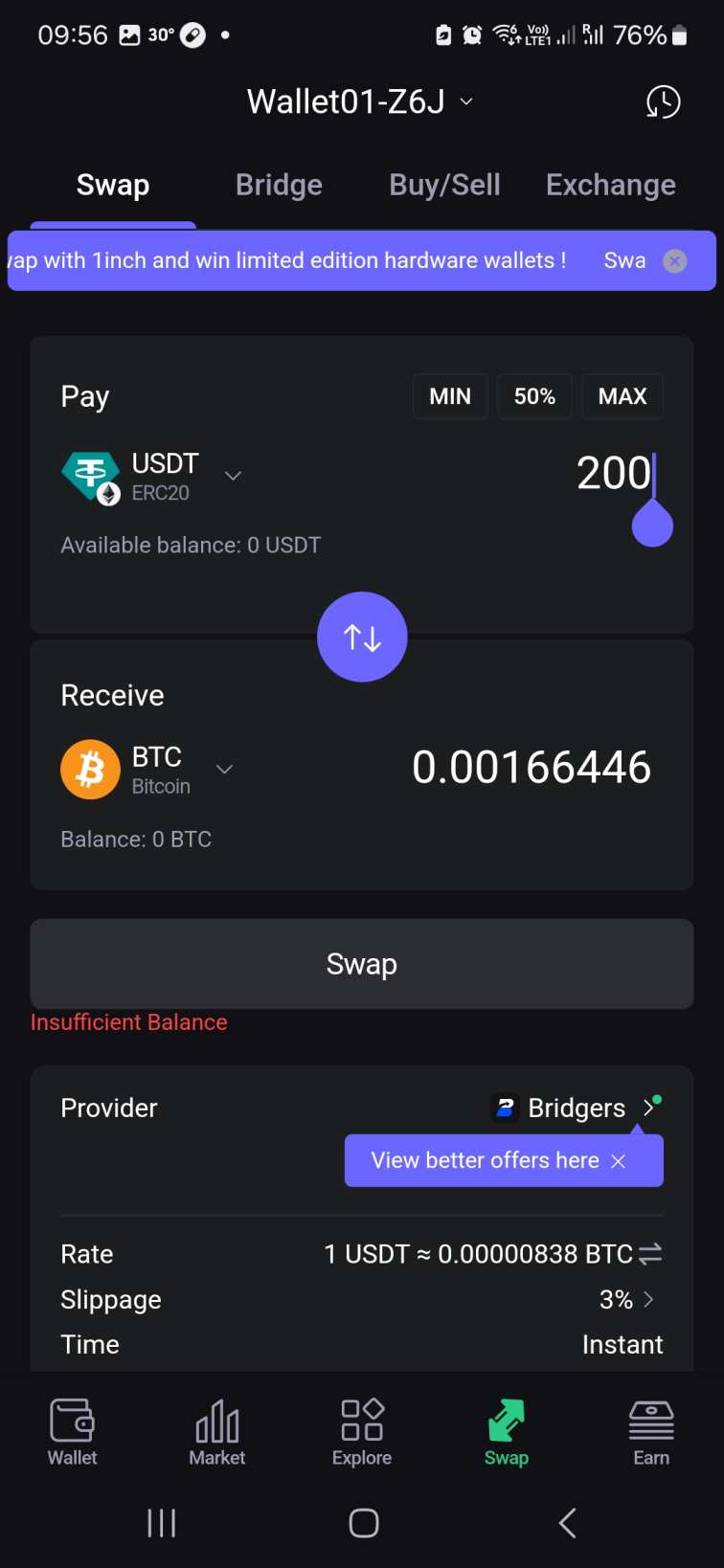
Tap the “Swap” icon and enter the two digital assets you want to trade. Provide the swap amount and review the quoted exchange rate. Confirm the swap, and the newly purchased tokens should arrive in your wallet a few minutes later.
Note: When sending or swapping cryptocurrencies on the SafePal app, hardware customers must authorize transactions via their device. This requires air-gapped QR scanning or Bluetooth/USB-C cables, depending on which model you own.
SafePal Limitations
Our SafePal wallet review discovered several limitations that may hinder the overall user experience.
The first consideration is that SafePal does not offer desktop software. The browser extension offers a workaround, yet it’s generally less secure than native software for Windows, Mac, or Linux.
A potential issue for beginners is that the air-gapped system requires some learning. This security mechanism concerns the S1 and S1 Pro models. First-time users might try multiple times before understanding the system, although the enhanced safety it offers is worth persevering with.
We should also mention that hardware wallet prices displayed on the SafePal website do not include VAT and import duty. These extra charges vary depending on where you live, so it’s important to check before placing an order.
Customer service is another area that requires improvement. Despite its 20 million customers and excellent reviews in the public domain, SafePal offers subpar support. With no live chat or telephone number, support is available via an online ticket system only. Some users report slow or even no replies, which misaligns with the wallet’s broader reputation.
SafePal Review Conclusion: Is SafePal Trustworthy?
SafePal is a safe and reputable wallet provider highly rated by its 20 million customers. Its hardware wallets start from just $49.99, and security features include cold storage, air-gapped technology, and firmware anti-tampering.
SafePal remains a good option for casual investors, too. While its mobile apps and browser extensions are free, they still offer robust protections to ensure a safe experience.
SafePal users also like the wallet’s support for over 200 blockchain standards, as well as features like token swaps and DeFi compatibility.
We tested each SafePal hardware model, as well as the software applications across all device types and operating systems. The team evaluated the user experience, security controls, responsiveness, potential learning curves, and functionality. We scored each metric and compared it to other top wallet providers in their respective categories. On the hardware front, we also analyzed key specifications like weight, durability, storage limits, and battery and chip quality. Our findings remain accurate and impartial, which ensures readers make informed decisions. Independent research remains important, especially when choosing a wallet to store large amounts.Our Methodology: How We Tested and Reviewed SafePal Wallet
The primary objective of this SafePal crypto wallet review was to provide a fair and accurate representation. Before initiating the testing phase, we extracted key data points that cover all wallet versions, including supported cryptocurrencies and blockchain standards, network and feature fees, and customer support.
FAQs
Has SafePal ever been hacked?
Can I stake crypto with SafePal?
What happens if I lose my SafePal hardware wallet?
How long does SafePal battery last?
Is SafePal a hot or cold crypto wallet?
References


